
Kwop › Guides › Stripe payments and session replays
How to connect Stripe payments to session replays
Stripe tells you who paid, how much and when. It does not tell you what that person did on your site before paying, or what the people who left without paying did instead. This guide shows how to put each Stripe payment next to the session replay of the visit behind it, and what you learn once both sit side by side.
Why Stripe alone can't explain a sale
A Stripe charge records a payment, not a visit. You see the amount, the email and the date. You don't see that the buyer came from Instagram, read your pricing page three times and paid on their phone, or the person who did the same and stopped at checkout.
Session replay records each visit like a video. Joined to Stripe, it answers the question neither answers alone: what do paying customers do that non-buyers don't?
What data Stripe gives you
Each successful payment in Stripe is a Charge object. These are the fields that matter for tying a payment to a visit:
| Stripe field | What it tells you |
|---|---|
amount, amount_refunded, currency | How much was paid, in the smallest currency unit (cents for USD), and how much was refunded. |
created | When the charge was made. Used to find the visit just before the payment. |
billing_details.email, receipt_email, customer | Who paid. This email is the key that links the payment to a visitor. |
status, paid | Whether the payment succeeded. |
description, metadata | Free text and key-value notes your integration attached to the charge. |
Products and Prices (monthly, yearly or one-time) are separate Stripe objects, and Payment Links tell you which price each buy.stripe.com link sells. That is how a click becomes "picked the yearly plan".
Building the join yourself usually means storing a session ID in the charge's metadata at checkout and matching it against your analytics. Matching by email needs no checkout code.
How matching by email works
For each charge, Kwop takes the email from the billing details, the receipt email or the Stripe customer, in that order. It then looks for a visitor on the same site who typed that email: in a sign-up form, an opt-in, a checkout field. When it finds one, the payment is attached to that visitor and to the visit just before the payment, and it appears in their timeline next to the replay.
A payment from someone who never typed their email on your site is kept but not shown, so nothing is guessed; if they type it later, the payment is linked then. On a logged-in app, call Flow.identify(email) after login.
Privacy: what is recorded and what is masked
- Inputs are masked in the browser. Passwords, card numbers and every other form field are masked before anything leaves the page, so what people type is not in the replays.
- The email is the one exception, read only from email fields in your own forms, to make the match. Turn it off with
data-capture-email="off"on the script line, ordata-flow-no-captureon a single form. - Hide more if needed.
flow-maskmasks an element's text,flow-blockkeeps it out of replays, anddata-consent="required"waits for your cookie banner. - From Stripe, Kwop keeps only what it needs: the amount (minus refunds), currency, date, description and email of each successful charge. It does not keep card details, and it skips failed charges.
Step by step with Kwop
- Optional: test first. Paste your link on kwop.io for 3 free test visits of your site, with replays. No install, no card.
- Add the script line. Copy your line from the Setup page of your dashboard and paste it inside the
<head>of every page:<script src="https://kwop.io/flow.js" data-site="your-site-id" defer></script> - Create a restricted key in Stripe. On the API keys page of your Stripe Dashboard, click Create restricted key, name it "Kwop", and set Charges, Customers, Products, Prices, Payment Links, Promotion codes and Coupons to Read. Leave everything else on None.
- Paste it in Kwop. In Setup & integrations, click Connect next to Stripe and paste the key (it starts with
rk_live_). Kwop checks it with Stripe and tells you if an access is missing. - Let it sync. Kwop imports the last 90 days of payments, then checks for new ones every 10 minutes. The refresh button (Sync now) pulls them right away.
- Optional: tag your plan buttons. Payment Links are matched to their exact price on their own. For other buttons, add
data-flow-plan="price_…"with the Stripe price ID.
Permissions and syncing are detailed on the Stripe integration page. Whop and Shopify connect the same way.
What you learn once payments and replays are joined
The useful part is the comparison. With both sides in one place, you can look at buyers and non-buyers through the same lens:
- How many visits it takes. Each payment shows how many visits came before it. If most buyers come back two or three times, a first-visit exit is not a lost cause.
- Where buyers come from. Each buyer's visits show where they came from (Google, Instagram, TikTok, direct), so you see which channels bring payments, not just traffic.
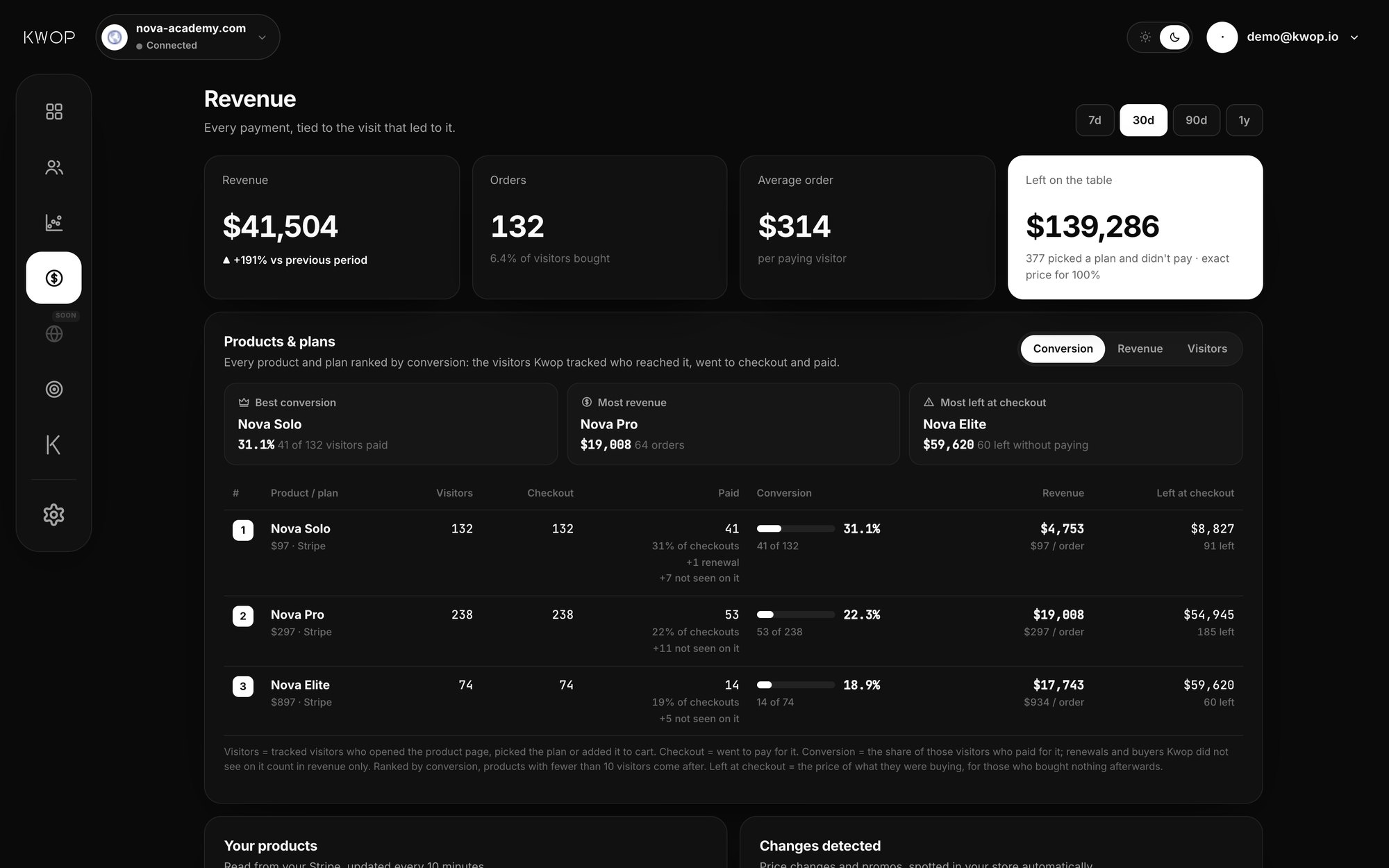
- Which plan they picked, and which one converts. Products and prices are ranked by how many visitors reached them, went to checkout and paid, with what was left at checkout.
- Where non-buyers stop. Funnels show the drop-off at each step, with the replays of who left there. Rage clicks flag a button or promo field that didn't respond.
- Money left on the table. Visitors who reached checkout or picked a plan without paying, valued at the price of the plan they picked (your average order when no plan is known).
From non-buyers to follow-ups
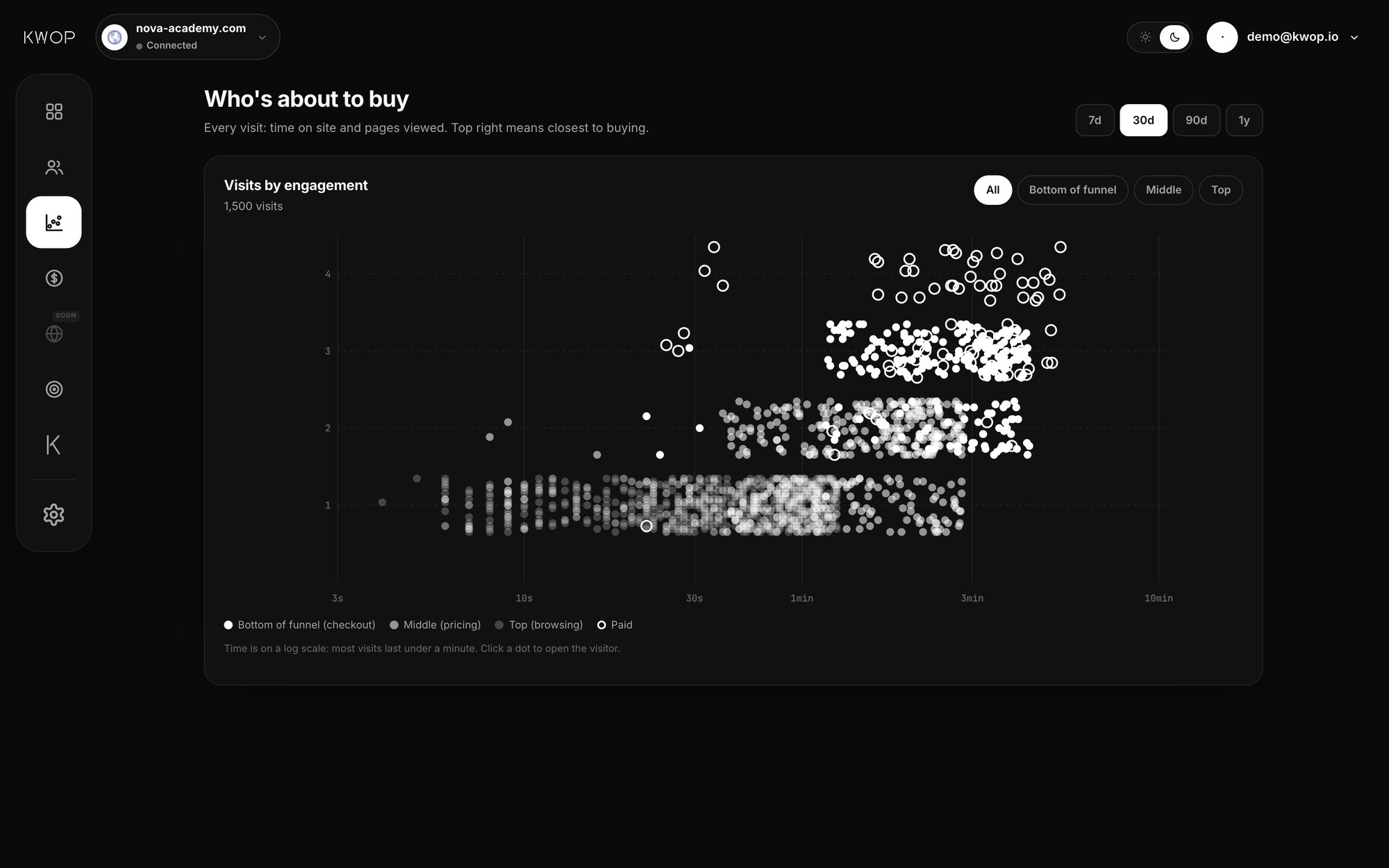
People who did what buyers did and didn't pay are your best leads. Kwop scores every visitor from 0 to 100 for buying intent and lists hot leads: high score, email left, no payment. For each one it writes a follow-up email from their own visit (the plan they picked, where they stopped), using only offers that exist in your Stripe, like an active promotion code. A 7-step sequence follows, and you see who clicked, came back and paid.
On Pro, you can also ask the Kwop chat "where am I losing buyers?", or let Claude, ChatGPT, Cursor or Gemini read the same data through the MCP server.
What it costs
The Stripe connection is part of Pro: $119 per month during launch week ($238 after), every session recorded, unlimited sites. Starter, at $47 per month at launch ($94 after), has no connectors. Yearly billing is 20% less; current prices are on the pricing page. If you are still choosing a replay tool, the comparisons with Hotjar and Microsoft Clarity lay out what each one is built for.
FAQ
Can Kwop move money or change anything in my Stripe account?
No. The restricted key only has Read access to Charges, Customers, Products, Prices, Payment Links, Promotion codes and Coupons. Kwop can see payments, never create charges, refunds, customers, prices or codes.
What if a buyer paid with a different email than the one they typed on my site?
Then the payment is not matched, and it stays hidden rather than being guessed. On a logged-in app, calling Flow.identify(email) with the account email closes most of that gap. If the person types the paying email on your site later, Kwop links their past payments to them at that moment.
Will I see payments from before I installed Kwop?
Kwop imports the last 90 days of Stripe payments when you connect, but a payment only shows up once it is matched to a visitor recorded on your site. Replays exist only from the day the script line is on your pages.
Which plan do I need to connect Stripe?
Pro, at $119 per month during launch week ($238 after), or 20% less billed yearly. Starter ($47 per month at launch) has replays, funnels and follow-ups for your hottest 30% of leads, but no Stripe connection.
Can I try it before installing anything?
Yes. Paste your link in the Kwop app and it sends 3 test visits through your site with a real browser, on desktop and on a phone, then shows their replays. No card and no install.
See who pays on your site
Paste your link: Kwop shows 3 free test visits of your site in about a minute. No card.