
Kwop › Whop integration
Kwop for Whop
Whop tells you who paid. Kwop shows you what they did before paying: the visit behind each Whop payment, the plan they picked, the people who reached checkout and left, and who to follow up today.
What Kwop adds to your Whop account
Kwop records every visit to your website like a video (session replay). Once Whop is connected, each payment sits next to the visit that led to it: where the buyer came from, what they read, how long they hesitated.
- The visit behind each Whop payment. Click a payment and watch the journey that led to it.
- The plan each visitor picked. Kwop reads your Whop plans and their checkout links. A click on a plan's Whop link counts as picking that exact plan.
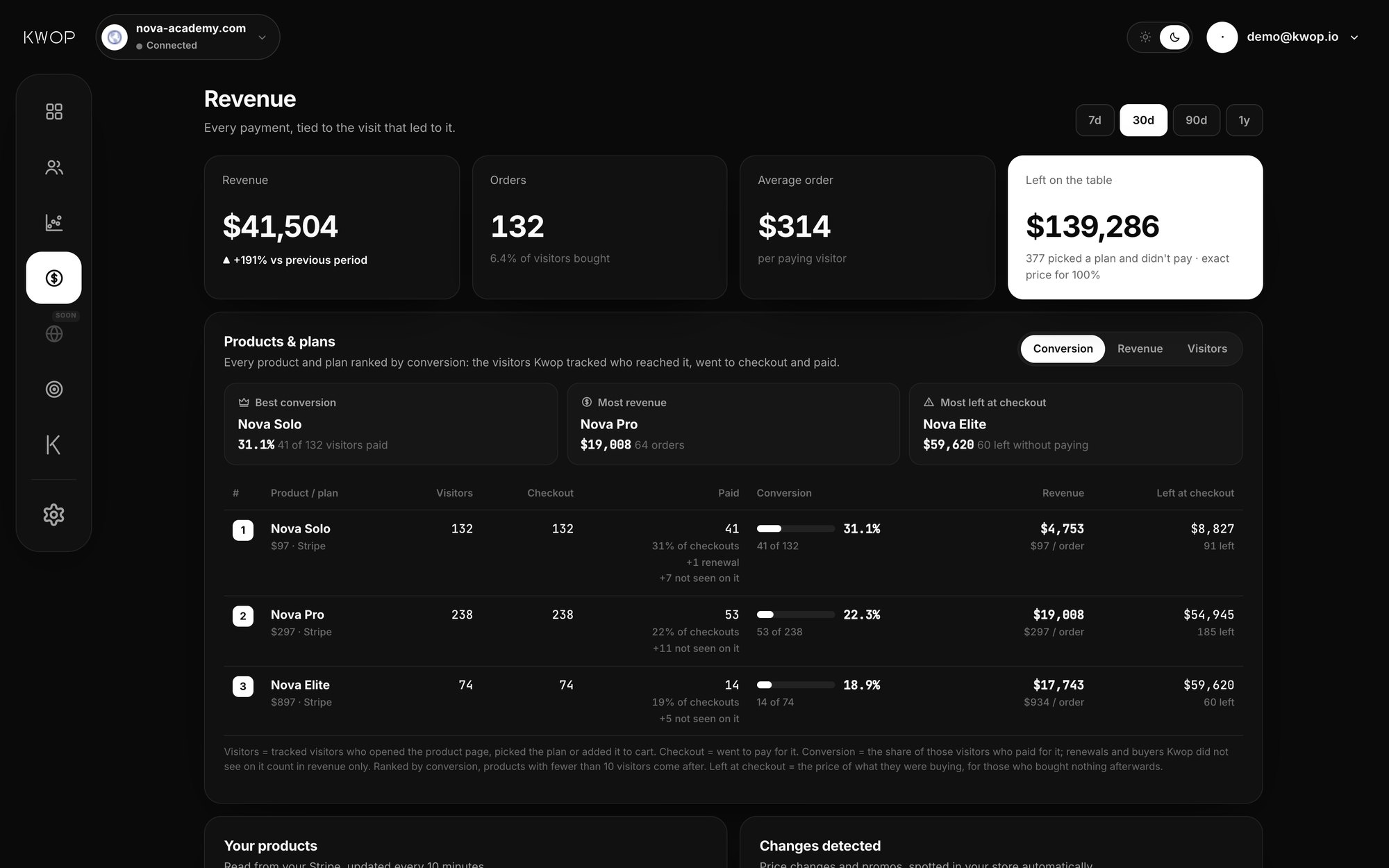
- Money left at checkout. The price of what people were about to buy, for those who reached checkout and bought nothing afterwards.
- Your promo codes and price changes. When you change a price, archive a plan or launch or end a promo code on Whop, Kwop notices it on its own.
- Who to follow up. People who were ready to buy, left their email and didn't pay, each with an email written from their own visit.
How a Whop payment is tied to a visit
Kwop matches each Whop payment to a visitor by email. The Kwop script reads the email people type in your own forms, such as a sign-up or opt-in form. Passwords and every other field are never read, and you can turn email capture off with data-capture-email="off" on the script tag. You can also identify a visitor yourself with Flow.identify(email).
When the email on a Whop payment matches a visitor on your site, the payment appears on that visitor's timeline, at their latest visit before the payment. A payment whose email never showed up on your site stays hidden. Kwop keeps it, and links it later if that person types their email on your site.
Plans, promo codes and money left at checkout
With plan access, Kwop reads every Whop plan: its name, product, price, and whether it is a one-time payment or renews weekly, monthly or yearly. That is what turns "someone looked at the pricing page" into "this visitor picked your yearly plan at its exact price".
The revenue page ranks every product and plan by conversion: visitors who reached it, went to checkout and paid, the revenue it brought, and what was left at checkout. Price history is kept, so each visit is valued at the price live at that moment.
Active Whop promo codes are listed with their discount. Kwop uses them in follow-up emails only while they are active, and never invents an offer.
Who to follow up, with the email written
The Follow-ups page lists people who were ready to buy, left their email and didn't pay. Each one comes with their replay and an email written from what they did: the Whop plan and price they picked, where they stopped, an active promo code or a price drop if there is one, and a link back to where they left off. You copy it and send it yourself.
How to connect Whop
The Whop connector is part of the Pro plan. These are the same steps shown in the Kwop dashboard.
- In Kwop, open Setup. Under 2. Connect your payments, click Connect next to Whop.
- Open Whop → Dashboard → Developer.
- Create an API key with these permissions:
payment:basic:read,member:basic:read,member:email:read,plan:basic:readandpromo_code:basic:read. - Copy the key and your company ID. The company ID starts with
biz_, and you see it in your Whop dashboard URL. - Paste both into Kwop and click Connect Whop.
Kwop checks the key with Whop first and tells you what to fix if it is refused. Once connected, it imports the last 90 days of payments, then syncs every 10 minutes (or on demand with Sync now). If you disconnect, it stops reading new payments; those already linked stay in your dashboard.
What Kwop reads from Whop
The connection is read-only: Kwop can see payments, never move money. Your key is encrypted and only used to read.
| Whop data | What Kwop reads | What it is used for |
|---|---|---|
| Payments | Paid payments: amount, currency, product, plan, date and buyer email | Tie each payment to the visit behind it, revenue per source and per plan |
| Plans | Name, product, price, one-time or renewal period, visibility, checkout link | Know which plan each visitor picked, value money left at checkout, spot price changes |
| Promo codes | Code, percent or amount off, status | Spot promos launched or ended, offer an active code in follow-up emails |
If the key cannot read plans, payments still sync and the Setup page flags the missing access. Without promo code access, follow-up emails simply offer no code.
Ask your Whop numbers in plain English
On Pro, ask Kwop "which Whop plan converts best?" or "where am I losing buyers?". Or plug your data into Claude, ChatGPT, Cursor or Gemini through the Kwop MCP server: revenue tied to visits, your plans and promo codes, and who to follow up.
Pricing
The Whop connector is part of Pro ($119/month during launch week, then $238/month; yearly saves 20%), with Stripe, Shopify, Kwop and MCP. Starter ($47/month at launch) records visits but has no connectors. See all plans.
FAQ
Can Kwop change anything in my Whop account?
No. The API key only needs read permissions for payments, members, plans and promo codes. Kwop can see payments, never move money, refund, edit a plan or create a code.
My checkout is on Whop. Can Kwop still tie payments to visits?
Yes. The payment happens on Whop and Kwop reads it from your Whop account. To link it to a visit, the buyer's email has to appear on your site: typed in one of your own forms, or passed with Flow.identify(email). A click on a plan's Whop checkout link also tells Kwop which plan they picked.
Why are some Whop payments not shown?
A payment from someone who never visited your site, or never typed their email on it, can't be tied to a visit. Kwop keeps it hidden and links it if that person identifies later. The dashboard shows how many payments are not matched yet.
How far back does Kwop import Whop payments?
The last 90 days when you connect, then new payments every 10 minutes.
Can I connect Whop and Stripe on the same site?
Yes. Each site can connect Stripe, Whop and Shopify. See the Stripe and Shopify integrations.
What does Kwop record about my visitors?
Clicks, scrolls, mouse movements and pages, like a video. Every input is masked in the browser; only the email typed in your own forms is read, to tie a visitor to their payment.
See who pays on your site
Paste your link: Kwop shows 3 test visits of your site in about a minute. No card.