
Kwop › Session replay
Session replay that shows who pays
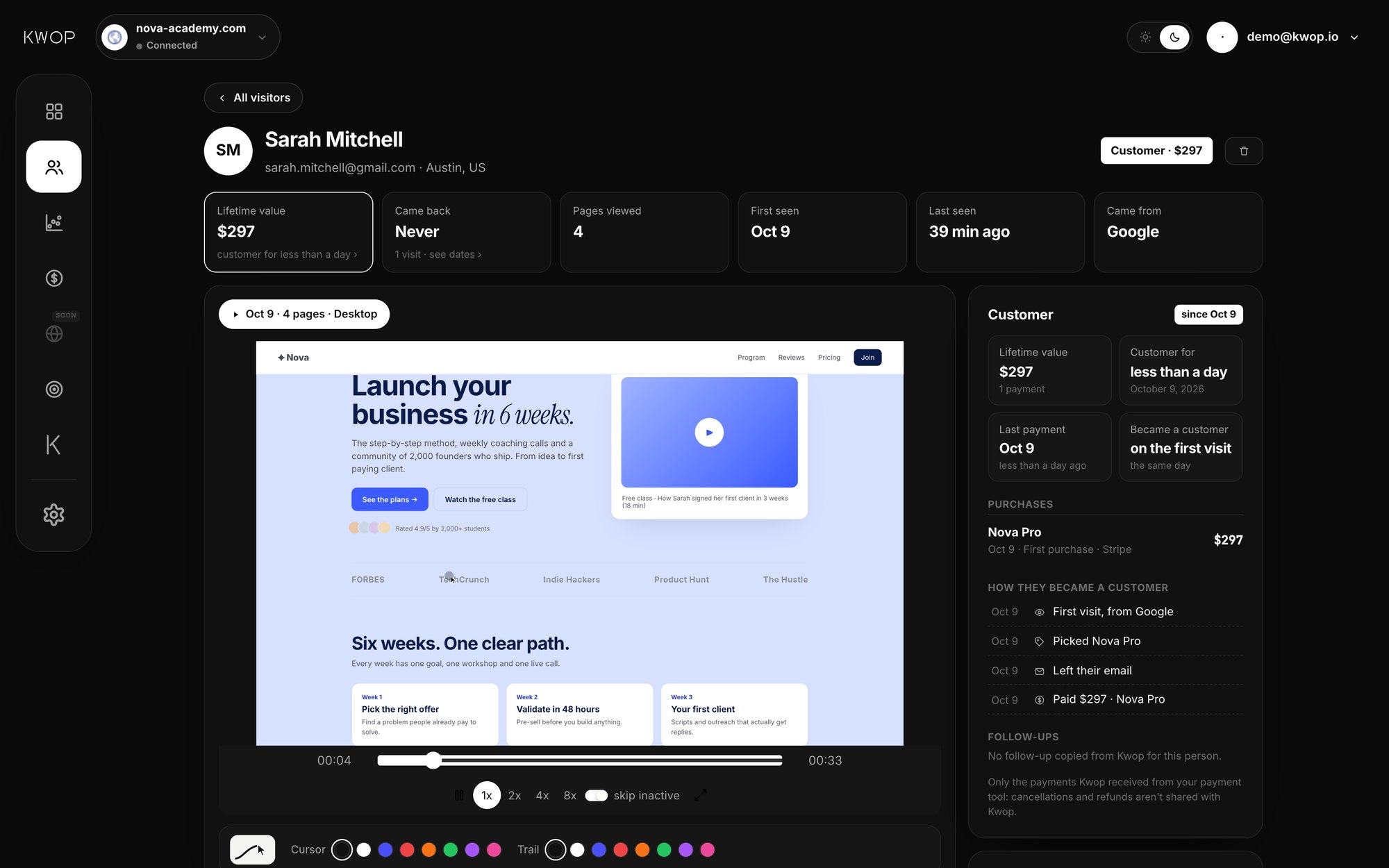
Kwop records every visit to your website like a video: the mouse, the clicks, the scroll, the moment someone hesitates. Then it puts each replay next to the payment it led to, so you can see who bought, who almost did, and who to follow up today.
What gets recorded, and how replays work
Once the Kwop line is on your site, visits are recorded on their own, day and night: every session on Pro, a sample of about 90% on Starter. Open a visitor and press play: their cursor moves, they scroll, they click, they leave. Watch at 1x, 2x, 4x or 8x and skip the moments where nothing happens.
Kwop does not film the screen. It records the page and its changes, then rebuilds the visit in your dashboard, so replays stay sharp and light. The script loads with defer, after your page.
Each replay comes with its context:
- The device and where the visitor came from (Google, Instagram, TikTok, direct…)
- A timeline of what they did: "Opened /pricing", "Clicked Choose Pro", "Left their email", "Paid"
- Every other visit by the same person, so you see them come back over days
Privacy and masking
Kwop records behavior, not what people type. This happens in your visitor's browser, before anything is sent:
- Every input is masked in replays. Passwords, card numbers and every other form field are masked in the browser, so what people type there never leaves the page.
- One exception: the email, to tie a payment to a visit. It is read only from email fields in your own sign-up or checkout forms. Turn it off with
data-capture-email="off"on the script line, ordata-flow-no-captureon one form. - Hide anything else. Add the class
flow-maskto mask an element's text, orflow-blockto keep an element out of replays entirely. - Wait for consent. With
data-consent="required", nothing is recorded until your cookie banner callsFlow.consent(). - Delete a visitor. From their page in the dashboard, you can erase their visits, replays and email for good. Their payments stay in your revenue as amounts, without a name.
Journeys, funnels, rage clicks and dead clicks
Kwop also groups visits so you see the patterns:
- Journeys. Every page and click in order, with the time it happened, up to the last step before the visitor left.
- Funnels. Your steps (for example Visit, Pricing, Checkout, Paid) with how many people reach each one and how many you lose at each step, so you know which replays to watch first.
- Rage clicks. Three fast clicks in the same spot within a second are flagged, so a broken button or a failing promo code shows up with its replay. Filter visitors to see only those.
- Dead clicks. Kwop's test visits send a real browser through your site, on desktop and on a phone. When a click does nothing, it is reported, along with a main button below the first screen, broken links and slow pages.
Tie replays to revenue, hot leads and follow-ups
On the Pro plan, you connect your own Stripe, Whop or Shopify account with a read-only key: Kwop can see payments, never move money. It imports the last 90 days, matches each payment to a visitor by email, and shows the replay next to the sale. With read access to products and prices, it also sees which plan each visitor picked.
Then Kwop ranks the people who did not pay yet:
- A buying-intent score from 0 to 100, from how far they went in your funnel, how often they came back and whether they left their email.
- Hot leads: people with a high score who left their email and did not pay. Each one comes with their replays and why they stopped.
- Follow-ups written from the visit itself: the plan they picked, where they stopped, a promo code that failed. Offers come only from your real data, like an active promo code.
Starter shows your hottest 30% of leads with how to follow up each one. Pro shows every hot lead and writes the email for each one. Claude, ChatGPT, Gemini or Cursor can read the same data through MCP.
How Kwop differs from Hotjar or Microsoft Clarity
Hotjar and Microsoft Clarity are popular, well-made tools for understanding behavior, with recordings and heatmaps. Clarity is free. If you only want to watch how people use a page, they do that job.
Kwop starts from another question: which visits made money, and who should I contact next? It ties each sale to the replay of the visitor who made it (matched by email), scores each visitor by buying intent, and writes the follow-up for people who were ready to buy. Details: Kwop vs Hotjar and Kwop vs Microsoft Clarity.
| Session replay in Kwop | Starter | Pro |
|---|---|---|
| Sites | 1 | Unlimited |
| Sessions recorded | Sampled (~90%), 5,000 / month | Every session |
| Replays, journeys, funnels, rage and dead clicks | Yes | Yes |
| Payments tied to replays (Stripe, Whop, Shopify) | No | Yes |
| Follow-ups | Hottest 30%, how to follow up | Every hot lead, email written |
| Kwop chat and MCP | No | Yes |
Current prices and the yearly discount are on the pricing page.
Install: one script line
To record your real visitors, copy your line from the Setup page of your dashboard and paste it inside the <head> of every page. It looks like this:
<script src="https://kwop.io/flow.js" data-site="your-site-id" defer></script>The Setup page has steps for Webflow, Shopify, WordPress, Framer, Wix and custom code, plus a prompt for Claude Code that adds the line for you. Once the first visit arrives, it shows "Receiving data".
FAQ
Is a Kwop session replay a real video?
To you it looks like one. Kwop records the page and its changes rather than pixels, which keeps replays sharp and light.
Does Kwop record passwords or card numbers?
No. Every form field is masked in the visitor's browser. Only an email typed in your own forms is read, to tie a payment to a visit, and you can turn that off.
Do I need to install anything to try it?
Not to try it: paste your link and get 3 test visits of your site with their replays, no card. To record real visitors, add one script line.
How does Kwop know which visitor paid?
On Pro, you connect Stripe, Whop or Shopify with a read-only key. Kwop matches each payment to the visitor who typed the same email on your site. Payments from people who never did are not shown.
Can Kwop wait for cookie consent?
Yes. Add data-consent="required" to the script line and nothing is recorded until your cookie banner calls Flow.consent().
See who pays on your site
Paste your link: Kwop shows 3 test visits of your site in about a minute. No card.