
Kwop › Guides › Following up website leads
How to follow up website leads who left checkout
Someone picked a plan, typed their email, reached your checkout and left. What works better than one generic reminder is a short sequence of personal emails: seven follow-ups over fifteen days, each written from what that person did on your site, each with one job, stopping the moment they pay. Here is the timing, what to write, the breakup email, and how to see who clicked, came back and paid.
First, decide who gets a follow-up
- They left their email in a signup, an opt-in or the checkout form.
- They showed real intent. They reached pricing or checkout, picked a plan, or came back more than once.
- They haven't paid. A "still thinking about it?" email to someone who bought yesterday costs you trust.
- They agreed to hear from you. These emails can count as marketing: Stripe's documentation treats cart-abandonment emails as promotional and requires consent.
Then watch their visit before you write. Two minutes of session replay shows the plan, the price, where they stopped and whether something broke. To find why people leave at all, see why visitors don't buy.
The timing: 7 follow-ups in 15 days
| # | When | Its one job |
|---|---|---|
| 1 | Day 0 | Answer their own visit: the plan, the price, where they stopped |
| 2 | Day 1 | Reassure them that taking time is normal, with real proof if you have it |
| 3 | Day 3 | Name the hesitation and answer price, fit and payment |
| 4 | Day 5 | Make the cost of waiting concrete |
| 5 | Day 8 | Ask a question they can answer in one word |
| 6 | Day 11 | Give the one real reason to act now, if there is one |
| 7 | Day 15 | The breakup: last email, their choice |
Day 0 means the same day, while the visit is fresh. The gaps then grow, so you stay present without crowding their inbox. Stop as soon as they pay or say no, never send more than one a day, and make each email stand on its own: they may not have read the one before.
What to write in each follow-up
A few rules apply to all seven:
- Start from their visit, not a template. "On Tuesday you picked the Coaching plan at $297 and stopped at payment" says you noticed. "You left something in your cart" doesn't.
- One link, straight back to where they stopped.
- Plain text, from your own inbox, signed by a person. Invite a reply.
- Social proof only if it is real. "14 people joined this plan last month" is fine if 14 people did. Otherwise, leave it out.
- No fake urgency. No invented deadline or "only 2 spots left". Real reasons to act now: an active promo code, a price that dropped, the yearly saving.
- Day 0, their visit. The plan, the price, the day, where they stopped. If the replay shows a problem (a dead button, a promo code that failed, a checkout on a phone), offer to sort it out. If they stopped right at payment, ask what their last question was.
- Day 1, reassurance. Taking time is normal. Add proof only from real buyers.
- Day 3, the hesitation. "It seems like something held you back." Then answer price, fit and the payment itself in one line each.
- Day 5, the cost of waiting. "If you'd started on the 3rd, you'd be five days in by now." Concrete, not pushy.
- Day 8, the one-word question. "Have you given up on the Coaching plan?" "Yes", "not now" or "still interested" takes two seconds, and any answer tells you what to do.
- Day 11, a real reason or the easy path. An active code or a lower price, if there is one. If not, show how quick it is to start.
- Day 15, the breakup. See below.
The breakup email
The last follow-up gives the decision back to them: no pressure, a clear exit, the link one more time. It asks for nothing, so it is easy to answer. Keep it this short:
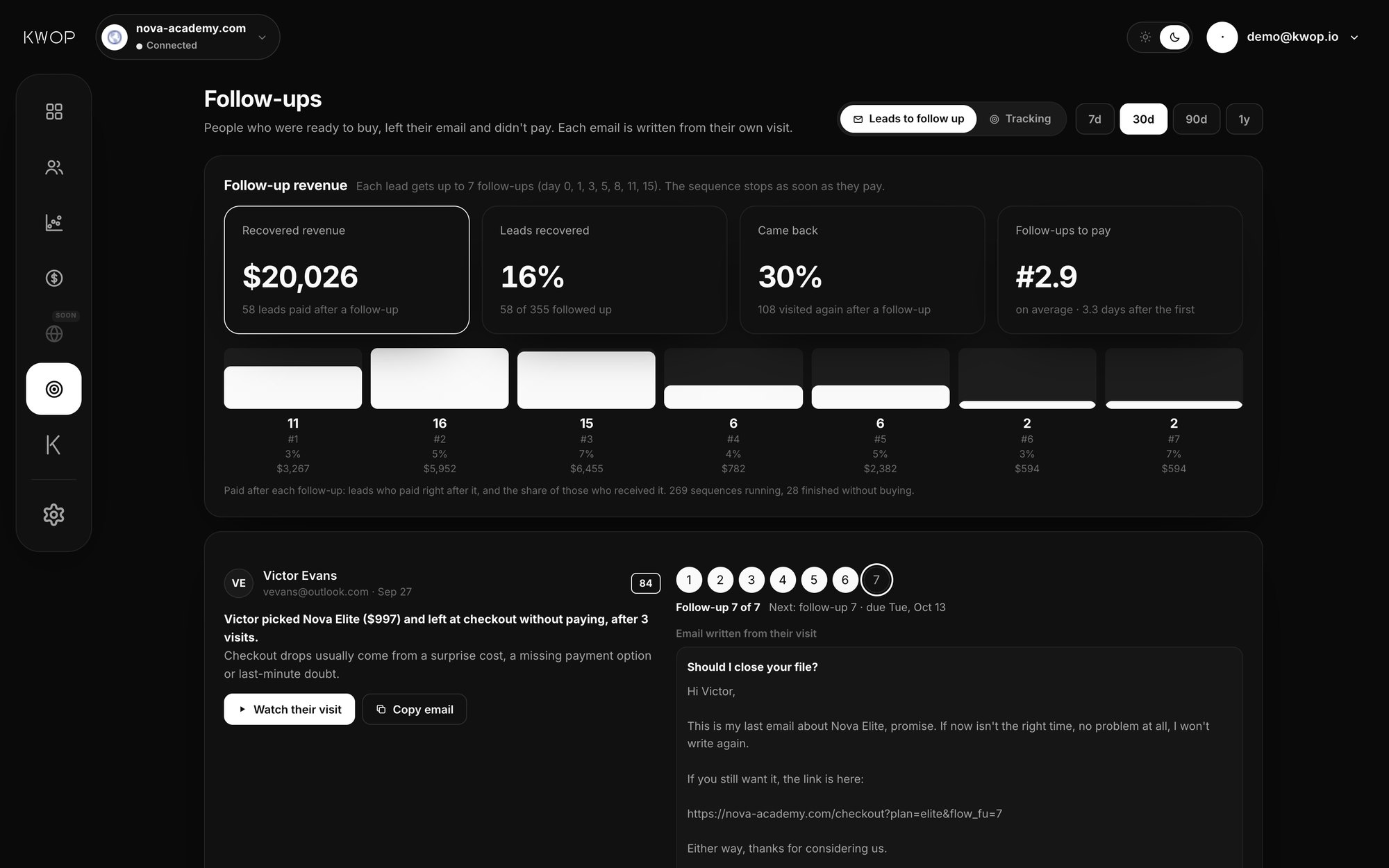
Subject: Should I close your file?

Hi Sam,

This is my last email about the Coaching plan, promise.
If now isn't the right time, no problem at all, I won't write again.

If you still want it, the link is here: [your link]

Either way, thanks for considering us.

— Alex
Then really stop: no "just checking in" after the breakup.
Track who clicked, came back and paid
- Opens: a plain-text email from your own inbox can't be counted, and you don't need it.
- Clicks: give the link in each follow-up its number (for example
?fu=3), so a visit from that link tells you which email worked. - Came back: any new visit from that person after a follow-up.
- Paid: a payment under the same email after a follow-up, credited to the last one sent before it.
After a few weeks you know which follow-up brings payments. Rewrite the weak ones rather than adding more.
What your checkout already does
As of October 2026, Shopify can send an automatic abandoned-checkout email with a link back to the cart, once a checkout stays unfinished for more than ten minutes after the customer entered their email. Stripe Checkout doesn't send the email itself: with recovery turned on, it gives you a recovery link when a session expires, 24 hours after it was created by default, and you send the email. Both are a good start, but neither knows what the person did before checkout: the pages they read, how often they came back, what broke. The follow-ups above are built from that.
How Kwop writes and tracks the 7 follow-ups
Add one script line to the <head> of your site. Kwop records every visit as a replay and scores each visitor from 0 to 100 by buying intent. The Follow-ups page in the Kwop app lists the people who were ready to buy, left their email and didn't pay, hottest first.
- Written from their visit. The plan and price they picked, where they stopped, a failed promo code, a rage click, a phone checkout. Proof and offers come only from your data (real buyer counts, an active promo code, a lower price), and the facts used are listed under each email.
- The same seven-step schedule. Day 0, 1, 3, 5, 8, 11 and 15. You copy each one and send it from your own inbox; Kwop shows which is next and when, and ends the sequence when they pay.
- Tracked without a pixel. The link back to your site in each email carries its number, so the Tracking view shows who clicked, who came back and, with a payment connector on Pro, who paid and after which follow-up.
Starter ($47/month at launch, then $94) shows your hottest 30% of leads, with how to follow up each one. Pro ($119/month at launch, then $238) opens every hot lead with the email written, and ties each Stripe, Whop or Shopify payment to its visit, so Kwop counts who paid and what each follow-up brought back. On Pro you can also ask Claude or ChatGPT "who should I follow up today?" through the MCP server. Yearly is 20% less (pricing). Comparing tools? See Kwop vs Hotjar and Kwop vs Microsoft Clarity.
FAQ
How many follow-up emails should I send to someone who left checkout?
Up to seven over fifteen days (day 0, 1, 3, 5, 8, 11 and 15), stopping as soon as they pay or say no. Better emails beat more emails.
Should I offer a discount in my follow-ups?
Only if the offer is real: an active promo code, a lower price or the yearly saving. Watch their visit first: if something broke or a question went unanswered, a discount will not fix it.
Can I follow up visitors who never left their email?
No. You can only write to people who typed their email on your site. Kwop reads only an email typed in your own forms, and you can turn that off.
Does Kwop send the follow-up emails for me?
No. Kwop writes each follow-up and tracks what happens next; you send it from your own inbox, so it arrives as a personal email. Opens are not counted; clicks, return visits and payments are.
See who left your checkout
Paste your link: 3 free test visits of your site, with their replays, in about a minute. No card.