
Kwop › Guides › Why visitors don't buy
Why visitors don't buy: how to find out in one afternoon
If your site gets visitors but few sales, the cause is usually one of a few plain reasons: the wrong traffic, a button that does nothing, a page that breaks on a phone, a confusing pricing page, a slow load, or a buyer who got distracted and never came back. You can find out which ones are yours in an afternoon. Here is the method, with a free way to do each step and how Kwop does it.
Step 1: Check where your visitors come from (20 minutes)
Before blaming the page, check the traffic. In Google Analytics 4, open Reports › Acquisition › Traffic acquisition and compare sources: how many sessions each one sends and, if you track purchases or sign-ups as key events, how many of those each one brings.
If one source sends lots of visitors who leave within seconds, that is a targeting problem (the ad, the post, the audience), not a page problem. Note it and move on.
With Kwop: this is the one step where we point you to your analytics tool. Kwop's traffic sources report is not live yet.
Step 2: Watch replays of people who reached pricing or checkout (1 hour)
This step finds most problems. Skip random sessions and watch the people who came close: they opened pricing or started checkout, and didn't pay. Watch 10 to 20 of them at 2x or 4x and note every moment they hesitate:
- They go back and forth between two plans.
- They scroll to the FAQ, read, then leave.
- They start the checkout form and stop at one field.
- They click a price or an image, expecting something to happen.
After ten replays, the same moment tends to come back. That is your first fix.
Without Kwop: any session replay tool works. Microsoft Clarity is free and records sessions.
With Kwop: the funnel shows your steps (for example Visit, Pricing, Checkout, Paid) and how many people you lose at each one. The "Who's about to buy" view then keeps only the visits that reached checkout, and each one opens on that visitor's replays. Each replay has a timeline ("Opened /pricing", "Clicked Choose Pro", "Left their email") and plays from 1x to 8x. More on session replay in Kwop.
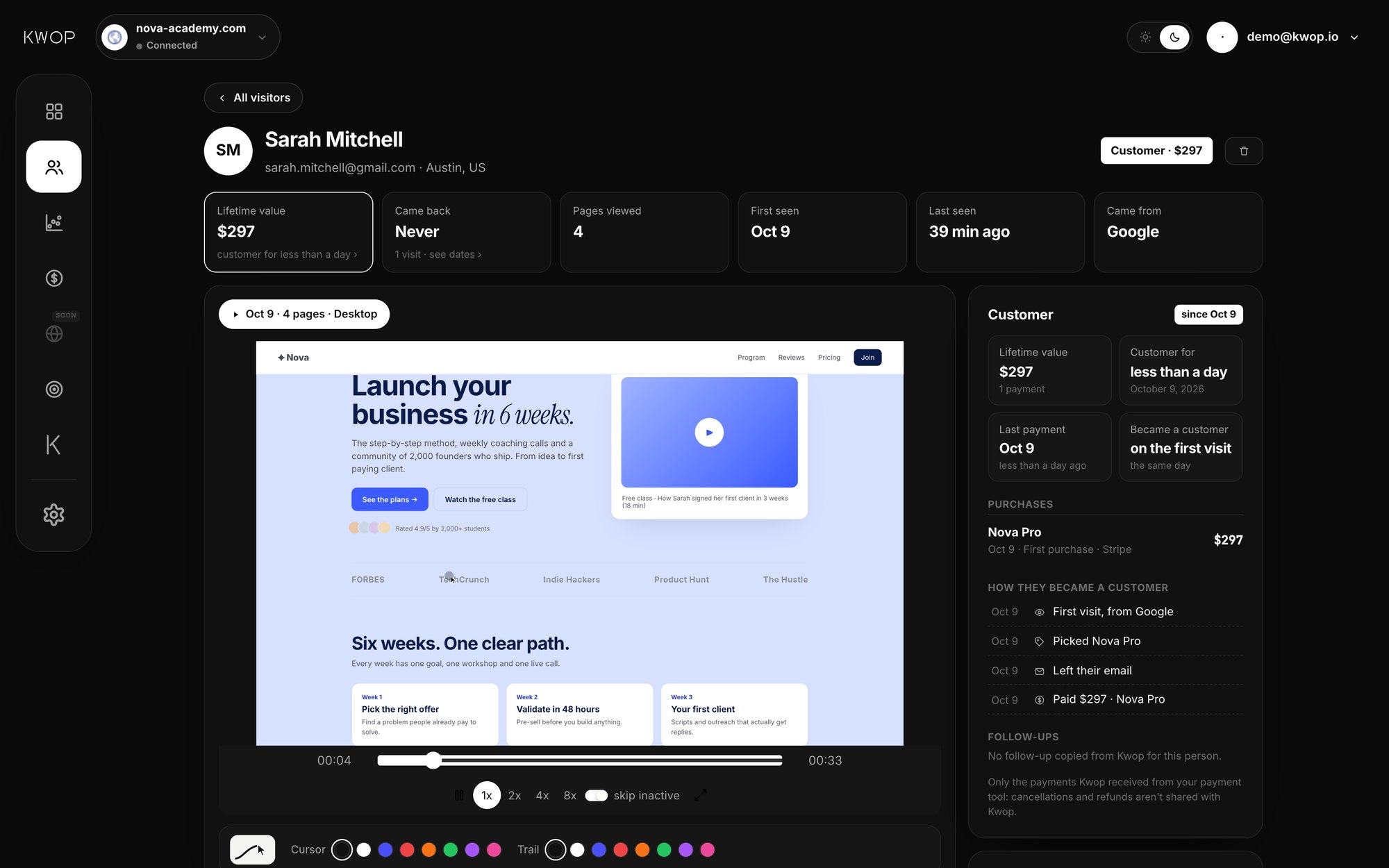
Step 3: Look for rage clicks and dead buttons (20 minutes)
A rage click is someone clicking the same spot again and again because nothing happens. A dead click does nothing at all. Typical causes: a promo code that fails, a Buy button disabled without saying why, a plan card that looks clickable but isn't.
Without Kwop: click every button and link on your pricing and checkout pages yourself, promo code included. Microsoft Clarity also flags rage clicks and dead clicks.
With Kwop: three fast clicks in the same spot within a second are flagged as a rage click, with the replay, and you can filter visitors to see only those. Test visits send a real browser through your site and report clicks that do nothing and broken links.
Step 4: Use your site on a phone (20 minutes)
If your traffic comes from Instagram or TikTok, most of your visitors are probably on a phone. Open your site on yours, from the app they come from, and try to buy. Is the main button visible without scrolling? Does the page scroll sideways? Can you get through checkout with one thumb?
With Kwop: one of the 3 test visits runs on a phone-sized screen and reports when the main button is not on the first screen, when the page scrolls sideways and when a tap does nothing.
Step 5: Look for price and plan confusion (30 minutes)
Back to the pricing replays. Signs of confusion: opening pricing several times over a few days, switching between monthly and yearly, comparing two plans for a long time, then leaving. Common fixes: mark one plan as recommended, describe each plan by what the buyer gets, and show the price exactly as it will be charged.
Without Kwop: compare the plans people look at in your replays with the plans they buy in your payment dashboard.
With Kwop (Pro): connect Stripe, Whop or Shopify. Kwop only reads your payments and never moves money. It ties each payment to the visit that led to it, shows the plan each visitor picked, and ranks every plan by conversion, with what people left at checkout.
Step 6: Check page speed (10 minutes)
A slow page loses people before they see anything. Run your home and pricing pages through Google's PageSpeed Insights, which reports on mobile and desktop, and start with its biggest issue.
With Kwop: the desktop test visit measures how long visitors wait before your page appears, and flags it as slow above 3 seconds.
Step 7: Follow up the people who were ready (the rest of the afternoon)
Some lost sales are not a page problem. People reach checkout, get a call, and forget. Email them today, while they remember you: list everyone who left their email and didn't pay, and write each one a short note about what they looked at. One link, one question, signed by you.
With Kwop: every visitor gets a buying-intent score from 0 to 100, from how far they went in your funnel, how often they came back, how many pages they saw and whether they left their email. Hot leads have a high score, left their email and didn't pay. For each one, Kwop writes the follow-up from their own visit: the plan and price they picked and where they stopped. Offers come only from your real data, like an active promo code. You copy it and send it yourself.
A 7-step follow-up sequence runs over about two weeks, and the Tracking view shows who clicked, came back or paid, and after which follow-up. Starter shows your hottest 30% of leads with how to follow up each one; Pro writes the email for every hot lead.
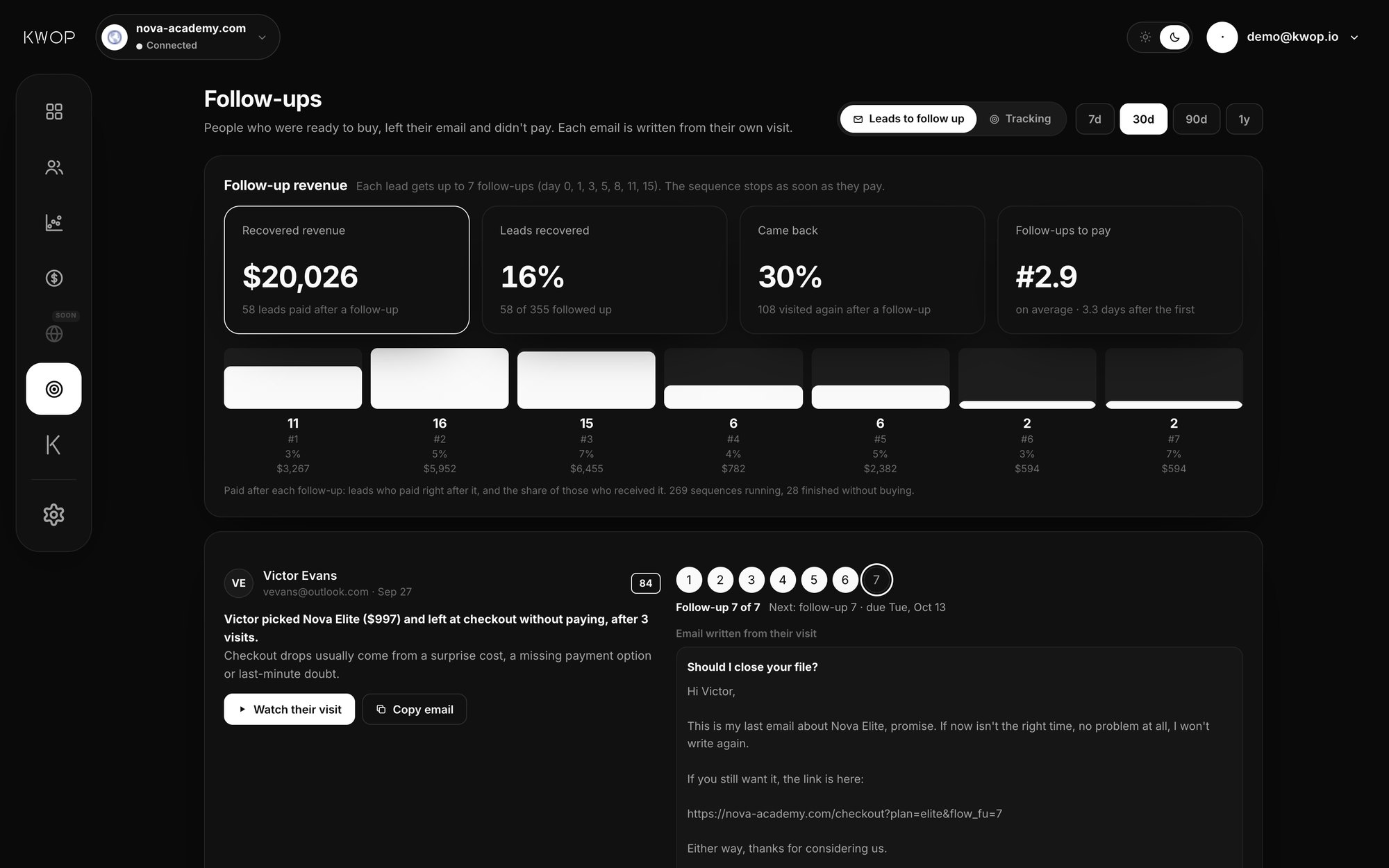
The afternoon at a glance
| Step | Time | Free way | In Kwop |
|---|---|---|---|
| Traffic sources | 20 min | GA4 Traffic acquisition | Not live yet |
| Replays near checkout | 60 min | Any replay tool | Funnel drop-off, replays of visits that reached checkout |
| Rage and dead clicks | 20 min | Click everything yourself | Rage clicks flagged, dead clicks in test visits |
| Phone | 20 min | Your own phone | Mobile test visit |
| Plan confusion | 30 min | Replays and payment dashboard | Plan each visitor picked (Pro) |
| Speed | 10 min | PageSpeed Insights | Load time in the desktop test visit |
| Follow-ups | The rest | Emails by hand | Hot leads, written emails, tracking |
Ask your data instead of digging
On Pro, ask Kwop chat "Who should I follow up today?" or "Where am I losing buyers?" and get the answer from your own visits and payments. Also on Pro, through the Kwop MCP server, Claude, ChatGPT, Gemini or Cursor can read the same data.
Start with 3 free test visits
No replays yet? Paste your link on the home page of the Kwop app: it sends 3 test visits through your site with a real browser (one on desktop, one on a phone, one looking for your prices) and shows their replays and what went wrong in about a minute. No install, no card.
To record real visitors, add one script line to the <head> of your pages. Starter is $47/month at launch (regular $94): 1 site, about 90% of sessions (sampled). Pro is $119/month at launch (regular $238): unlimited sites, every session, connectors, Kwop chat and MCP. Yearly is 20% less. See the pricing page, or compare Kwop vs Hotjar and Kwop vs Microsoft Clarity. To go further, read how to connect Stripe payments to session replays.
FAQ
How many replays should I watch?
Start with 10 to 20 from people who reached pricing or checkout and didn't pay. When you keep seeing the same problem, fix that one first.
Can I do this without paying for a tool?
Mostly: Google Analytics for sources, a free replay tool such as Microsoft Clarity, PageSpeed Insights and your own phone. Kwop adds a ranked list of who was about to buy, follow-ups written from their own visits, and, on Pro, each payment tied to its visit.
Does recording visitors capture passwords or card numbers?
Not in Kwop. Every form field is masked in the visitor's browser. Only an email typed in your own forms is read, to tie a payment to a visit, and you can turn that off. With data-consent="required", nothing is recorded until your cookie banner gives consent.
How long does Kwop take to set up?
Test visits need no install and take about a minute. Recording real visitors takes one script line in the head of your pages, with steps for Webflow, Shopify, WordPress, Framer, Wix and custom code.
See why your visitors don't buy
Paste your link: Kwop shows 3 test visits of your site in about a minute. No card.