
Kwop › Kwop for SaaS
Kwop for SaaS: see who signs up, who pays, and why
People land on your SaaS site, open the pricing page, some start a trial, a few pay. Your analytics give you the counts. Kwop shows you the people: the replay of each visit, the plan they picked, where they got stuck in onboarding, which visit led to a Stripe payment, and who was close to paying and should hear from you today.
The questions it answers
- Who opened the pricing page this week, which plan did they pick, and did they sign up?
- Where do new signups give up: the sign-up form, the first screen of the app, a setup step?
- Which visit led to a payment, from which source, and after how many visits?
- Who was ready to buy, left their email and never paid, and what should I write to them?
Watch trial signups and pricing-page visits
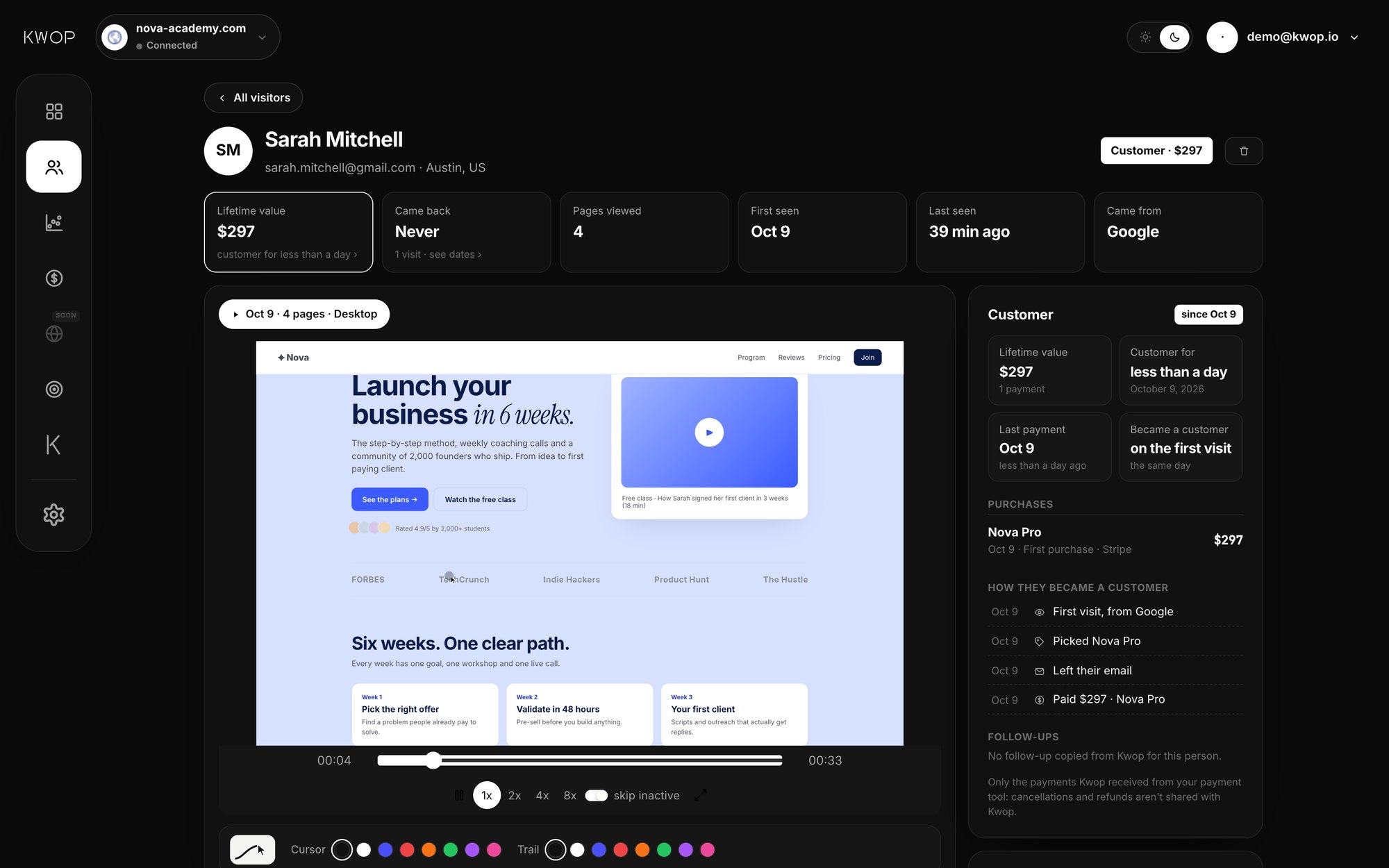
Kwop records every visit like a video (session replay): the cursor, the clicks, the scroll, the moment someone hesitates on your pricing table. Each replay comes with a plain timeline ("Opened /pricing", "Clicked Choose Pro", "Left their email") and every other visit by the same person.
Once Stripe, Whop or Shopify is connected (Pro), Kwop also notes which plan each visitor picked, from your real products and prices. A click on a Stripe Payment Link counts as an exact plan choice, you can tag a button with data-flow-plan="price_…", and otherwise Kwop matches plan names, billing period and amounts in what people click. The email typed in your sign-up form identifies the visitor. Inside a logged-in app, call Flow.identify(email) after login.
See who paid in Stripe, next to the visit that led to it
On the Pro plan, you connect Stripe with a restricted, read-only key. Kwop imports the last 90 days of payments, then syncs every 10 minutes. Each successful charge is matched by email to the visitor who typed that email on your site, and attached to the visit just before the payment. When a trial becomes a paid charge, you can open the person who paid and watch the visits that came before it.
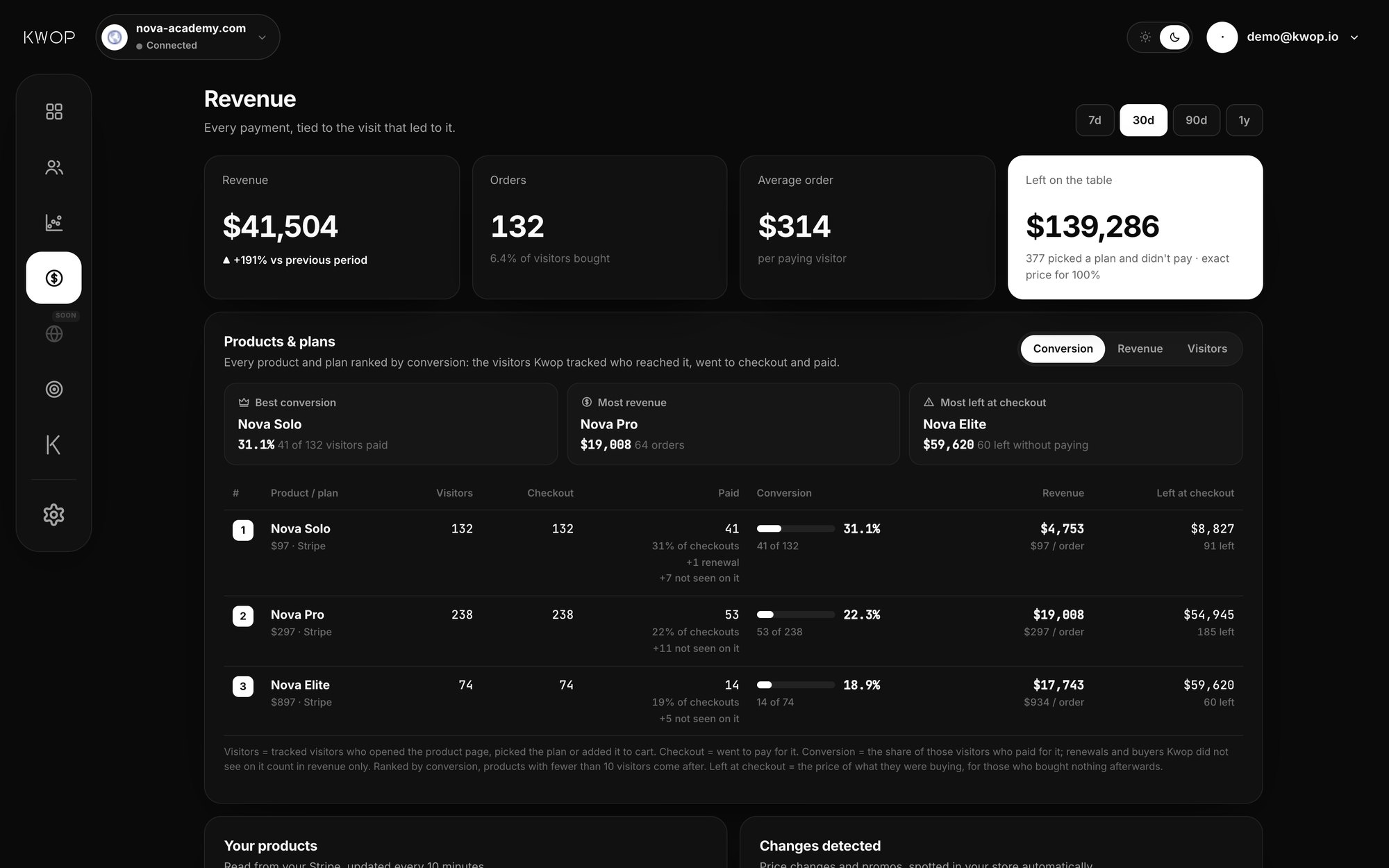
The revenue page ranks each product and price by conversion and shows what was left at checkout. Kwop can see payments, never move money. Setup steps are on the Stripe integration page; Whop and Shopify also connect with read-only access. For the full walkthrough, read how to connect Stripe payments to session replays.
Find friction in signup and onboarding
- Funnels with drop-off. Kwop builds your funnel from your own pages, including pricing and sign-up, then adjusts it from real visits (for example Visit, Pricing, Checkout, Paid). You see how many people you lose at each step, and the replays of the ones who left.
- Journeys. Every page and click in order, up to the last step before someone left, such as step two of your setup.
- Rage clicks. Three fast clicks in the same spot are flagged, so a button that does nothing or a promo code that fails shows up with its replay.
- Dead clicks. Kwop's test visits send a real browser through your site, on desktop and on a phone, and report clicks that do nothing, broken links and slow pages.
Typed inputs are masked in the visitor's browser, and the flow-block class keeps any sensitive screen of your app out of replays.
Follow up warm leads before they go cold
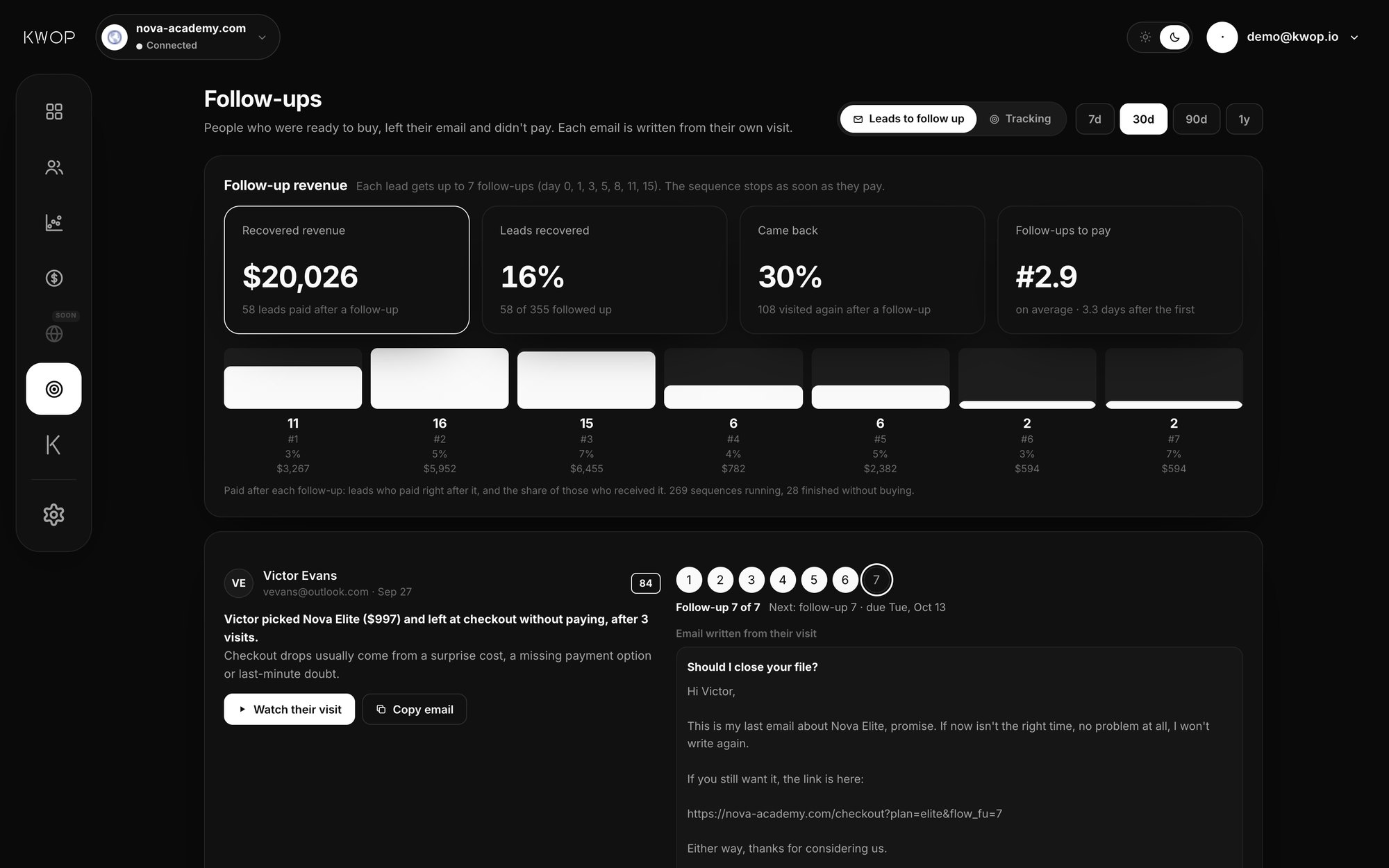
Every visitor gets a buying-intent score from 0 to 100, from how far they went in your funnel, how often they came back, how many pages they saw and whether they left their email. Hot leads are people with a high score who left their email and did not pay, like the trial user who reached checkout and stopped.
On Pro, Kwop writes the email for each hot lead from their own visit: the plan and price they picked, where they stopped, how often they came back. Offers come only from your real data, such as an active Stripe promo code. Six more emails follow over about two weeks, a 7-step sequence. You send each one yourself, and Kwop shows who clicked, who came back and who paid. Starter shows your hottest 30% of leads, with how to follow up each one. More on this in how to follow up website leads who left checkout.
Ask Claude about your signups and revenue
On Pro, the Kwop MCP server lets Claude, ChatGPT, Cursor or Gemini read your Kwop data. Paste one private link from your dashboard into your AI app and ask, for example:
- Who should I follow up today?
- Why do visitors leave my pricing page?
- Which plan converts best this month, and how much was left at checkout?
- Write a follow-up email for my top 3 leads.
The 9 tools are read-only: your AI can read your data and draft a follow-up, but it cannot change your sites, settings or payments, and it never emails anyone. The same questions work in the Kwop chat in your dashboard.
Try it on your own site first
Paste your link on the Kwop home page. It sends 3 test visits through your site with a real browser, on desktop and on a phone, and shows their replays in about a minute. No card, nothing to install. To record your real visitors, copy your line from the Setup page and paste it in the <head> of your site and app:
<script src="https://kwop.io/flow.js" data-site="your-site-id" defer></script>The Setup page has steps for Webflow, Framer, WordPress and custom code, plus a prompt for Claude Code that adds the line for you.
Which plan fits a small SaaS
| Starter | Pro | |
|---|---|---|
| Launch-week price | $47 / month | $119 / month |
| Regular price (after launch week) | $94 / month | $238 / month |
| Sites | 1 | Unlimited |
| Sessions recorded | Sampled (~90%), 5,000 / month | Every session |
| Replays, journeys, funnels, rage clicks | Yes | Yes |
| Follow-ups | Hottest 30% of leads, with how to follow up | Every hot lead, email written |
| Stripe, Whop, Shopify, revenue, Kwop chat, MCP | No | Yes |
Yearly billing is 20% less. Starter fits if you are pre-revenue and mostly want to watch signups and fix onboarding. Pro fits once you charge through Stripe and want each payment tied to its visit, every hot lead written up, and Claude reading your data. Current prices are on the pricing page.
What Kwop does not do
Kwop has no heatmaps and no on-page surveys. If those are what you need, Hotjar offers both, and Microsoft Clarity is free with recordings and heatmaps (both as of October 2026). Payments only show up when the payer's email appeared on your site, by a form or by Flow.identify. For side-by-side details, see Kwop vs Hotjar, Kwop vs Microsoft Clarity, Kwop vs PostHog and Kwop vs Fullstory.
FAQ
Can Kwop record inside my logged-in app, not only my marketing site?
Yes. Put the same script line in the <head> of every page you want recorded, app included. After login, call Flow.identify(email) so each visit is tied to the right person. Every form field is masked in the browser, and the flow-block class keeps any element out of replays.
Does Kwop see when a trial turns into a paid Stripe subscription?
On Pro, Kwop reads your successful Stripe charges with a read-only key. When a charge comes in with an email that a visitor typed on your site, or that you passed with Flow.identify, the payment is attached to that visitor and to the visit just before it, with the replay next to it.
Does Kwop email my users for me?
No. Kwop writes the follow-up and you copy it and send it yourself. It then shows who clicked the link in it, who came back to your site and who paid.
Is Starter enough for an early SaaS?
Starter covers one site with replays of about 90% of sessions, journeys, funnels, rage and dead clicks, and your hottest 30% of leads with how to follow up each one. Stripe revenue, the Kwop chat and the MCP server for Claude are on Pro.
Is there a free plan?
No, but the test is free: paste your link and Kwop sends 3 test visits through your site, on desktop and on a phone, and shows their replays in about a minute. No card and nothing to install.
See who signs up and who pays
Paste your link: Kwop shows 3 free test visits of your site in about a minute. No card.