
Kwop › For Whop sellers
Session replay and revenue tracking for Whop sellers
If you sell a community, a course or a signals group on Whop, Whop tells you who paid. Kwop shows you the visits behind it: which visitor bought which Whop plan, where people leave your sales page before paying, and who almost bought, with a follow-up written from their own visit.
What Whop shows you, and what it doesn't
Whop's own dashboard is built around your business numbers. As of October 2026, its analytics cover things like gross revenue, MRR, churn and an estimated count of visits to your Whop store pages, and Whop tracking links report clicks, revenue and conversion rate per link.
What those numbers don't show is what each person did on your own site before clicking through to Whop: which part of your sales page they read, whether they compared your monthly and yearly plans, how long they hesitated, and where the ones who left stopped. That is the part Kwop fills in.
What Kwop adds for a Whop store
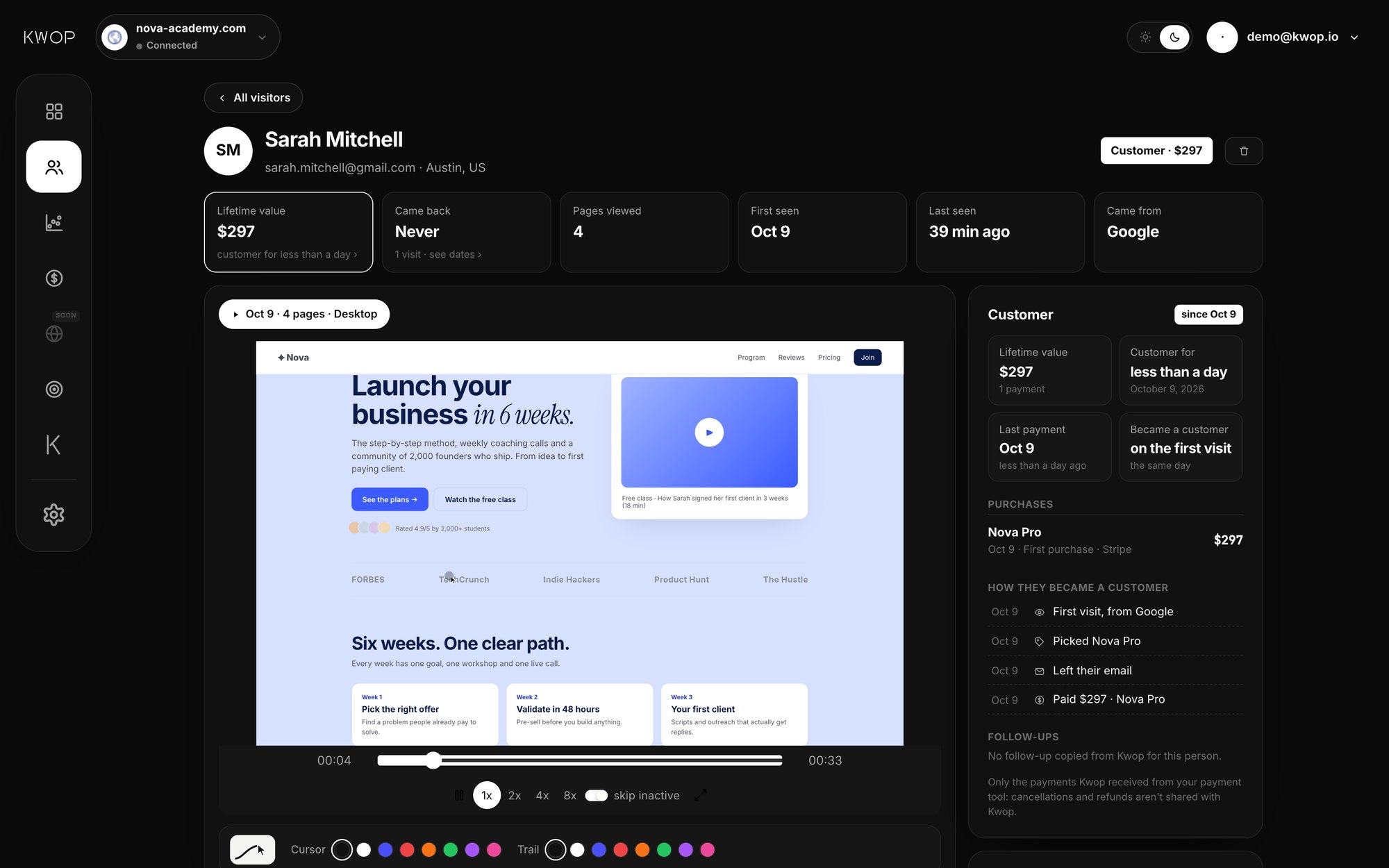
- A replay of every visit. Clicks, scrolls, mouse moves and pages, played back like a video (session replay). Pro records every session; Starter records a sample of about 90%.
- Which visitor bought which Whop plan. On Pro, Kwop reads your Whop plans and their checkout links. A click on a plan's Whop link counts as picking that exact plan, and each Whop payment sits next to the visit that led to it.
- Where people leave before paying. Visitor journeys page by page, and funnels with the drop-off at each step and the replays of the people who left.
- Rage clicks and dead clicks. Repeated angry clicks and clicks on things that do nothing, which often point to a broken button or a confusing plan table.
- Who almost bought. Every visitor is ranked by buying intent. On Pro, every hot lead comes with a follow-up email written from their visit; Starter shows your hottest 30%.
- Answers in plain English. On Pro, ask Kwop "which Whop plan converts best?", or let Claude, ChatGPT, Cursor or Gemini read your data through the Kwop MCP server.
Communities, courses and signals groups
- Paid communities. Many sell a monthly plan next to a yearly one. On Pro, Kwop shows which plan each visitor picked and which plan the people who left were about to buy, so you can tell whether people stall on the yearly price or the monthly one.
- Courses. Course sales pages tend to be long. A few replays of people who left show how far they scrolled, whether they clicked play on your free lesson, and the section where they stopped reading. More in Kwop for coaches and course creators.
- Signals groups and trading communities. Traffic can arrive in bursts from TikTok, X or Instagram. Kwop shows where each visit came from and, on Pro, the revenue per source, so you see which platform brings buyers and not just clicks.
See where people leave before paying
Your checkout happens on Whop, not on your site, so Kwop does not record the checkout page itself. It still sees the step: a click on a Whop checkout link counts as reaching checkout. A typical funnel for a Whop seller reads Visit, Pricing, Checkout, Paid, with the Paid step coming from your Whop payments on Pro.
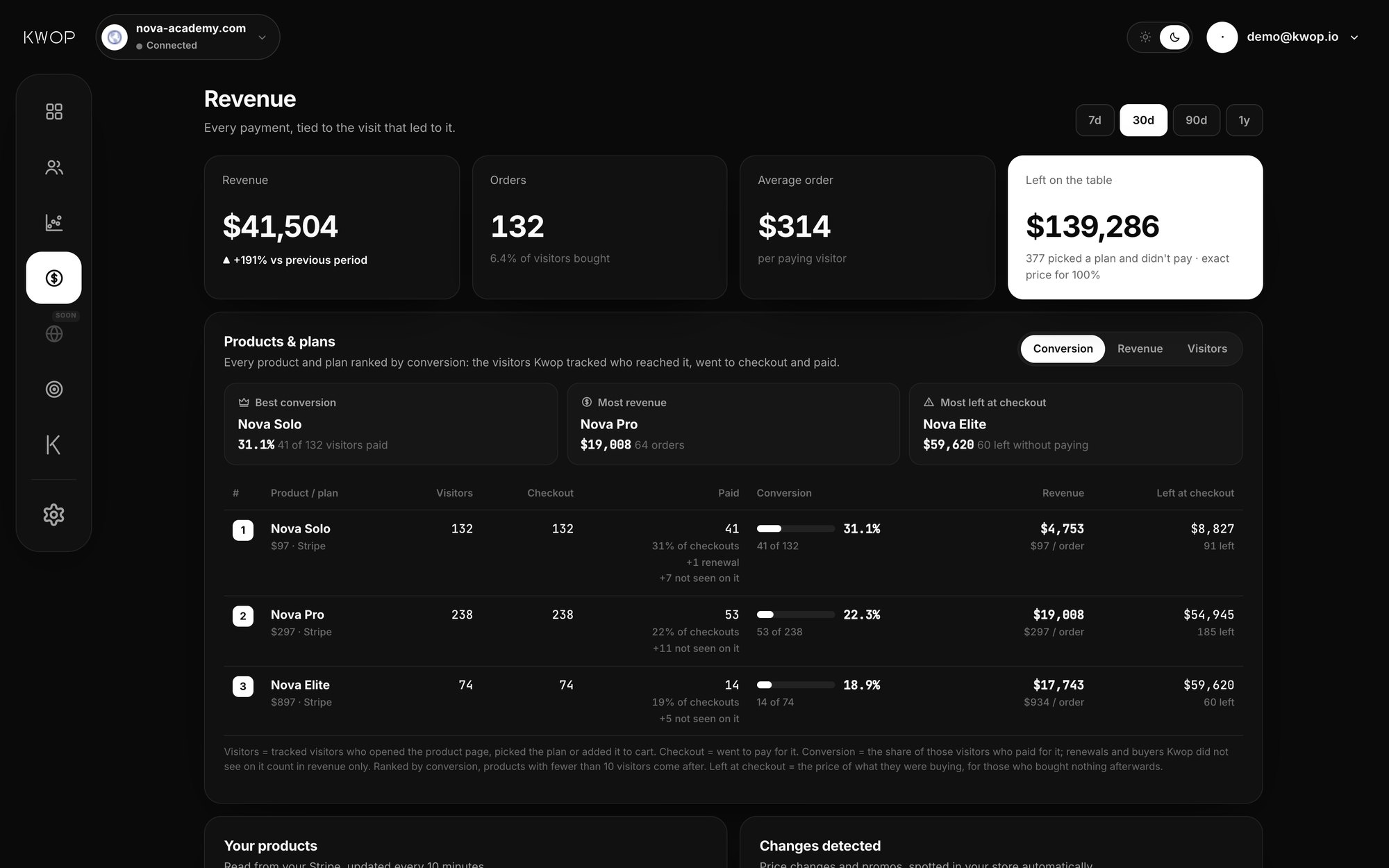
At each step you see how many people dropped and can watch their replays. On Pro, the revenue page ranks every product and plan by conversion, with the money left at checkout: the price of what people were about to buy when they clicked through and never paid. For a method to read those replays, see why visitors don't buy.
Follow up the ones who almost bought
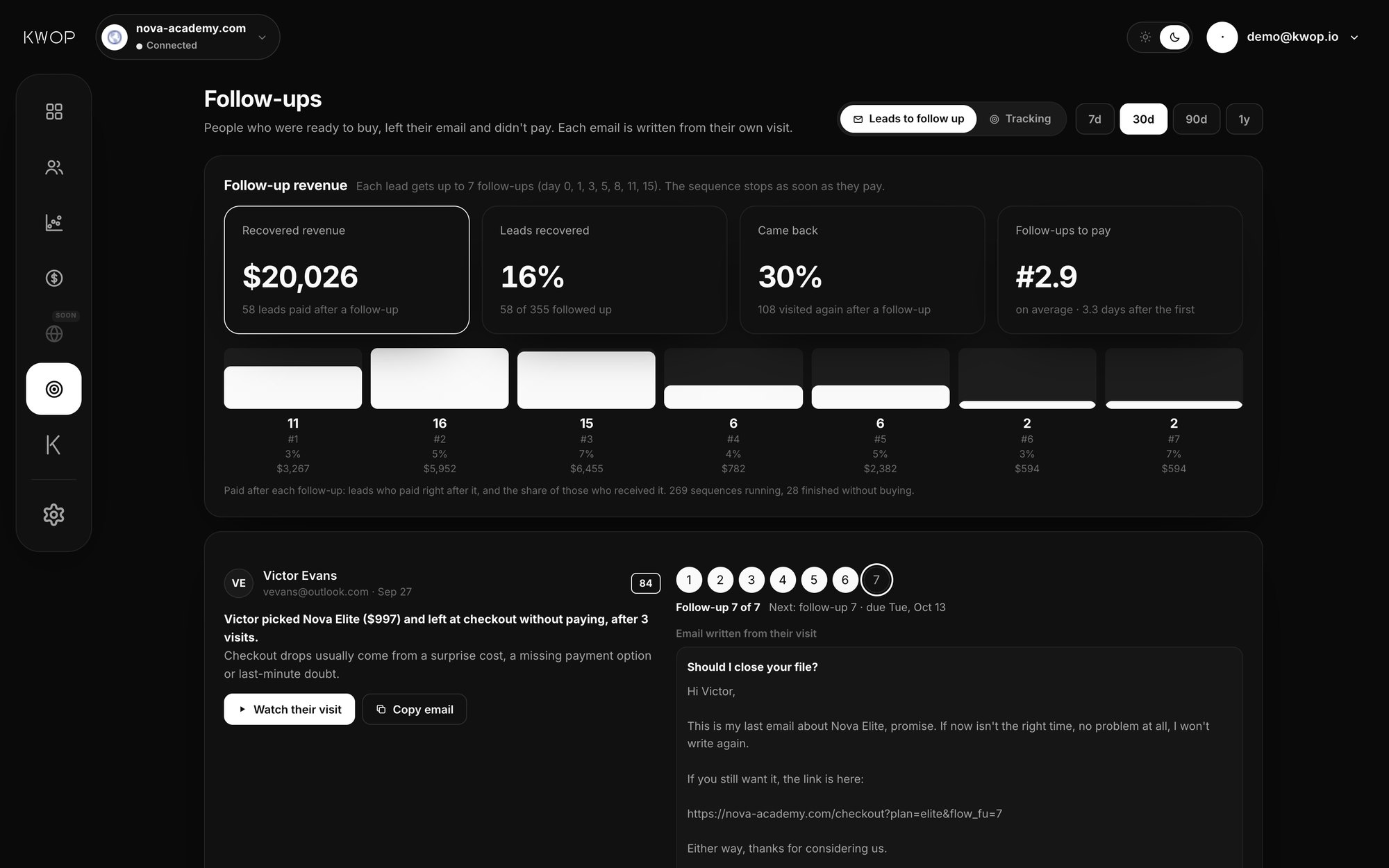
Every visitor gets a buying-intent score from 0 to 100, based on how far they went in your funnel, how often they came back, how many pages they saw and whether they left their email. Hot leads are the people with a high score who left their email and did not pay.
On Pro, Kwop writes the email for each one from the visit itself: the Whop plan and price they picked, where they stopped, an active promo code or a price drop if there is one, and a link back to where they left off. It never invents an offer. You copy the email and send it from your own mailbox.
Each lead gets a sequence of up to 7 follow-ups over about two weeks (day 0, then days 1, 3, 5, 8, 11 and 15), and it stops as soon as they pay. The tracking view shows who clicked the link, who came back to your site and who paid, and after which follow-up. Opens are not tracked, because the email leaves your mailbox as plain text with no tracking pixel. More in the guide to following up website leads.
On Starter, Follow-ups shows your hottest 30% of leads with how to follow up each one. On Pro, it covers every hot lead, with the email written.
How Kwop connects to Whop
Setup takes two steps. First, paste one script line in the <head> of your own site: your sales page, landing page or website. Copy yours from the Setup page of the Kwop app; it looks like this:
<script src="https://kwop.io/flow.js" data-site="your-site-id" defer></script>Second, on Pro, connect Whop with an API key from your Whop dashboard that only has read permissions. Kwop imports the last 90 days of payments, then syncs every 10 minutes. The exact steps and permissions are on the Whop integration page.
Kwop ties a Whop payment to a visit by email. The script reads the email people type in your own forms, such as an opt-in or a waitlist, or you pass it yourself with Flow.identify(email). Every other field is masked in the visitor's browser, and data-capture-email="off" turns email capture off. A payment whose email never appeared on your site stays hidden until that person identifies. Selling through Stripe or Shopify too? Each site can connect all three.
Already using another replay tool?
Read Kwop vs Hotjar, Microsoft Clarity, Fullstory, PostHog, Mouseflow or Lucky Orange. Each comparison says plainly where the other tool is better.
Pricing for Whop sellers
Tying Whop payments to visits needs Pro: $119/month during launch week, then $238/month. It adds unlimited sites, every session recorded, the Whop, Stripe and Shopify connectors, Kwop chat and MCP.
Starter, $47/month at launch (then $94), covers one site with replays, journeys, funnels and rage clicks on a sample of sessions (about 90%, up to 5,000 a month), plus follow-ups for your hottest 30% of leads. It has no Whop connection, so payments are not tied to visits. Yearly billing saves 20% on both. See the pricing page for current prices.
FAQ
My store is only on whop.com. Can I use Kwop?
Kwop records the pages that carry its script, so you need a page of your own that sends people to Whop: a sales page, a landing page or a site built with Webflow, Framer, WordPress, Wix or custom code. If your visitors only ever see your Whop store page, Kwop has no visit to record.
My checkout is on Whop. Can Kwop see who paid?
Yes, on Pro. Kwop reads your Whop payments through a read-only connection and matches each one to the visitor who typed the same email on your site. A click on a plan's Whop checkout link also tells Kwop which plan that visitor picked.
What if visitors go straight to Whop without typing their email on my site?
You still get their replay, the plan they clicked and where they dropped off. Their payment is tied to that visit only once their email appears on your site, in one of your forms or through Flow.identify(email). The dashboard shows how many payments are not matched yet.
Can Kwop change anything in my Whop account?
No. The Whop API key only needs read permissions for payments, members, plans and promo codes. Kwop can see payments, never move money, refund, edit a plan or create a code.
Can I try Kwop before paying?
There is no free plan, but the test is free: paste your link and Kwop sends 3 test visits through your site with a real browser, on desktop and on a phone, then shows their replays in about a minute. No card.
See who buys your Whop plans
Paste your link: Kwop shows 3 free test visits of your site in about a minute. No card.