
Kwop › Guides › Smartlook shutting down
Smartlook is shutting down: key dates and where to move
Cisco is winding Smartlook down: new sales ended on 31 May 2026, renewals ended on 31 August 2026, and the platform is switched off with all data deleted on 30 September 2027 (checked 18 October 2026 on smartlook.com and Cisco's end-of-life notice). Web teams can move their recordings to Microsoft Clarity or PostHog, mobile-app teams need an app SDK such as PostHog's or UXCam's, and online sellers who want to see which visitor paid can use Kwop (kwop.io). Below: the dates with their sources, what happens to your data, which tool fits which job, an honest Kwop vs Smartlook table and a one-week switch plan.
When does Smartlook shut down?
The Smartlook platform is deactivated on 30 September 2027, and all remaining customer data is deleted that day. The last paid subscriptions end on 31 August 2027; after that, accounts can use the Smartlook Free plan, with its usual limits, until the switch-off.
| Date | What happens | Source |
|---|---|---|
| 31 March 2026 | End of life announced | Cisco bulletin EOL15639 |
| 31 May 2026 | End of sale: no new Smartlook subscriptions | smartlook.com FAQ, Cisco EOL15639 |
| 31 August 2026 | End of contract renewals: no further renewals or expansions | smartlook.com FAQ, Cisco EOL15639 |
| 31 August 2027 | Last day of support; the last paid subscriptions (annual renewals started by 31 August 2026) end | smartlook.com FAQ, Cisco EOL15639 |
| 30 September 2027 | Platform deactivated; all remaining customer data securely deleted | smartlook.com FAQ |
Smartlook's own wording is that it "will gradually wind down as a standalone product" (smartlook.com, checked 18 October 2026). Cisco's bulletin names Splunk Observability Cloud (RUM + DXA) as the migration product, but Smartlook's FAQ says your subscription does not move to it automatically. If your annual plan ends before August 2027, you drop to the Free plan earlier, so your real deadline for full-speed exports may be sooner than the switch-off.
What happens to your Smartlook data?
It is deleted on 30 September 2027, and Splunk will not migrate any historical data from Smartlook. Smartlook recommends exporting before your paid subscription ends, and no later than 31 August 2027.
What you can take with you, according to Smartlook's docs (checked 18 October 2026):
- Data through the REST API. The REST API gives access to visitors, events, funnels and sessions, at
https://api.eu.smartlook.cloud(the default region) orhttps://api.us.smartlook.cloud. Only the project owner can create a token, each token covers one project, and it stops working after more than 90 days without use. - Rate limits matter. The API allows 20 requests an hour on the Free plan, 100 on paid plans and 1,000 with the REST API add-on. Large projects should export while they are still on a paid plan.
- CSV of users. From the sessions view, you can export a CSV of up to 1,000 users in a segment (Reports and exports).
- The recordings themselves. Smartlook's docs do not describe downloading recordings as video files, and session public links point to Smartlook, so they stop working when it is switched off. We know of no tool that imports Smartlook recordings. Write down what your key sessions showed, then start recording fresh in the new tool.
Which Smartlook alternative fits what you used it for?
Pick by the job Smartlook did for you, not by the longest feature list. Smartlook covered websites and mobile apps, so the right replacement depends on which one you recorded and what you looked for in the recordings.
| You used Smartlook for | Move to | Why (checked 18 October 2026) |
|---|---|---|
| Web replays and heatmaps, at no cost | Microsoft Clarity | Free forever, no traffic limits, no sampling, heatmaps; recordings kept 30 days (favorites and a sample up to 9 months) |
| Events, funnels and product analytics | PostHog | Free tier of 1M analytics events and 5,000 recordings a month; free-plan recordings kept 1 month, 90 days on pay-as-you-go |
| Mobile apps (iOS, Android, React Native, Flutter) | PostHog, UXCam or Clarity's mobile SDKs. Not Kwop. | PostHog mobile replay is generally available on Android, iOS, React Native and Flutter; UXCam is built for mobile apps and websites; Clarity has Android, iOS, Flutter and React Native SDKs |
| The same features, staying with Cisco | Splunk Observability Cloud (Digital Experience Analytics) | Cisco's named migration product; Smartlook says session replay, heatmaps and funnels continue there. It is a new subscription, and no historical data is migrated |
| Revenue in funnels, and who left without buying | Kwop | Reads real payments from Stripe, Whop or Shopify, ties each one to its visit, and writes follow-ups for people who were close to buying |
Web replays and heatmaps. If you mostly watched sessions and looked at heatmaps on a marketing site, Microsoft Clarity is the obvious free move. If heatmaps plus surveys are the core, our Hotjar alternatives page covers the other options.
Events and funnels. Smartlook let you define events and funnels on top of recordings. PostHog does that as a full product analytics suite with replay, feature flags and experiments, which suits product teams that want analytics, replay and experiments in one tool.
Mobile apps. Smartlook had SDKs for iOS, Android, React Native and Flutter. Kwop records websites only, including visits from mobile browsers, but it has no app SDK. For native or cross-platform apps, choose PostHog, UXCam or Clarity.
Revenue and follow-ups. Smartlook's Revenue insights estimated funnel revenue and missed opportunity from custom events you tagged with a revenue property. If you sell online and want the actual payment next to the visit that led to it, plus the people who reached checkout and left, that is what Kwop does. See replays that show who paid.
Kwop vs Smartlook: what's the difference?
Both record website visits as replays. Smartlook also covers mobile apps, heatmaps and JavaScript errors; Kwop instead ties Stripe, Whop or Shopify payments to each visit and tells you who to follow up.
| Feature | Kwop | Smartlook |
|---|---|---|
| Website session replay | Yes. Every input is masked in the browser; single-page apps supported | Yes |
| Mobile app SDK | No. Mobile browser visits only | Yes: iOS, Android, React Native, Flutter |
| Heatmaps | No | Yes |
| Funnels | Yes. Steps detected from your site and re-learned from visits | Yes, set up by you |
| Rage clicks | Yes, flagged on every recorded visit | Yes |
| JavaScript error capture | No | Yes |
| Payments tied to visits | Yes, on Pro: Stripe, Whop and Shopify payments matched by the email typed on your site | Revenue estimated from custom events with a revenue property |
| Follow-ups for people who didn't buy | Yes: hot leads, up to 7 emails written from each visit, one-click Send with Gmail | No |
| AI chat and MCP server | Yes, on Pro: Kwop AI, and an MCP server with 9 read-only tools for Claude, ChatGPT, Cursor and Gemini CLI | None listed in its integration docs |
| Status | Active | No new sales since 31 May 2026; shut down 30 September 2027 |
| Price | Launch prices: Starter $47/month (regular $94), Pro $119/month (regular $238) | No longer sold |
How Kwop does this. The script records each visit to your site (session replay) and scores every visitor by buying intent, from how far they went in your funnel, how often they came back and whether they left their email. On Pro, you connect Stripe, Whop or Shopify with a read-only key; Kwop imports the last 90 days and syncs every 10 minutes. A payment is matched to the visitor who typed the same email on your site, so you watch the visit next to the sale. Hot leads, people who went far, left their email and did not pay, get follow-up emails built only from what they did: the plan they picked, where they stopped, a promo code that failed.
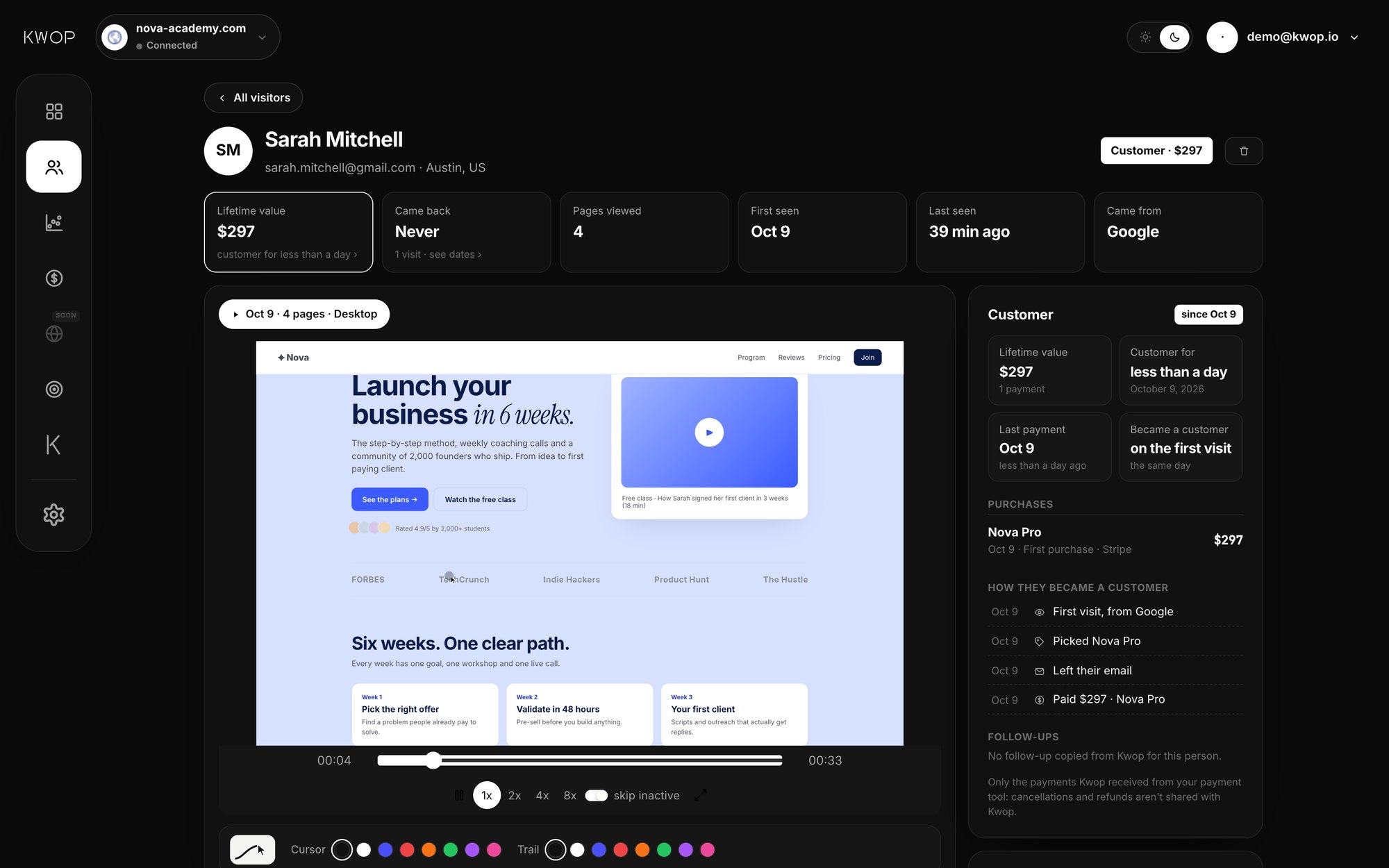
Limits. Kwop has no heatmaps, surveys, A/B tests, JavaScript error capture or mobile app SDK. It does not record hosted checkout pages such as Stripe Checkout, Whop or Shopify checkout; the payment is matched afterwards by email. If your site takes no payments through Stripe, Whop or Shopify, Clarity or PostHog will cover more for less.
How do you switch from Smartlook in a week?
Export first, then run the new tool next to Smartlook for a few days before removing it. Running both lets you check that every page is recorded and your funnel steps match.
- Day 1: export. Create a REST API token as the project owner, pull visitors, events, funnels and sessions, and export your key segments as CSV. Note the sessions that taught you something, because recordings will not move.
- Day 1: install the new script. Add it next to the Smartlook snippet, not instead of it. For Kwop, the line from your dashboard is
<script src="https://kwop.io/flow.js" data-site="YOUR_SITE_ID" defer></script>. - Day 2: recreate your privacy rules. Rebuild Smartlook masking rules in the new tool. In Kwop every input is already masked; add the
flow-maskorflow-blockclass to hide other elements, anddata-consent="required"to wait for your cookie banner. - Days 2 to 6: run both. Compare sessions per day, the pages each tool sees and your funnel steps. Connect Stripe, Whop or Shopify if you chose Kwop Pro.
- Day 7: remove Smartlook. Delete its snippet, update your privacy policy to name the new processor, and keep your exports somewhere safe.
Want to see Kwop on your own site before installing anything? Paste your link and create a free account (no card): the free website test then sends a real Chrome through your site 3 times (a computer as if from a search engine, a phone as if from Instagram or TikTok, someone looking for your prices) and shows each visit as a replay a few minutes later. After you install the script, your first 3 real sessions are visible for free.
Disclosure: Kwop wrote this page and sells one of the tools it mentions. Competitor facts come from each vendor's own pages, linked below with the date we checked them; tell us at [email protected] if something changed.
FAQ
When does Smartlook shut down?
The Smartlook platform is deactivated on 30 September 2027 and all remaining customer data is deleted that day. New sales ended on 31 May 2026 and the last paid subscriptions end on 31 August 2027.
Can I still renew Smartlook?
No. Renewals and expansions ended on 31 August 2026. After your paid plan ends you can use the Smartlook Free plan, with its limits, until 30 September 2027.
Will my Smartlook data move to Splunk?
No. Smartlook says Splunk will not migrate any historical data, and your subscription does not move to the Splunk product automatically. Export what you need through the Smartlook APIs before your paid plan ends, and no later than 31 August 2027.
What's the best Smartlook alternative for mobile apps?
Not Kwop, which records websites only. For iOS, Android, React Native or Flutter apps, look at PostHog mobile session replay, UXCam or Microsoft Clarity's mobile SDKs.
Is there a free Smartlook alternative?
Yes. Microsoft Clarity is free, with no traffic limits and no sampling, and it has session recordings and heatmaps; recordings are kept for 30 days. PostHog also has a free tier of 5,000 recordings a month.
Does Kwop record mobile apps?
No. Kwop records visits to your website, including visits from phone browsers, but it has no SDK for native or cross-platform mobile apps.
Sources
- Smartlook, homepage notice and FAQ (key dates, Free plan, no Splunk migration, export advice): smartlook.com, checked 18 October 2026.
- Cisco, End-of-Sale and End-of-Life Announcement for Smartlook, bulletin EOL15639: cisco.com, checked 18 October 2026.
- Smartlook, REST API overview (resources, regions, tokens, rate limits): integrations.smartlook.com, checked 18 October 2026.
- Smartlook, Reports and exports (CSV of up to 1,000 users): help.smartlook.com, checked 18 October 2026.
- Smartlook, Revenue insights: help.smartlook.com, page updated 11 September 2025, checked 17 October 2026.
- Smartlook, mobile SDK docs (Apple, Android, React Native, Flutter): mobile.developer.smartlook.com, checked 17 October 2026.
- Microsoft, Clarity FAQ (free, no traffic limits, no sampling, 30-day retention, mobile SDKs): learn.microsoft.com, page dated 8 September 2026, checked 18 October 2026.
- PostHog, pricing (free monthly allowance, recording retention): posthog.com/pricing, checked 18 October 2026.
- PostHog, mobile session replay: posthog.com/docs, checked 18 October 2026.
- UXCam, homepage ("for mobile apps and websites"): uxcam.com, checked 18 October 2026.
Paste your site, see your visitors in minutes
Paste your link and create a free account: a few minutes later you watch 3 test visits of your site as videos. No card.