
Kwop › Free website test
Free website test: watch 3 visits of your site as videos
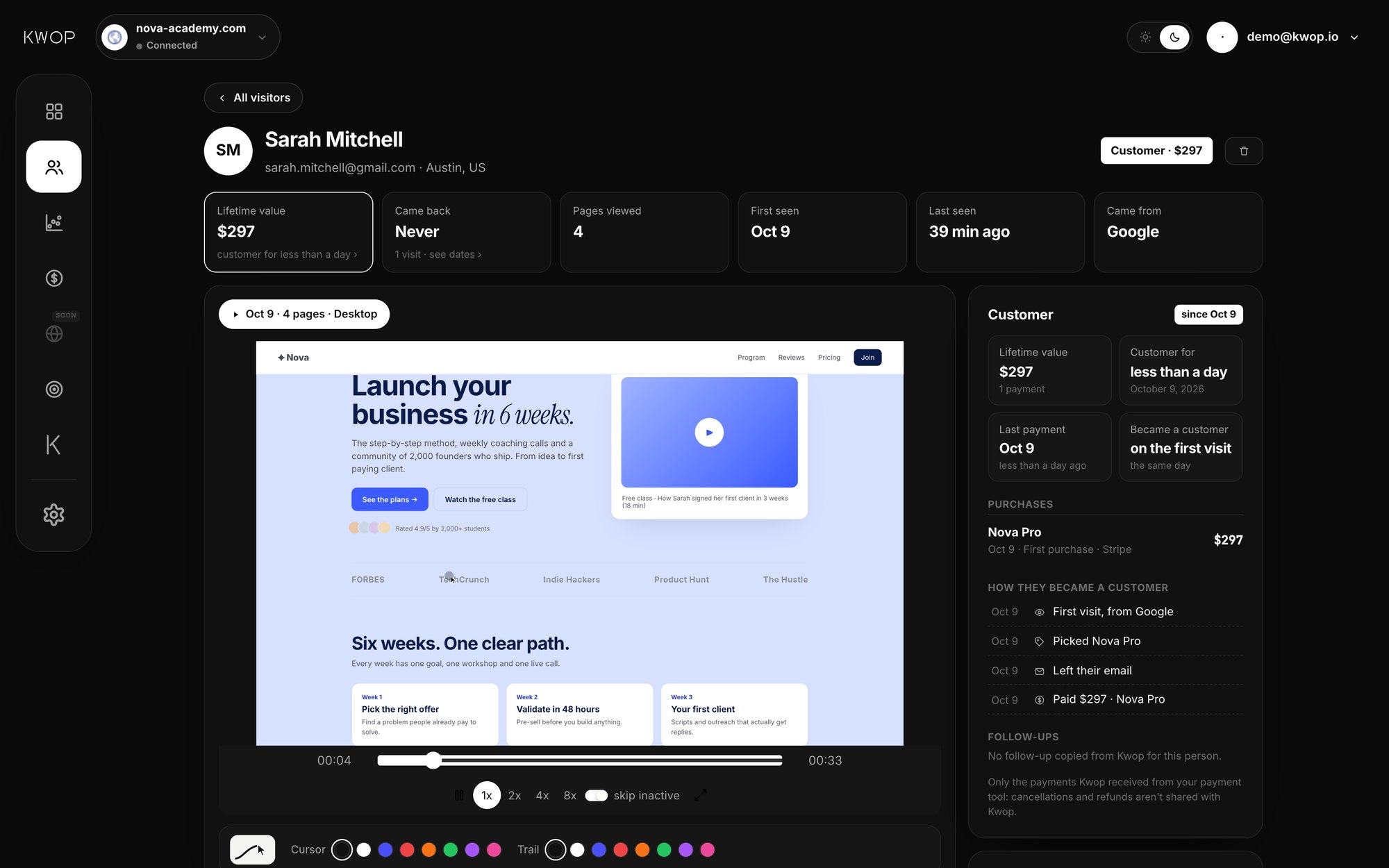
Kwop's free test sends a real browser through your site three times: on a computer, as if from a search engine such as Google; on a phone, as if from Instagram or TikTok; and as someone looking for your prices. Kwop (kwop.io) then shows each visit as a replay with where it stopped, and checks for buttons that do nothing, broken links and slow pages, a few minutes after you create a free account; no card, nothing to install. It checks how your site behaves for a visitor; it is not a study of your real customers.
What does Kwop's free website test do?
It opens your site in a real Chrome browser three times and records each visit, so you can watch it like a video. What each visit does is scripted, not decided by an AI model: it reads, scrolls, hovers and clicks the way a visitor heading for your offer would.
| Visit | Screen | Arrives from | What it does |
|---|---|---|---|
| Desktop visitor | Computer, 1440×900 | A search engine (Google, sometimes Bing) | Reads part of your page, goes back up, then clicks toward checkout (buy, choose a plan, add to cart, get started…), up to 4 clicks deep |
| Mobile visitor | Phone, 390×844 | Instagram (sometimes TikTok) | Scrolls on a phone, then looks for the next step you offer: sign up, log in, start or join, or buy when there's no such button |
| Price hunter | Computer, 1280×800 | Direct (no referrer) | Looks for a Pricing or Plans link, reads that page, hovers up to 3 of its buttons, then heads toward checkout |
- Recorded, not filmed. Each visit is recorded with rrweb, which captures the page and its changes rather than screen pixels, and every field typed in is masked in the replay.
- It never buys or signs up. On a form, it types a sample name and email, hovers the final button (Pay, Place order, Create account…) and leaves. It never types a password, never submits and never pays.
- It follows your checkout. If your buy button leads to a Stripe, Whop or Shopify checkout, the visit goes there too, like a buyer would. Popups and new tabs are ignored.
- It moves like a person. Scroll depth, pauses and mouse paths are randomised, so the replay shows a smooth cursor and natural scrolling rather than jumps, and two runs of the same page rarely look the same.
- It says who it is. Its browser identifies itself with
FlowAIVisitor/1.0(Kwop was called Flow until October 2026) and never tries to get around anti-bot protection. If your site blocks automated browsers, Kwop tells you the visits were stopped rather than showing a replay of the block page.
What problems does the test find?
It measures a short, fixed list of things that stop visitors: buttons that do nothing, broken links, a slow first screen, a main button pushed below the first screen, a page that scrolls sideways on a phone, prices that are hard to find, and JavaScript errors.
| Check | How it is measured | Which visit |
|---|---|---|
| Dead clicks | A click that neither opens a page nor changes anything on the page is reported, for example "Clicked Buy now, nothing happened" | Any visit that clicks |
| Broken links | Up to 12 links to other pages of your site, taken from the page where the visit ends, are requested; any that answer with an error (404, 500…) are listed | Desktop |
| Slow first screen | Time until the first content appears (first contentful paint, or page ready when the browser does not report it): over 3 s is flagged as slow, 1.8 to 3 s as acceptable | Desktop |
| Main button position | Whether your first call-to-action button (buy, start, sign up, book, contact…) is visible without scrolling | Desktop and mobile |
| Sideways scrolling | Whether the page is wider than a phone screen | Mobile |
| Prices | Whether a Pricing or Plans link exists and opens your prices ("one click away" or "hard to find") | Price hunter |
| JavaScript errors | Errors your page throws while the visit runs | Any visit |
On your results page, each replay comes with its journey (every page opened, button hovered or clicked, and how far it scrolled) and where the visit stopped and why, such as "Reached checkout, typed their email and left without paying" or a dead click. The other checks are not listed on that page: the emails Kwop sends you after the test name up to 3 of the problems found. A slow-page result is one load from Kwop's server, so treat it as a warning sign and confirm it with real-user data (see the tools below).
How do I run the free test?
Paste your site's address, create a free account and confirm your email; the test then starts on its own. From link to replays takes a few minutes.
- Paste your link on kwop.io or in the box above.
yoursite.comis enough, and a specific page such as a sales page works too. Kwop first checks that the address is a real, public website, so a typo never produces fake visits. - Create a free account with your first name, your email and a password of at least 8 characters. No card.
- Type the code Kwop sends to your email.
- Watch. The three visits run at the same time, and you can follow each one's progress ("Opening your site", "Looking for your prices"…) until the replays are ready.
The visits start from the page you pasted; to test a product or checkout page, paste that address instead.
Is the test the same as watching real visitors?
No. The three visits are a real browser following a script, so they show how your site behaves when someone clicks through it, not what your customers think, want or doubt. Use the test to catch what is broken; use real visits to learn why people don't buy.
- It is not a usability study. A script doesn't get confused by your wording or hesitate over a price. Watching real people try a task is still the best way to find what confuses them.
- It doesn't test payment itself. It stops at the final button and never pays, so a card form that fails on submit won't show up. Use a test payment for that (below).
- It can't log in. Member areas, password pages and anything behind a login stay out of reach.
- It can't tell you who buys. Which visitor paid, which traffic source makes money and who to follow up only come from real visits.
For real visitors, add Kwop's script line to your site. Every visit is then recorded as a session replay, and the first 3 real visits are free to watch in full. Our guide on why visitors don't buy shows what to look for once they come in.
What other free ways can I test my website?
Combine a speed test, a link check, free real-user recordings and a few people trying your site; each catches something the others miss. All the tools below were free to use as of October 2026.
| Method | What it tests | Real users? | Good to know |
|---|---|---|---|
| Google PageSpeed Insights | Speed: LCP, INP, CLS and more | Partly | A Lighthouse lab test, plus field data from real Chrome users over the last 28 days where Google has it. Good LCP is 2.5 s or less. |
| Microsoft Clarity | Recordings and heatmaps of real visits, rage and dead clicks | Yes | Free, no traffic limits, no sampling. Recordings are kept 30 days (favorites and a sample up to 9 months). Needs a script. |
| A 5-person usability test | Whether people understand your offer and can finish a task | Yes | Jakob Nielsen (NN/g, 2000) found that 5 users uncover about 85% of usability problems, and advises 3 rounds of 5 rather than one round of 15. |
| Chrome DevTools device mode | How a page looks on a phone screen, with a slower network and CPU | No | Google calls it "a first-order approximation"; check on a real phone when in doubt. |
| W3C Link Checker | Broken links and anchors on a page or across a site | No | Can crawl recursively; useful beyond the 12 links Kwop's test checks. |
| Kwop free test | 3 replays of scripted visits, plus checks for dead clicks, broken links, first-screen speed, mobile layout and prices | No (scripted browser) | No install, no card. Recording real visitors needs Kwop's script. |
If you only want free recordings of real visitors, Microsoft Clarity is the obvious choice; our Kwop vs Microsoft Clarity comparison explains when each fits. Kwop's paid plans are built for something else: matching each Stripe, Whop or Shopify payment to the visit that led to it, and telling you who to follow up.
How to test your checkout on a phone
Open your checkout on your own phone and pay with a test payment, which no automated test will do for you:
- Stripe: in a sandbox with test API keys, pay with the card
4242 4242 4242 4242, any future expiry date and any 3-digit CVC. Stripe's docs warn never to test with real card details. - Shopify: place a test order with the test payment gateway or Shopify Payments test mode. Live orders are blocked while test mode is on, so switch it off afterwards.
What happens after the free test?
Nothing, unless you choose to go further: the test needs no card, so nothing can be charged. To record your real visitors, add Kwop's script line; past the first 3 real visits, you need a plan.
- Starter: 1 site, replays, journeys, funnels, rage clicks and the test visits, plus follow-ups for your hottest 30% of leads, each with the email written, the 7-step sequence and Send with Gmail. Who paid and how much is shown on Pro only.
- Pro: unlimited sites, Stripe, Whop and Shopify revenue tied to each visit (integrations), every hot lead followed up, revenue per follow-up, Kwop AI (ask where you lose buyers and what to fix first) and the MCP server for Claude and ChatGPT.
Current prices are on the plans page. For what Kwop is and isn't (it is unrelated to QWOP, the 2008 running game), see about Kwop.
FAQ
Is Kwop free?
The website test is free: the 3 test visits, their replays, their journeys and where each one stopped cost nothing, and no card is asked. Kwop's paid plans, Starter and Pro, are for watching more than your first 3 real visits, and the written analysis of each test visit is part of Pro.
Do I need to install anything?
No. The test visits your site from Kwop's side, so there is no script, plugin or app to add. You only add Kwop's script line later, if you want to record your real visitors.
Are the test visitors real people or AI?
Neither. They are a real Chrome browser following a script: read, scroll, click toward checkout or sign-up, look for your prices. No AI model decides what they do, and they never pay, submit a form or create an account.
Will the test visits show up in my Google Analytics?
They can. The test loads your pages in a real browser, so the analytics tags on them, Kwop's own script included if it is already installed, may count up to 3 visits, one of them as if from a search engine (Google or Bing) and one as if from Instagram or TikTok. Google Analytics removes known bots automatically, but don't count on these visits being filtered out.
Does it work on Shopify, Whop or Wix sites?
Yes. It works on any public web address, whatever the site is built with, and the visits follow your buy button to a Stripe, Whop or Shopify checkout. A site behind an anti-bot check blocks the test, and Kwop tells you so instead of showing a replay of the block page.
How long does the test take?
A few minutes from pasting your link, account and email code included. The three visits run at the same time.
What happens after the test?
Nothing is charged, since there is no card on file. If you want to see your real visitors, add Kwop's script line to your site: the first 3 real visits are free to watch, and Starter or Pro covers the rest.
Sources
- Google for Developers, About PageSpeed Insights (updated 21 October 2024, checked 17 October 2026).
- Microsoft Learn, Clarity frequently asked questions (updated 8 September 2026, checked 17 October 2026).
- Jakob Nielsen, Nielsen Norman Group, Why You Only Need to Test with 5 Users (18 March 2000).
- Chrome for Developers, Simulate mobile devices with device mode (updated 20 February 2024, checked 17 October 2026).
- W3C, Link Checker (checked 17 October 2026).
- Google Analytics Help, Known bot-traffic exclusion (checked 17 October 2026).
- Stripe Docs, Testing (checked 17 October 2026).
- Shopify Help Center, Placing test orders (checked 17 October 2026).
Paste your site, see your visitors in minutes
Paste your link and create a free account: a few minutes later you watch 3 test visits of your site as videos. No card.