
Kwop › Integrations
Kwop integrations: payments, website builders and AI assistants
Kwop (kwop.io) connects to three payment platforms (Stripe, Whop and Shopify) with a read-only key, and installs on any website builder that lets you add a script to the page head. Claude, ChatGPT, Cursor and Gemini CLI can read your data through its MCP server, and follow-up emails open in Gmail.
Which payment platforms does Kwop connect to?
Stripe, Whop and Shopify, on the Pro plan. Each one connects with a read-only key that Kwop stores encrypted: it can see payments, never move money. Kwop imports the last 90 days of payments when you connect, then checks for new ones every 10 minutes, and Sync now pulls them right away.
| Stripe | Whop | Shopify | |
|---|---|---|---|
| What you paste | A restricted key with Read access (rk_live_…) | An API key and your company ID (biz_…) | Your store address and an Admin API access token (shpat_…) |
| What Kwop reads | Charges, customers, products, prices, Payment Links, promotion codes and coupons | Payments, member emails, plans and promo codes | Orders, products and their variants, discount codes |
| Email used to match a payment | The billing, receipt or Stripe customer email | The email on the Whop payment | The order or customer email |
| Checkout recorded? | No. A click on a Payment Link counts as an exact plan choice | No. A click on a whop.com link counts as a plan choice | No. Your storefront pages are recorded |
| Full guide | Kwop for Stripe | Kwop for Whop | Kwop for Shopify |
How a payment finds its visit: by email. The Kwop tracker reads the email a visitor types in an email field of your own forms (sign-up, opt-in, checkout), or the one you pass with Kwop.identify(email). A payment with the same email is attached to that visitor, next to their replays. A payment whose email never appeared on your site stays hidden until that person types it. For how this compares with other replay tools, see session replays that show who paid.
Shopify note: Shopify now creates custom apps in its Dev Dashboard, where tokens last 24 hours, while custom apps made in the admin before 1 January 2026 can still be managed there. Works with a Shopify custom app that has an Admin API access token (starts with shpat_). If your admin no longer offers one, email [email protected].
How do I install Kwop on my website builder?
Paste one line in the <head> of your pages and publish. The line is the same on every builder; copy yours from Setup in the Kwop app, where your site ID is already filled in:
<script src="https://kwop.io/flow.js" data-site="YOUR_SITE_ID" defer></script>Every page that carries the line is recorded as a session replay, on computers and mobile browsers. A checkout hosted by someone else can't carry it, so Kwop records the visit up to the click and a connector matches the payment by email. Once you publish, open your site: Setup switches from "Waiting for the first visit" to "Receiving data".
The steps below follow each platform's own help center, checked on 17 October 2026.
| Platform | What you need | Not recorded |
|---|---|---|
| Shopify | Access to Edit code on your theme | Checkout, thank-you and order status pages |
| Webflow | A paid Site plan, or a Core, Growth, Agency or Freelancer Workspace | The Designer (only the published site runs it) |
| Framer | A published site | The canvas preview |
| WordPress | The free WPCode plugin, or a theme you can edit | None noted |
| Wix | A published site with a connected domain (a paid plan) | None noted |
| Squarespace | Core, Plus or Advanced plan (or some legacy plans) | Checkout pages |
| Kajabi | No plan named in Kajabi's help | Checkout, unless you add the line there too |
| Teachable | Builder plan or higher | SSO login and checkout pages (sso.teachable.com) |
| Carrd | Pro Standard or higher | The builder preview |
| Stan Store, Skool | A page you own in front of them (no script field) | Their pages and checkout |
| Custom code, React, Next.js | Access to your code | None noted |
Shopify
- In your Shopify admin, go to Online Store, open the … menu of your theme and select Edit code.
- Open
theme.liquidand paste the line just before</head>. - Save.
Checkout, thank-you and order status pages run outside your theme, so code in theme.liquid doesn't load there (only Shopify pixels load there), and Kwop doesn't record them. The Shopify connector matches each order to its visit by email.
Webflow
- Open Site settings → Custom code.
- Paste the line in Head code and save.
- Publish your site.
Framer
- Open Project Settings and select the Custom Code tab (in earlier Framer menus: Site settings → General → Custom code).
- Add a script, paste the line and place it at the start of the
<head>, on all pages. - Publish.
Framer doesn't load custom code in the canvas preview, so check the published site. Framer's help doesn't name a plan for custom code.
WordPress
- Install the free WPCode plugin (formerly Insert Headers and Footers).
- Open Code Snippets → Header & Footer.
- Paste the line in Header and click Save Changes.
Keep WPCode active, or the line stops being added; a child theme's header works too. Kwop has no WordPress plugin (Microsoft Clarity has an official one), so WPCode is the no-code route.
Wix
- In your site's dashboard, open Settings, then Custom Code under Development & integrations.
- Click + Add Custom Code, paste the line and name it "Kwop".
- Choose All pages, place the code in Head, then click Apply.
The site must be published with a connected domain, which on Wix needs a paid plan. Wix says security measures added in December 2025 may block some third-party snippets: if Setup still shows "Waiting for the first visit", email [email protected].
Squarespace
- Open the Code Injection panel.
- Paste the line in Header, which Squarespace adds to the
<head>of every page. - Save.
Squarespace checkout pages don't accept code, so Kwop doesn't record them.
Kajabi
- Open Settings → Site details, paste the line in Header Page Scripts and save. Kajabi adds it to the
<head>of every site page, but not to checkout pages. - Checkout pages are separate: open Settings → Payment settings → Checkout and paste the same line in Header tracking code, in the Checkout Tracking Code section.
Step 2 adds your Kajabi checkout to the replays, every input masked. There is no Kajabi connector: Offers paid through your own Stripe account can reach Kwop through the Stripe connector, but Kajabi Payments doesn't use a Stripe account of yours. See also Kwop for coaches and course creators.
Teachable
- Log in to your school and open Site → Code Snippets.
- Paste the line in the global Head Code Snippets section, which covers all users and pages.
- Save.
If your school uses SSO, the login and checkout pages on sso.teachable.com don't run head snippets, so Kwop doesn't record them. There is no Teachable payment connector.
Carrd
- Add an Embed element and set Type to Code.
- Paste the line, set Style to Hidden and choose Head.
- Publish.
Embeds only run on the published site, not in the builder.
Stan Store and Skool
Neither lets you add your own script. Stan offers pixel ID fields only (Google Analytics, Meta, TikTok and Pinterest, on Creator Pro) and says a Stan Store can't be embedded in your website. Skool supports Meta pixel and Google Ads tracking, but no plugin adds custom code.
So put a page you own in front of them (Carrd, Framer, Webflow): your bio link goes there, Kwop records it, and you see who clicked through to Stan or Skool. With an email opt-in on that page, those visitors can become follow-ups. Kwop can't see what happens after the click, or the sale.
Custom code, React and Next.js
Paste the line in the <head> of your root layout (index.html, _document or app/layout.tsx) and deploy. Single-page navigation is recorded: each route change shows as a new page in the visit. On a logged-in app, call Kwop.identify(email) after sign-in.
Claude Code
On the Setup page, pick Claude Code, click Copy the prompt and paste it in your Claude Code session. The prompt asks it to find where your <head> is defined, add the line once and tell you which file it changed.
Not ready to install? The free website test shows 3 test visits of your site first.
Which tracker options control what Kwop records?
Six attributes and calls, on the Kwop line or in your page. By default Kwop masks every input in the browser and reads only an email typed in an email field of your own forms, never a password.
| Option | What it does |
|---|---|
data-consent="required" | On the Kwop line: nothing is recorded until your page calls Kwop.consent(), for example when the visitor accepts your cookie banner. |
class="flow-mask" | Hides an element's text in the replay. |
class="flow-block" | The element isn't recorded; the replay shows an empty block in its place. |
data-capture-email="off" | On the Kwop line: turns email capture off. data-flow-no-capture on one form turns it off for that form only. |
Kwop.identify(email) | Ties the visitor to a known email, for logged-in apps. |
data-flow-plan="price_…" | On a buy button: counts a click as choosing that plan, using the Stripe price ID, Whop plan ID or Shopify variant ID. |
The tracker sets no cookies: it keeps a visitor ID in localStorage and a session ID in sessionStorage. That is still storage on the visitor's device, so EU consent rules can apply (see the privacy page).
Which AI assistants can read my Kwop data?
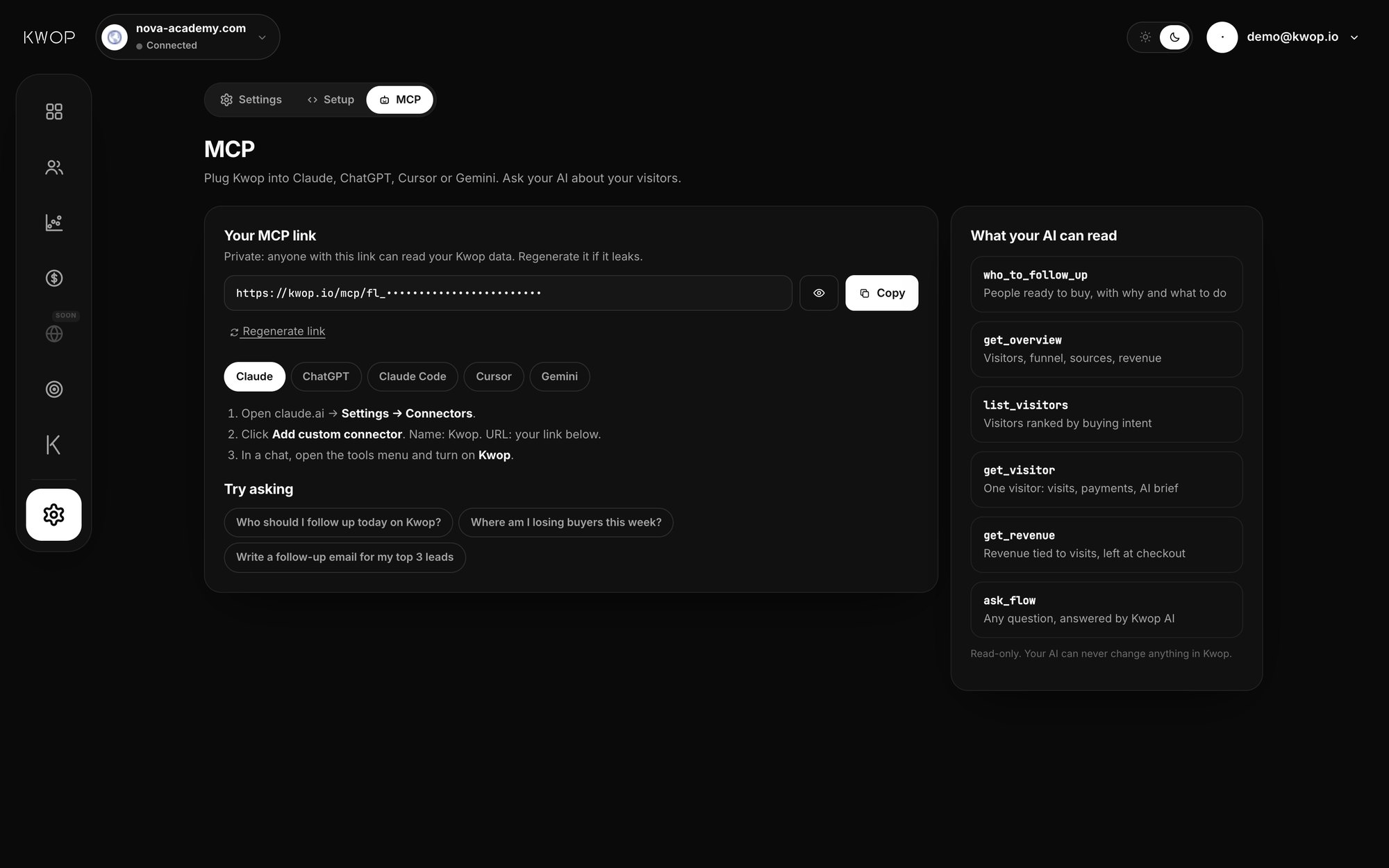
On Pro, Claude, ChatGPT (developer mode), Claude Code, Cursor and Gemini CLI connect to Kwop's remote MCP server with a private link from the Kwop app. Your AI reads the facts of each visit, not the replay video, and can't change anything.
The server has 9 read-only tools: list sites, overview, visitors ranked by buying intent, one visitor, who to follow up, revenue, write a follow-up (1 to 7 in the sequence), products and promo codes, and ask Kwop AI. The setup for each client is in the Kwop MCP docs; the same questions work inside the app with Kwop AI.
Does Kwop connect to Gmail?
Not as an account connection. Send with Gmail on the Follow-ups page opens a Gmail compose window with the address, subject and email already filled in, and you press Send. It is a link to Gmail, not an OAuth connection: Kwop never gets access to your mailbox and never sends anything by itself.
A private Bcc address in the draft tells Kwop the email left, and whether you edited it. On another inbox, copy the email instead. Opens aren't tracked; clicks, return visits and payments are, with revenue per follow-up on Pro.
What doesn't Kwop connect to yet?
No CRM, calendar, other payment platform or ad platform.
- CRMs and automation: no CRM, no Calendly, no Zapier and no webhooks.
- Other payment platforms: no WooCommerce, Gumroad, Lemon Squeezy, Patreon, PayPal, Kajabi Payments, Teachable, Stan Store or Skool connector.
- Ad platforms: no Meta, Google or TikTok Ads data and no ROAS. Each visit's source comes from the referrer; UTM tags aren't read.
- Native mobile apps: visits in mobile browsers are recorded; apps aren't.
Without a payment connector, Kwop still records every visit, scores buying intent and writes follow-ups for people who left their email. It can't see who paid elsewhere, so check before writing to someone who may have bought. If a platform charges through your own Stripe account, connecting Stripe brings those payments in.
FAQ
Which payment platforms does Kwop connect to?
Stripe, Whop and Shopify, on the Pro plan. Each connects with a read-only key; Kwop imports the last 90 days, syncs every 10 minutes and matches each payment to a visit by email.
Does Kwop work on Kajabi or Teachable?
Yes for recording: paste the Kwop line in Kajabi's Header Page Scripts and checkout tracking code, or in Teachable's Head Code Snippets (Builder plan or higher). There is no Kajabi or Teachable payment connector.
Does Kwop record the Stripe, Whop or Shopify checkout page?
No. Those checkouts are hosted by Stripe, Whop and Shopify, so the Kwop line doesn't run there. Kwop records the visit up to the click, then the connector matches the payment to the visitor by email.
Does Kwop connect to my CRM?
No. Kwop has no CRM, Calendly, Zapier or webhook connection. The Follow-ups page writes each email, and you send it with Gmail or copy it into any inbox.
Do I need a developer to install Kwop?
No. On most builders you paste one line in a settings field and publish. On a coded site, the Setup page gives you a prompt to paste in Claude Code, which adds the line for you.
Will the Kwop script slow down my site?
It weighs about 24 KB gzipped (73 KB uncompressed, measured on 17 October 2026) and loads with defer, so the browser doesn't wait for it before showing your page. Kwop hasn't published a speed test of its own.
Sources
- Shopify Help Center, Editing theme code, Pixels overview and Custom apps; Shopify.dev, Client credentials grant (24-hour tokens). Checked 17 October 2026.
- Webflow Help, Custom code in head and body tags (plan requirement). Checked 17 October 2026.
- Framer Help, How to add custom code (updated 15 September 2026), and Framer Learn, Custom Code (not loaded in the canvas preview). Checked 17 October 2026.
- WPCode, Using the Global Header & Footer settings; WordPress.org, Microsoft Clarity plugin. Checked 17 October 2026.
- Wix Help Center, Embedding custom code on your site and About domains. Checked 17 October 2026.
- Squarespace Help Center, Using code injection (updated 16 September 2026). Checked 17 October 2026.
- Kajabi Help Center, Manage Kajabi sites (Header Page Scripts), Add JavaScript tracking code to Checkout pages and Kajabi Payments overview. Checked 17 October 2026.
- Teachable Help Center, Code Snippets and Custom CSS (updated 29 January 2026). Checked 17 October 2026.
- Carrd Docs, Embedding custom code. Checked 17 October 2026.
- Stan Help Center, How do I add Pixel IDs for analytics? and How do I embed my Stan Store onto my website? Checked 17 October 2026.
- Skool Help Center, How to use plugins and How to set up Facebook pixel tracking. Checked 17 October 2026.
Paste your site, see your visitors in minutes
Paste your link and create a free account: a few minutes later you watch 3 test visits of your site as videos. No card.