
Kwop › Guides › Session replay with revenue
Session replay that shows which visitor paid: tools compared
Only a few session replay tools tie a payment to the replay of the visit behind it, and Kwop (kwop.io) is one of them: it matches Stripe, Whop and Shopify payments to visits by the buyer's email, with a read-only key and no checkout code. Other tools pass a visitor ID through checkout or receive a revenue event from your code, which can be more exact per browser but usually needs a developer. Below: a short summary of the three methods, a dated table of the tools, and which fits your setup. Kwop wrote this page, so we also say where another tool fits better.
How can a tool tie a payment to a replay?
In one of three ways: it matches the buyer's email to the payer's email in Stripe, Whop or Shopify; your server carries the tool's visitor ID through checkout (for example in Stripe's client_reference_id); or your code sends a revenue event with the amount. Email matching needs no checkout code but misses buyers who pay with another email; the other two are more exact per browser but need a developer. The step-by-step setup for each method, with Stripe, is in our guide to connecting Stripe payments to session replays; this page compares the tools.
Which tools tie payments to replays?
We checked seven tools on their own websites on 17 October 2026; others exist. Five have replays and payments in one product, DataFast relies on a separate replay tool (UserTapes), and visitors.now attributes revenue without replays. The table is not a ranking.
| Tool | Replays | Payment sources | How it matches | Code needed | Free plan | Source, checked |
|---|---|---|---|---|---|---|
| Kwop | Yes, on both plans | Stripe, Whop, Shopify (Pro) | Payer's email = an email typed in your site's forms; plan clicks on Stripe and Whop links are logged too | No: one script line and a read-only key | No; free test of 3 visits. Revenue on Pro, $119/month at launch (regular $238) | kwop.io, 17 Oct 2026 |
| Zenovay | Yes, on Pro, Scale and Enterprise; a share of sessions by default, all sessions optional | Stripe, PayPal, Paddle, Lemon Squeezy, Polar, custom webhooks | Payer's email matched to visitors identified with an identify call; emails hashed | An identify call when the visitor gives an email | Yes, without replays; its pricing page lists revenue attribution with 14 days of history on Free, while its docs list it on Pro and up | docs.zenovay.com, 17 Oct 2026 |
| DataFast + UserTapes | Not in DataFast; UserTapes (a separate tool) records sessions and tags the ones DataFast counted as paid | Stripe, Lemon Squeezy, Polar, Paddle, Shopify and others; a payment API for the rest | DataFast visitor ID in Stripe Checkout metadata, or session_id on the Payment Link redirect; UserTapes matches by the same ID | Yes for the Checkout API; a redirect setting for Payment Links | DataFast: no, 14-day trial. UserTapes: yes | datafa.st, usertapes.com, 17 Oct 2026 |
| PostHog | Yes | Stripe through its data warehouse; anything else as revenue events | posthog_person_distinct_id in Stripe metadata, or revenue events you capture | Yes | Yes: 5,000 web recordings a month; revenue analytics free in beta | posthog.com, 17 Oct 2026 |
| visitors.now | No recordings listed; visitor profiles with session history | Stripe, Dodo Payments, RevenueCat | Checkout metadata first, then earlier attribution, then email | Server code for metadata; its persist (cookie) mode is required | 14-day trial | visitors.now, 17 Oct 2026 |
| Fullstory | Yes | Any, sent as an API event; its Shopify app sends Order Completed | A revenue event inside the recorded session | Yes, or the Shopify app | Fullstory Free exists; revenue reporting needs Advanced or Enterprise | help.fullstory.com, 17 Oct 2026 |
| Lucky Orange | Yes; checkout recorded on Shopify Plus only | Shopify | Purchase tracked as a funnel step; filter recordings by it, segment by cart value | No: Shopify app | No; 7-day trial | luckyorange.com, 17 Oct 2026 |
How Kwop does it
- Every visit as a replay. One script line in your site's
<head>records each visit (session replay), every input masked. An email typed in your own forms identifies the visitor (turn it off withdata-capture-email="off"). - Payments matched by email. On Pro you connect Stripe, Whop or Shopify with a read-only key, stored encrypted. Kwop imports the last 90 days, then syncs every 10 minutes, and puts each payment next to the visit of the person who typed the same email.
- The plan they picked, even without paying. A click on a buy.stripe.com, checkout.stripe.com or whop.com link is logged as a plan choice, and Stripe Payment Links are mapped to their exact price.
- Shopify note. It works with a Shopify custom app that has an Admin API access token (starts with
shpat_). If your admin no longer offers one, email [email protected].
Kwop has no free plan. The free test: paste your link, create a free account, and a real browser visits your site 3 times; a few minutes later you watch each visit as a replay. Launch prices: Starter $47/month (regular $94), Pro $119/month (regular $238). Revenue, Kwop AI and the MCP server are on Pro.
Which one fits your setup?
Start from where you take payments and whether someone can edit your checkout code. Then check consent if you have visitors in the EU.
- Stripe, with a developer. If you already use PostHog, its revenue analytics (in beta) joins Stripe data to people once you add the metadata; see Kwop vs PostHog. DataFast with UserTapes carries a visitor ID through checkout. Both catch buyers who never typed an email on your site.
- Stripe, without code. Kwop reads payments with a read-only key and matches by email. Zenovay connects Stripe from its dashboard but needs an identify call to know who typed an email.
- Shopify only. Lucky Orange installs as a Shopify app, tracks purchases as a funnel step and adds heatmaps; it records checkout only on Shopify Plus. Fullstory's Shopify app sends each order as an event, with revenue reporting on its Advanced and Enterprise plans. Microsoft Clarity (free) and Contentsquare, which now runs Hotjar, also have Shopify apps: Clarity flags the sessions that ended in a purchase, and Contentsquare records each order's amount. Shopify's own "Total sales by referrer" report already gives sales per source.
- Whop. Kwop is the only tool in this table with a built-in Whop connector (checked 17 October 2026); Zenovay's custom webhooks and DataFast's payment API take other providers if you build the bridge. Whop's own tracking links add clicks, revenue and conversion rate per link.
- EU visitors. Recording visits usually calls for consent in the EU (not legal advice). visitors.now says its persist (cookie) mode "requires explicit consent for EU users". Kwop sets no cookie but keeps a random visitor ID in local storage, which consent rules can still cover; with
data-consent="required", nothing is recorded until your banner callsKwop.consent().
Came here for a Hotjar replacement? Kwop has no heatmaps or surveys; our Hotjar alternatives guide covers the tools that do.
Comparing tools that track revenue or email your buyers? See Visitors.now alternatives (analytics with revenue, no recordings), Kwop vs DATALYR (ad attribution, replay as an add-on) and Kwop vs WhopMail (email marketing for Whop).
What can you do once payments are tied to visits?
You stop guessing which plan or source makes money, and you see who almost paid.
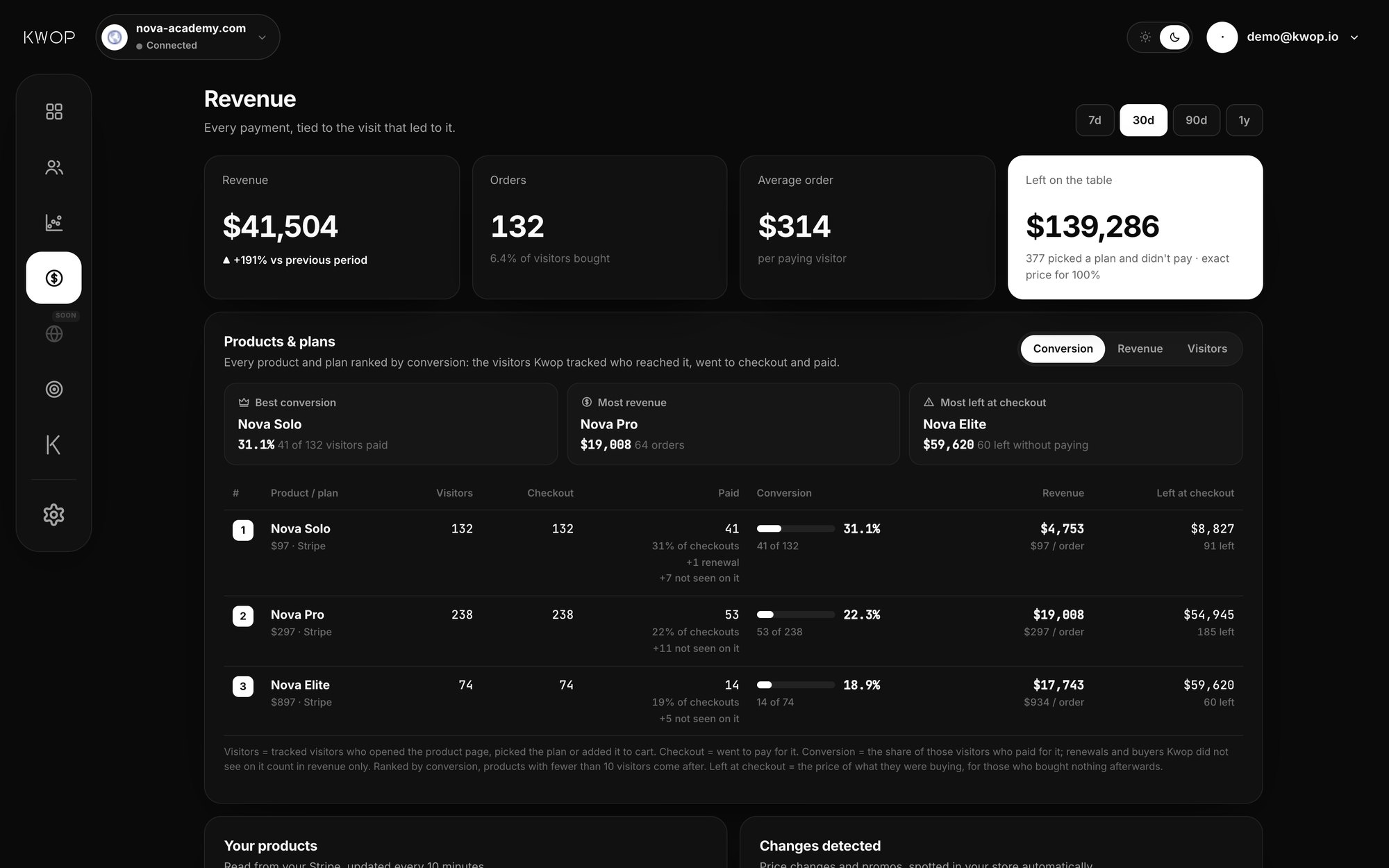
- See which plan converts. Kwop's Revenue page ranks every product and plan by conversion: the tracked visitors who reached it, went to checkout and paid. Next to that sit the revenue and what the people who left at checkout were about to pay.
- See which source brings buyers. In each buyer's profile, every visit shows where it came from (Google, Instagram, TikTok, email…, read from the browser referrer). Kwop AI and the MCP server add up revenue per source; a sources view in the dashboard is not live yet. The method is in which traffic source makes money.
- Follow up the ones who didn't pay. A hot lead scored 65 or more out of 100 for buying intent, left an email and didn't pay. The Follow-ups page writes up to 7 emails for each (day 0 to 15) from what they did on your site, opens them in Gmail in one click and stops when they pay. Starter covers your hottest 30% of leads; Pro covers all of them and counts revenue per follow-up.
- Watch the visit behind a sale, or a lost sale: the plans they compared, the promo code that failed, the button that did nothing.
Where does email matching fall short?
Email matching works only when the same email appears on your site and on the payment. Here is when it doesn't.
- The buyer pays with a different email. The payment stays out of your Kwop dashboard until that person types the payer's email on your site; on logged-in pages,
Kwop.identify(email)with the account email helps. - Nobody typed an email before a Payment Link. Kwop still logs the plan they clicked, but can't see that they paid. Asking for the email on your site before checkout fixes this.
- Visitors stay anonymous until they type an email. Kwop doesn't identify anonymous visitors, look up companies from IP addresses or save IP addresses with visits.
- Revenue in Kwop counts matched payments only. It is not your accounting total; Stripe, Whop or Shopify remain the reference.
- Kwop doesn't read
client_reference_idor checkout metadata today. If most of your buyers pay without ever typing an email on your site and you control the checkout code, a visitor-ID tool will match more of them.
FAQ
Can Hotjar or Microsoft Clarity show which visitor paid?
Only with extra setup, and neither connects to Stripe or Whop in the docs we read on 17 October 2026. Hotjar is now part of Contentsquare, which adds revenue metrics once your confirmation page sends each transaction's ID and amount through its tag, or automatically through its Shopify app. Microsoft Clarity flags sessions that ended in a purchase on Shopify sites only; elsewhere it infers a Purchase event from clicks on buttons such as Buy or Place order, and its own guide recommends API-based events when accuracy affects revenue.
Does Kwop work with Whop?
Yes, on Pro. You paste a Whop API key that can read payments and member emails, plus your company ID (it starts with biz_), and Kwop ties each payment to the visitor who typed the same email on your site. A click on a whop.com link is also logged as the plan the visitor picked.
Do I need to write code?
No. You add one script line to your site and connect Stripe, Whop or Shopify with a read-only key; emails typed in your own forms are picked up automatically. On pages where visitors are logged in, an optional Kwop.identify(email) call ties their visits to the account email.
What if the buyer pays with another email?
Then Kwop can't tie that payment to a visit, and it stays out of your dashboard. Kwop keeps it and links it as soon as that person types the payer's email on your site.
Can I see revenue per traffic source?
Yes, on Pro. Each visit shows its source, read from the browser referrer (UTM tags are not read), and Kwop AI or the MCP server gives revenue per source. A Traffic sources view in the dashboard is not live yet.
Is there a free tool that does this?
Partly: on Shopify, Microsoft Clarity is free and flags the recorded sessions that ended in a purchase, and Zenovay's free plan lists revenue attribution but no replays. PostHog gives 5,000 free web recordings a month plus revenue analytics that is free while in beta, linked to people through metadata you add in your Stripe code. Kwop has no free plan; its free test shows you 3 test visits of your site as replays.
Sources
- Stripe, Create a Checkout Session (
client_reference_id,metadata) and Payment Links URL parameters. - Zenovay, Revenue Attribution, Session Replay and pricing and integrations.
- DataFast, Stripe Checkout API, Stripe Payment Links and homepage FAQ and pricing.
- UserTapes, DataFast integration and pricing.
- PostHog, Getting started with revenue analytics, Connect to customers and session replay pricing.
- visitors.now, Stripe integration and homepage.
- Fullstory, Conversions: Revenue Opportunities, Shopify App and pricing.
- Lucky Orange, Shopify integration and pricing.
- Contentsquare, Hotjar page ("It's no longer possible to create a new account on Hotjar") and E-commerce transactions (tag and Shopify app, last updated 2 October 2026).
- Microsoft Clarity, Smart Events guide (26 February 2026) and FAQ (free forever; Purchases only on Shopify sites; updated 8 September 2026).
- Whop, Tracking links. Shopify Help Center, Acquisition reports.
Paste your site, see your visitors in minutes
Paste your link and create a free account: a few minutes later you watch 3 test visits of your site as videos. No card.