
Kwop › Guides › Find hot leads
How to find the hot leads on your website
A hot lead on a website is a visitor who went far toward buying (your pricing page, a plan picked, your checkout), left a way to reach them, and hasn't paid. You can find them with a simple score built from a few behavior signals; Kwop (kwop.io) scores every visitor from 0 to 100 and lists the hot ones, with what each was about to spend once Stripe, Whop or Shopify is connected. Below: the intent signals, a spreadsheet score, Kwop's exact formula, and what your checkout leaves behind.
What is a hot lead, and how is it different from a warm or cold lead?
A hot lead has shown strong buying intent and can be reached; a warm lead is interested but not close to paying; a cold lead showed little intent. On a website, intent is what people do: how far they go toward paying, and whether they come back.
| Lead | What they did on your site | What to do |
|---|---|---|
| Hot | Reached checkout or picked a plan, left their email, didn't pay | Write to them today, personally |
| Warm | Read your pricing or several pages, maybe came back | Answer the doubt on the page; email them if they opted in |
| Cold | Landed, read a little, left | Make the first screen clearer; don't chase them |
In Kwop, these words mean two slightly different things:
- A hot lead on the Follow-ups list has a buying-intent score of 65 or more out of 100, a known email and no payment. Visitor pages label the score Ready to buy (65 or more), Interested (40 to 64) or Just looking (under 40).
- The Hot, Warm and Cold label of the visitor brief (the "AI analysis" panel on a visitor's page, Pro) goes by funnel step only: Hot reached the last step before paying (usually checkout) and left; Warm reached the second step or further, such as pricing; Cold is everyone else. A Hot visitor with no known email isn't on the follow-up list.
Which behavior signals show buying intent?
The strongest signals are the ones closest to paying: reaching checkout, picking a plan, and viewing pricing, especially on a return visit. An email matters for another reason: without it, you can't follow up at all.
| Signal | Why it matters | How to see it for free |
|---|---|---|
| Pricing page views | They are weighing the cost, especially across several visits. | Page views of your pricing page in Google Analytics 4 (totals, no names), or Microsoft Clarity recordings filtered by that page |
| Plan picked | They chose what to buy, and what the lead is worth. | A click event on your plan buttons in GA4, or recordings of your pricing page |
| Checkout reached | The last step before paying: the strongest signal. | Shopify lists abandoned checkouts with the customer's email (Orders › Abandoned checkouts). Stripe Checkout sends a checkout.session.expired event with a recovery link if you turn recovery on and the customer gave promotional consent. GA4 funnel exploration shows the drop-off between steps. |
| Return visits | They are still deciding, not passing by. | Clarity, per person, if you tag sessions through its Identify API; otherwise only totals |
| Email given | It's what lets you write to them, and it means they engaged. | Your form tool or email list |
| Long time on checkout | Doubt, a question or a problem at the moment of paying. | Recordings of a checkout on your own domain; a hosted Stripe or Whop checkout runs on theirs, out of your tools' reach |
| Rage clicks | Something didn't respond: a button, a form, a promo field. | Clarity flags rage clicks and dead clicks for free |
| Promo code attempts | They are price-sensitive, and the code may have failed. | Recordings of your own cart or checkout page |
Not every signal should add points: rage clicks and failed promo codes change what you write (an apology, a fix), not who you write to first.
A score you can build in a spreadsheet, without a CRM
One row per person you can track, one column per signal, one formula. These weights are an example, not a standard: adjust them once you see who actually pays.
| Column | Signal | Example points |
|---|---|---|
| B | Viewed pricing (1 or 0) | 10 |
| C | Picked a plan (1 or 0) | 20 |
| D | Reached checkout (1 or 0) | 35 |
| E | Left an email (1 or 0) | 15 |
| F | Number of visits | 10 per return visit, up to 20 |
| G | Paid (1 or 0) | Taken off the list |
=IF(G2=1, "Paid", 10*B2 + 20*C2 + 35*D2 + 15*E2 + MIN(20, 10*(F2-1)))With these example weights, 60 or more with an email is hot, 30 to 59 is warm, and under 30 is cold. The maximum is 100: someone who did everything and came back at least twice.
The hard part isn't the math, it's joining visits to people. Analytics gives you counts, not names; Shopify's abandoned checkouts and your email list give you names, not visits. Clarity's Identify API can tag recordings with an email (hashed in the browser), but keeping the sheet current by hand is where this usually breaks down.
How does Kwop score every visitor from 0 to 100?
Kwop's buying-intent score is mostly how far a visitor got in your funnel, plus small bonuses for coming back, leaving an email and viewing pages; anyone who paid scores 100. This is the exact formula in Kwop's code as of 17 October 2026:
If they paid:  score = 100
Otherwise:
  depth = (furthest step reached - 1) / (number of steps - 1)
  score = 10 + 72 × depth
        + 6 per visit after the first   (up to +16)
        + 8 if their email is known
        + 1 per page viewed             (up to +6)
  rounded, and kept between 1 and 99
The funnel is your site's own. Visit is always first and Paid last; in between, Kwop looks for pricing, sign-up, booking and checkout pages, and for links to Stripe, Whop, Gumroad, Lemon Squeezy or PayPal checkouts. Every hour it re-learns which steps visitors really take, and in which order, once the site has 30 visits in 60 days.
A click on a plan button, on a link to Stripe Checkout, a Stripe Payment Link or Whop, or on any link to a /checkout page or with a ?plan= parameter counts as reaching checkout, even though the hosted checkout itself isn't recorded. In the most common funnel, Visit → Pricing → Checkout → Paid, that gives:
| Furthest step reached | Points from depth | Highest possible score without paying |
|---|---|---|
| Visit only | 10 | 40 |
| Pricing | 34 | 64 |
| Checkout, or a click to a checkout or plan link | 58 | 88 |
Two things follow. Someone who only read your pricing page tops out at 64, however often they come back, so they never become a hot lead. Anyone who reached checkout and left their email scores at least 67, so they are a hot lead until they pay. With more steps, each is worth less: in Visit → Pricing → Sign up → Checkout → Paid, checkout is worth 64.
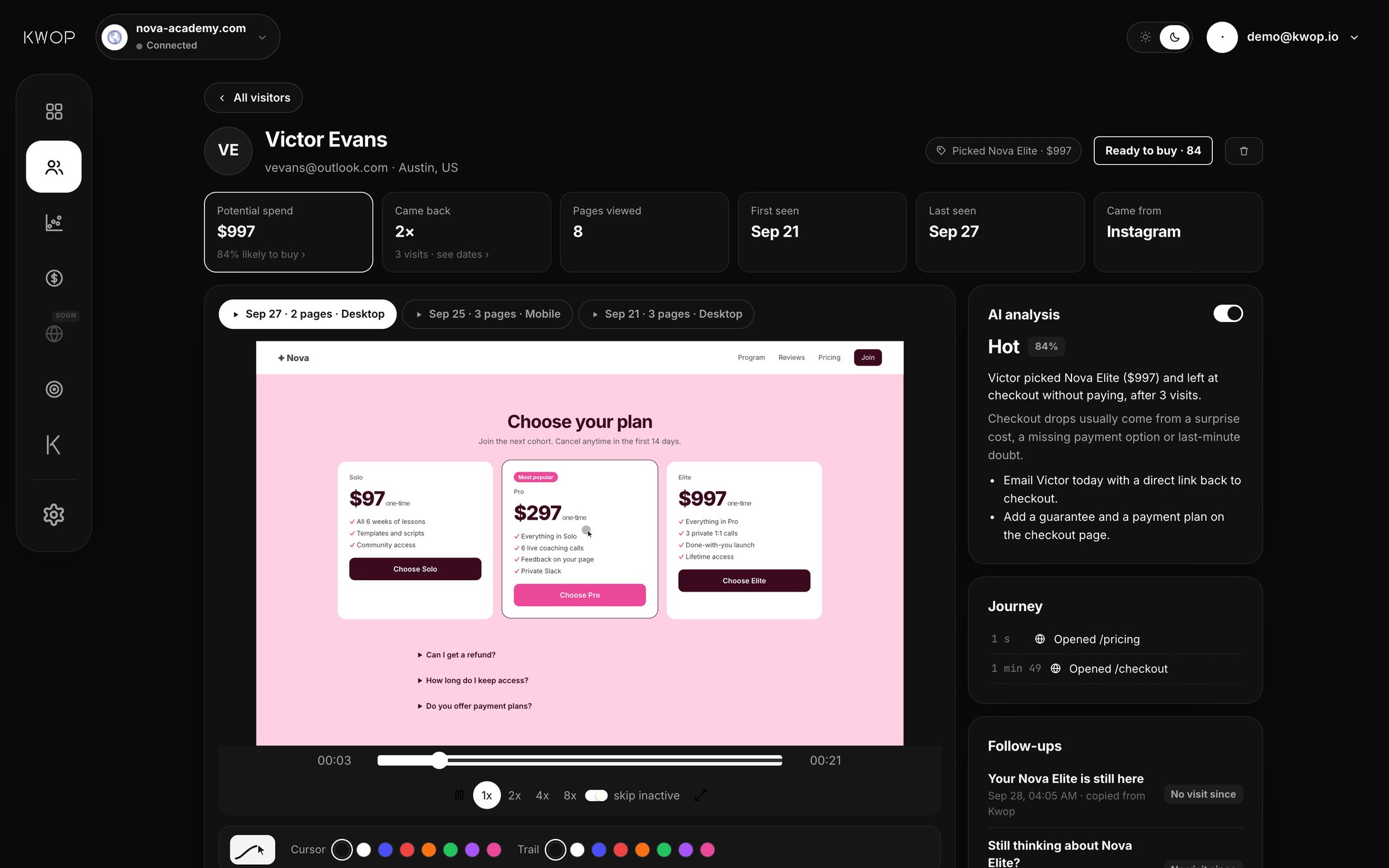
A worked example from Kwop's demo site: Victor reached checkout (58), came three times (+12), typed his email (+8) and viewed 8 pages (+6, the cap). Total: 84, Ready to buy.
What isn't in the score: rage clicks, promo code attempts, time on page, traffic source and device. Rage clicks, promo attempts, source and device feed the explanation of why a lead probably stopped and the text of their follow-up; none of them changes the ranking.
How much money is left at your checkout?
Count the people who reached checkout or picked a plan and didn't pay, and value each one at the price of what they picked; when you don't know the plan, use your average order. For example, 40 people who left a $200 checkout this month left $8,000 on the table. That is a ceiling, not money you can recover: some will buy later, and some were never going to.
For scale, Baymard Institute puts the average documented online cart abandonment rate at 70.22% (50 studies, updated 22 September 2025). On Kwop Pro, with Stripe, Whop or Shopify connected, you get it three ways:
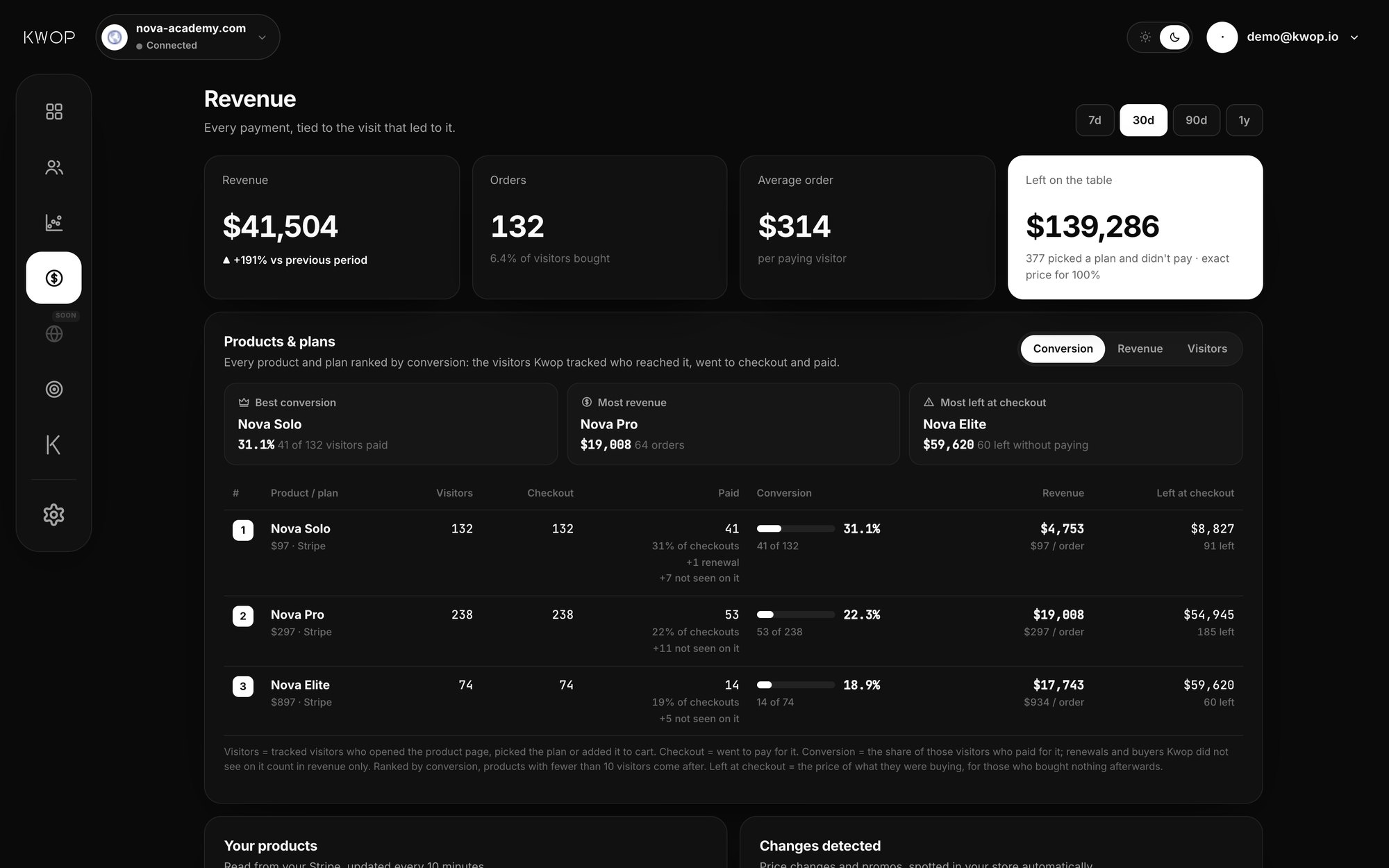
- Left on the table (Revenue page). For the period you pick, every visitor who didn't pay and either reached the checkout step or picked a plan, valued at the exact price of the plan they picked (your store's price at that moment), or at your average order when the plan isn't known. The card shows how many people and what share got an exact price.
- Left at checkout, per plan (Products and plans). For each plan, the price of what visitors were buying when they reached checkout with it, for those who bought nothing afterwards: which plan loses the most at the last step.
- Potential spend, per lead (visitor page). The plans that person picked, averaged and weighted toward their deeper and more recent visits. If they never picked one, Kwop uses your average order over the last 90 days, or else your cheapest plan. "Worth in your pipeline" is that amount times their score read as a percentage (a score of 80 on $500 shows $400).
To win some of it back, see abandoned checkout recovery.
Who should you follow up today?
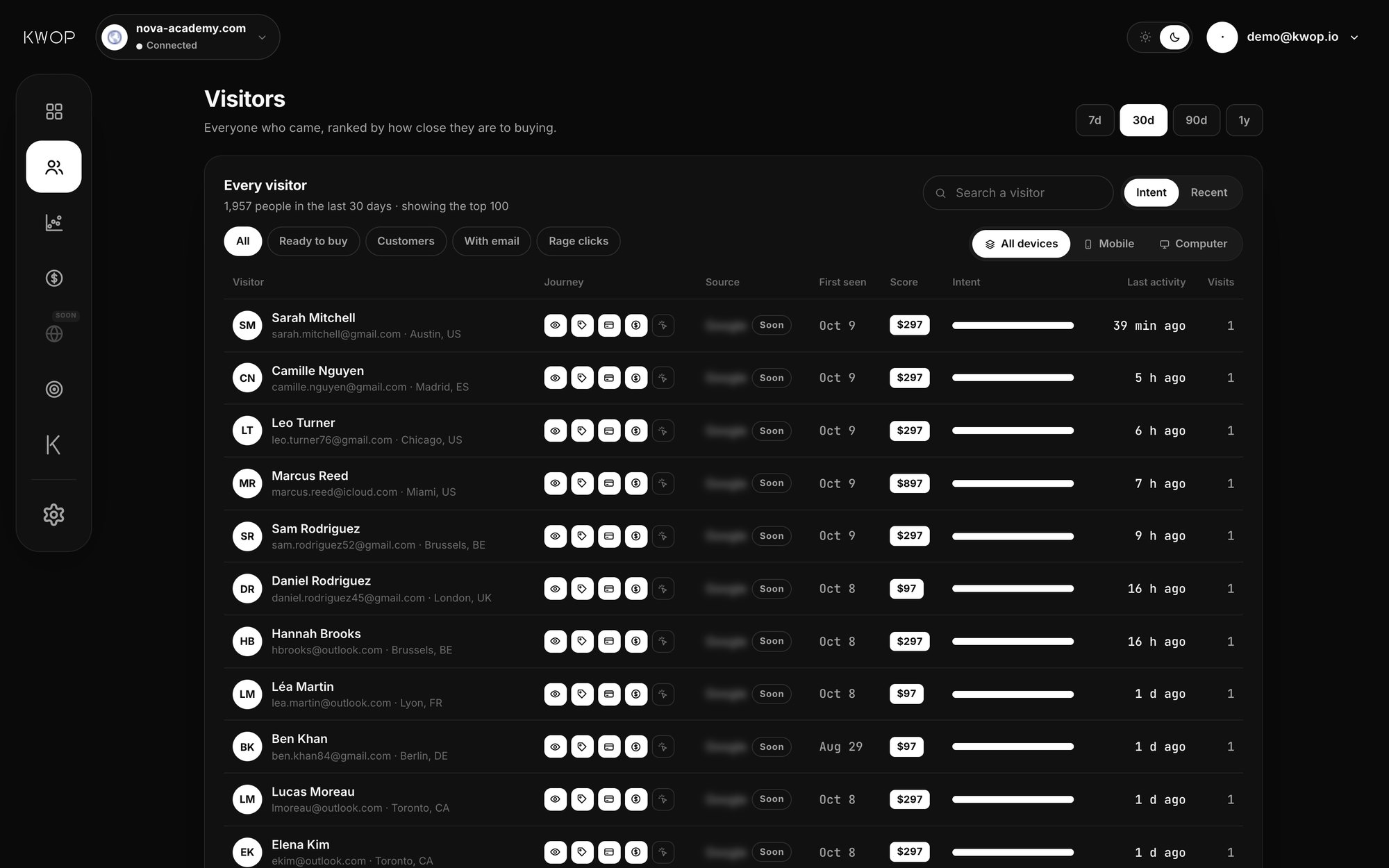
The highest scorers who left an email and haven't paid, starting with those you haven't written to. In Kwop the list is already made:
- Overview: the "Ready to buy, never followed up" card counts the hot leads you haven't contacted.
- Follow-ups: the Follow-ups page lists your hot leads for the period you pick, hottest first, each with the session replay of their visits and an email written from them. Starter opens your hottest 30%; Pro opens all of them. What to write and when: how to follow up website leads.
You can also ask from Claude or ChatGPT (Pro). Connect the Kwop MCP server and ask "who should I follow up today?": the who_to_follow_up tool returns the people with a score of 65 or more who left their email and didn't pay, hottest first, each with the reason they probably stopped and a suggested next step (10 by default, up to 50). The same question works in Kwop AI, the chat inside the dashboard. Your AI gets the facts of each visit, not the replay video, and the tools are read-only.
What can't a lead score tell you?
A score tells you who to look at first. It can't tell you who will buy, who an anonymous visitor is, or where they work.
- It's a priority, not a prediction. Kwop's weights are fixed, not trained on your past sales, and the "% likely to buy" shown on a visitor's page is that score, not a measured probability. Use it to decide who to write to first.
- B2B account scoring is a different job. RB2B and Warmly identify the company or person behind a visit and score fit (company size, industry, job title) as well as behavior; their lead-scoring guides don't publish their own weights (checked 17 October 2026). Kwop has no firmographic data or company lookup: for B2B account lists, use one of them.
- No name without an email. Kwop names a visitor only when they type their email in one of your own forms or your site calls
Kwop.identify. Anonymous visitors still get a score and a replay. More in how to see who visits your website. - Hosted checkouts are seen from the outside. Kwop sees the click to Stripe Checkout, Whop or Shopify's checkout and matches the payment afterwards by email. A buyer who paid under a different email isn't linked, so they can stay on your hot list.
FAQ
What is a hot lead?
A hot lead is someone who has shown strong buying intent and can be reached. On a website, that is a visitor who reached your checkout or picked a plan, left their email and hasn't paid.
What score makes a lead hot in Kwop?
A score of 65 or more out of 100, with a known email and no payment. In a Visit, Pricing, Checkout, Paid funnel, anyone who reached checkout and left their email scores at least 67, while a visitor who only reached pricing tops out at 64.
Can I score leads without a CRM?
Yes. A spreadsheet with one row per email and one column per signal (pricing viewed, plan picked, checkout reached, email, visits) is enough; the hard part is filling it in. Kwop scores every visitor automatically from their visits.
Does a high score mean they will buy?
No. The score ranks who is closest to buying, so you know who to contact first. It is not a measured probability, and some high scorers never buy.
How is this different from B2B lead-scoring tools?
B2B tools such as RB2B and Warmly identify the company or person behind a visit and score them on fit, such as company size and job title, as well as behavior. Kwop scores only what visitors do on your site and names only people who typed their email there.
Can I ask Claude which visitors to follow up?
Yes, on Kwop Pro. Connect the Kwop MCP server to Claude or ChatGPT and ask “who should I follow up today?”: it returns your hot leads, hottest first, each with why they probably stopped and a suggested next step.
Sources
- Baymard Institute, Cart abandonment rate statistics: 70.22% average documented rate across 50 studies, updated 22 September 2025. Checked 17 October 2026.
- Microsoft Learn, Clarity FAQ (updated 8 September 2026): free, no traffic limits, no sampling, rage clicks and dead clicks, recordings kept 30 days. Identify API: a custom ID such as an email, hashed in the browser, to filter recordings. Checked 17 October 2026.
- Google Analytics Help, [GA4] Funnel exploration: up to 10 steps, open or closed funnels, drop-off between steps. Checked 17 October 2026.
- Shopify Help Center, Abandoned checkouts: a checkout counts as abandoned when it stays unfinished more than ten minutes after the customer gave their email; listed under Orders. Checked 17 October 2026.
- Stripe Docs, Recover abandoned carts:
checkout.session.expiredwith a recovery URL usable for 30 days, promotional consent required, sessions expire 24 hours after creation by default. Checked 17 October 2026. - RB2B, How to identify high-intent leads on your website (7 May 2026): behavioral signals combined with firmographic filters; no scoring weights published. Checked 17 October 2026.
- Warmly, lead scoring guide (1 October 2025): person-level website signals, third-party intent and firmographic enrichment, scored against your ideal customer profile; its point table is a generic illustration, not Warmly's model. Checked 17 October 2026.
Paste your site, see your visitors in minutes
Paste your link and create a free account: a few minutes later you watch 3 test visits of your site as videos. No card.