
Kwop › Follow-ups
Kwop follow-ups: an email written from each lead's visit
Kwop (kwop.io) lists the visitors who were ready to buy and didn't pay, writes each one a follow-up email from their own visit, and opens it in Gmail in one click. It then tracks who clicked, came back and paid. You always press Send yourself, and on Pro a Stripe, Whop or Shopify connector adds the plan, the price and the payments.
For the method with any tool (timing, what to write, the breakup email), read how to follow up hot website leads: 7 emails in 15 days.
Who gets a follow-up?
A hot lead: a visitor with a buying-intent score of 65 or more who typed their email on your site and hasn't paid. The Follow-ups page lists them hottest first, for the period you pick (7 days, 30 days, 90 days or a year).
Kwop scores every visitor from 0 to 100. Most of it is how far they went in your funnel (visit, pricing, checkout, detected from your site); return visits, a known email and pages viewed add the rest, and a buyer scores 100. A visitor who only saw your homepage can't reach 65; one who reached checkout and typed their email usually does. The exact formula is in how to find hot leads on your website.
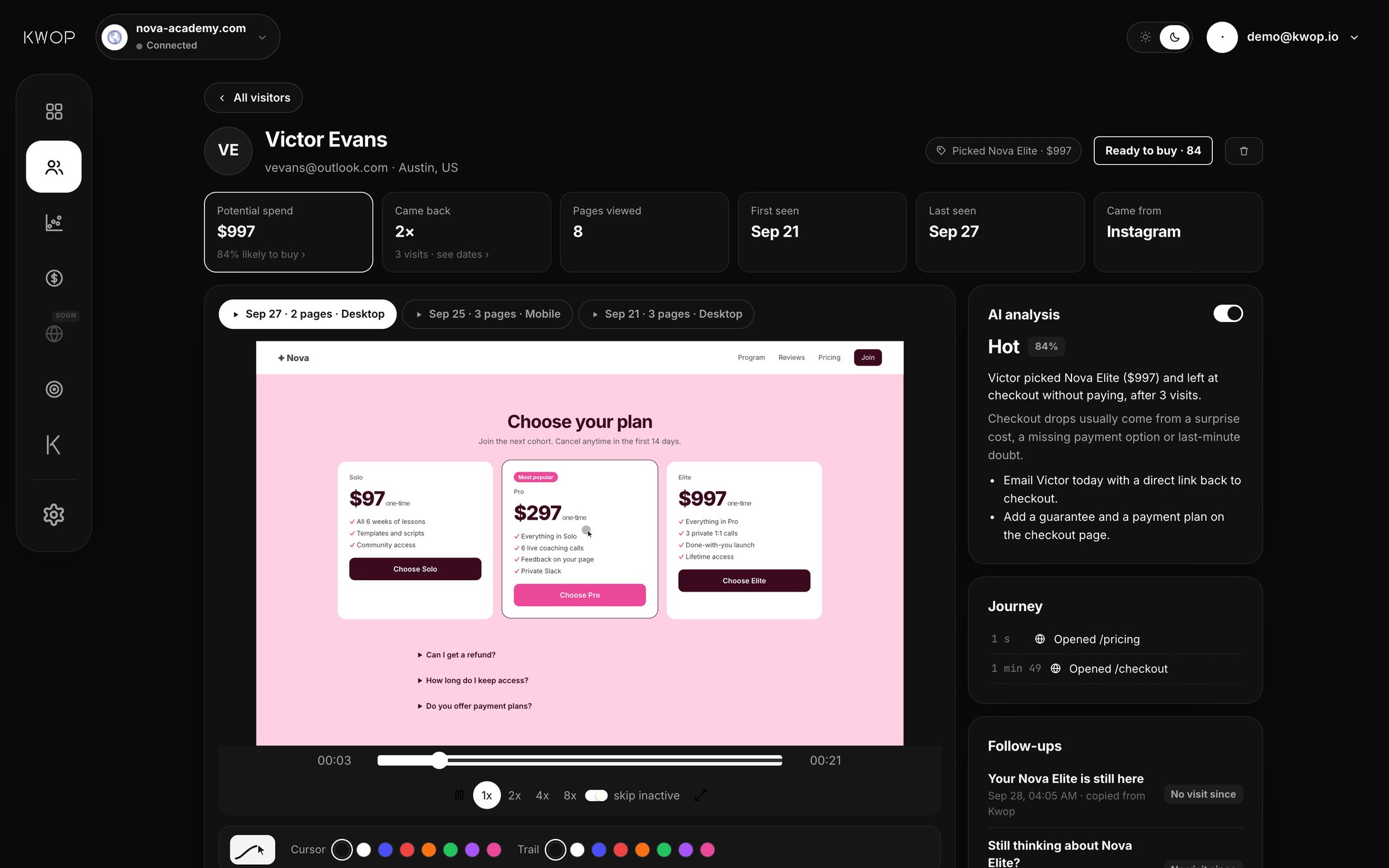
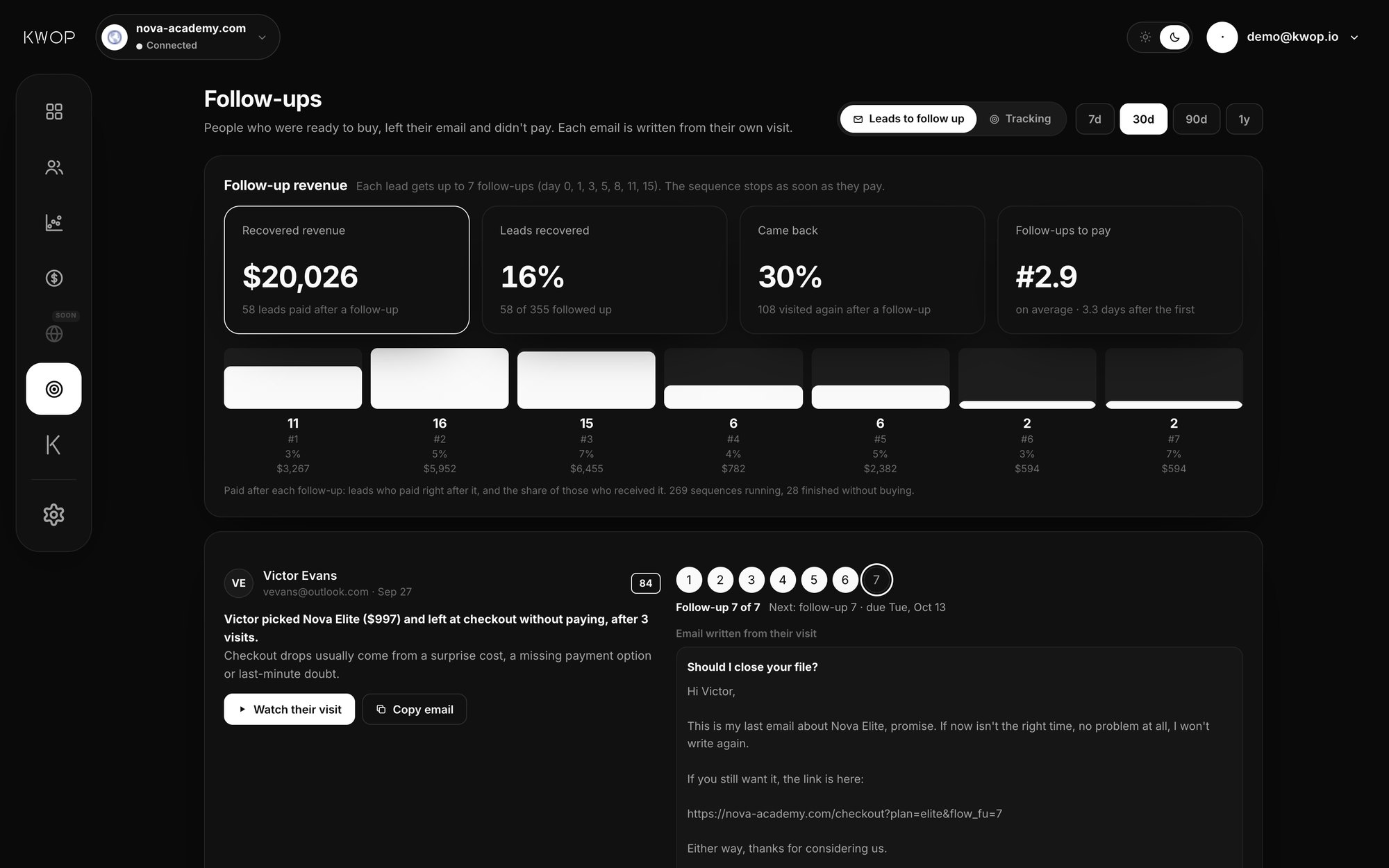
Each lead's card in Kwop shows the score, a short summary of why they may have stopped, a link to the session replay of every visit, where they are in the sequence ("Follow-up 3 of 7", with the day the next one is due), and the email itself.
What is each email built from?
From the facts of that person's visit and your store's real data, never a fill-in template. A "Written from" list under each email shows the facts used, so you can check every sentence before sending.
| Fact | How it is listed (Nova Academy demo) | Needs a connector |
|---|---|---|
| The plan and price they picked | Picked Nova Pro ($297) on Oct 13 | Yes: their clicks are matched to your store's catalog |
| Where they stopped | Reached checkout, left without paying (or: Looked at your prices N times) | No |
| A promo code they tried on your own pages | Tried a promo code at checkout | No |
| Rage clicks | 1 rage click (something didn't respond) | No |
| Visits, source and device | 1 visit · from Google · on a phone | No |
| Recent buyers of that plan (or of your store), when there are at least 3 | 45 people bought Nova Pro in the last 30 days | Yes |
| An active promo code in your store | Active promo in your store: WELCOME10 (10% off) | Yes |
| A price that dropped since their visit | Price dropped since their visit: $997 → $897 | Yes |
| The yearly saving versus monthly | Used in the email text, not listed | Yes |
The facts change the email. A failed promo code leads with an apology and, if one exists, a code that works. A rage click becomes an offer to fix what didn't respond. A phone checkout suggests finishing on a computer; a stop right at payment asks what their last question was.
Nothing is invented: no fake deadline, no "only 2 spots left", no discount you didn't create. The writer is rule-based, not a language model. Emails come in your account's language (English or French), signed with your name and your site's name, with a link back to the checkout page they reached, or to your pricing page. Here is follow-up 1 as Kwop wrote it for a lead on the demo store:
Subject: Your Nova Pro is still here

Hi Daniel,

On Tuesday you picked Nova Pro ($297) and went all the way to checkout, then stopped right before paying.

Paying on a phone isn't always smooth. You can finish on your computer with the same link below; it takes a minute.

45 people joined Nova Pro in the last 30 days. Many of them found us on Google, just like you.

And if it helps, you can use WELCOME10 (10% off) at checkout.

Here's your direct link to pick up where you left off:
https://nova-academy.com/checkout?plan=pro&kw_fu=1

Or just reply to this email with your question. I read every message myself.

— Alex, Nova Academy

Written from: Picked Nova Pro ($297) on Oct 13 · Reached checkout, left without paying · 1 visit · from Google · on a phone · 45 people bought Nova Pro in the last 30 days · Active promo in your store: WELCOME10 (10% off)What does Kwop fill into each of the 7 follow-ups?
Kwop writes all seven from the lead's own data, and the sequence stops as soon as Kwop sees the lead pay. The table shows what each email takes from the visit and from your connected store; the timing and the copywriting method behind the sequence are explained in the guide how to follow up hot website leads: 7 emails in 15 days.
| What Kwop fills in from the data | Demo example (Nova Academy) | |
|---|---|---|
| 1 | The plan and price they picked, the day, where they stopped, a promo code that failed or a click that didn't respond | "On Tuesday you picked Nova Pro ($297) and went all the way to checkout, then stopped right before paying." |
| 2 | How many people bought that plan (or your store) in the last 30 days, only when there are at least 3, and whether they came back several times or came from the same source | Subject: "Still thinking about Nova Pro?" |
| 3 | The price line: a price drop since their visit, an active promo code or the yearly saving; a "finish on a computer" line if they were on a phone | Subject: "It seems like something held you back" |
| 4 | The number of days since their visit | "If you'd joined Nova Pro on Tuesday, you'd be 4 days in today." |
| 5 | The plan name, in a question with a one-word answer, and no link | "Have you given up on Nova Pro?" |
| 6 | The one real offer from your store, if there is one; otherwise a link that picks up their checkout | Subject: "One last thing about Nova Pro" |
| 7 | The plan name and the link back, in a last email | Subject: "Should I close your file?" |
Offers only appear when they exist in your Stripe, Whop or Shopify data; Kwop never invents a discount. You can open any of the seven from the lead's card.
How do you send it?
Send it from Gmail in one click: Kwop opens a new Gmail email with the address, subject and text already filled in, and you press Send. A private Bcc address tells Kwop the email left, so the lead is marked as followed up. If you edited it in Gmail, the card shows the version that actually left, marked as edited.
On another inbox, Copy email puts the subject and text on your clipboard and counts the follow-up as sent. Nothing is sent automatically, so each email arrives as a personal one from your own address.
What do you see after sending?
The Tracking view shows who clicked, who came back and who paid after each follow-up. Opens are not tracked: the email is plain text from your own inbox, with no tracking pixel.
- Clicks. The link in each email carries
kw_fu=and the follow-up's number, added only to links to your own site, so a visit from that link is credited to that follow-up. - Came back. Any new visit by the lead after a follow-up, with its replay.
- Paid. The first payment after the sequence started, credited to the last follow-up sent before it, if it came within 30 days of it. Payments come from your Stripe, Whop or Shopify connector (Pro).
- Each follow-up. Sent, clicked, paid right after and revenue for all seven, plus a day-by-day chart and revenue by product.
For recovery emails sent by your checkout itself, see abandoned checkout recovery.
What do Starter and Pro include?
Starter: 1 site, replays, journeys, funnels, rage clicks, test visits, and follow-ups for the hottest 30% of leads, each with the email written, the 7-step sequence and Send with Gmail. Amounts are hidden, and Tracking shows sends, clicks and return visits.
Pro: unlimited sites, Stripe, Whop or Shopify revenue, every hot lead followed up, revenue per follow-up, Kwop AI and the MCP. The connector is also what puts the plan, the price, real buyer counts and real offers into each email, and what stops a sequence once their payment syncs (every 10 minutes, or right away with Sync now). Current prices are on the pricing page.
Can Claude or ChatGPT tell me who to follow up today?
Yes, on Pro, through Kwop's MCP server. Ask "Who should I follow up today?" and the who_to_follow_up tool returns the people who were ready to buy, left their email and didn't pay, each with a reason and a suggested next step.
Then write_follow_up returns one person's email (subject, body, facts used) and n, its number in the sequence (1 to 7, by default the next one due). Kwop keeps that email on the lead's card as that follow-up. None of the 10 MCP tools sends email: your assistant drafts, you send. They work in Claude, ChatGPT (developer mode), Claude Code, Cursor and Gemini CLI (MCP setup). The same question works in Kwop AI, the chat in your dashboard.
What doesn't it do, and when does another tool fit better?
Kwop only writes emails for people who left their email on your own site, and you send each one.
- Only people who typed their email on your site, in a signup, opt-in or checkout form on your own pages, or through
Kwop.identify. Kwop doesn't identify anonymous visitors or look up companies from IP addresses; see how to see who visits your website. - Hosted checkout pages (Stripe Checkout, Whop, Shopify checkout) are not recorded, so an email typed only there doesn't make someone a lead.
- Consent rules are yours. Stripe's documentation treats cart-abandonment emails as promotional: "Customers must agree to receive promotional emails before you can contact them." Check the rules where your customers live (see the follow-up guide).
Other ways to follow up visitors who didn't buy, as of 17 October 2026:
| Tool | Who gets the email | What it is built from | Who sends it |
|---|---|---|---|
| RB2B with Clay | Business visitors RB2B identifies; "Contact-level (person) ID is US only" (RB2B FAQ) | The Clay workflow you build (RB2B Academy video tutorial) | That automated workflow |
| Warmly AI email step | B2B leads, for example chat visitors who didn't book a meeting | Chat transcript, enriched person and company data, CRM stage, pages visited, intent signals | Warmly orchestrations; after a test-and-refine step you can switch them to fully autonomous sending |
| PostHog abandoned checkout workflow template | People who start checkout but don't finish | The emails you set up in the workflow | PostHog Workflows; anyone who completes an order leaves it |
| Shopify abandoned checkout emails | Customers whose checkout stays unfinished more than ten minutes after they enter their email | Shopify's email with a link to their cart | Shopify, automatically once you turn it on |
| Stripe Checkout recovery | Customers who agreed to promotional emails, once their Checkout Session expires (after 24 hours by default) | Your email, with a recovery link valid for 30 days | You, from your own webhook code |
| Kwop | Visitors scoring 65 or more who typed their email on your site and didn't pay | The facts of their visit and your store's real data | You, from Gmail or any inbox |
Warmly's pricing page lists auto email generation and follow-up on its AI Inbound Autopilot plan, from $30,000 a year; its lowest paid plan starts at $10,000 a year (warmly.ai/pricing, October 2026). RB2B and Warmly fit B2B outreach to people who never gave you their email. Keep Shopify's or Stripe's recovery email for every checkout, and use Kwop for hot leads who deserve a personal email written from what they did.
FAQ
Does Kwop send the emails for me?
Not on its own. You stay in control: one click on Send with Gmail opens a Gmail compose window with the email already written, and you press Send. Kwop then marks it as sent, notes whether you edited it, and tracks who clicked, came back and paid. On another inbox, copy the email.
Can I send from Outlook or another inbox?
Yes. Copy email puts the subject and text on your clipboard and counts the follow-up as sent; paste it into Outlook, Apple Mail or any inbox. Clicks, return visits and payments are tracked the same way. Only the Gmail compose window, the sent check and the "edited in Gmail" note are Gmail-specific.
Who does Kwop choose to follow up?
Hot leads: visitors with a buying-intent score of 65 or more out of 100, who typed their email on your site and haven't paid, hottest first. Starter opens the hottest 30% of them; Pro opens all of them.
How many follow-ups, and when?
Up to seven per lead, on day 0, 1, 3, 5, 8, 11 and 15 when each is sent on time. The sequence stops as soon as Kwop sees the lead pay.
Does it use templates or AI?
Neither a fill-in template nor a language model. Kwop writes each email from the facts of that person's visit, with fixed rules for each of the seven steps, and lists the facts it used under the email.
Will it invent a discount?
No. An offer appears only if it is real in your connected store: an active promo code, a price that dropped since their visit, or the yearly saving. With none of those, the email makes no offer.
Can I see if they opened it?
No. The email is plain text sent from your own inbox, with no tracking pixel. Kwop tracks clicks on the link in each follow-up, return visits and payments instead.
Can it follow up visitors who never left an email?
No. Kwop only knows the email someone typed in your own site's forms, or that your site passed with Kwop.identify. It doesn't identify anonymous visitors or look up who they are from their IP address, but you still get their replay and journey.
Sources
- Stripe Docs, Recover abandoned carts, checked 17 October 2026.
- Shopify Help Center, Abandoned checkouts, checked 17 October 2026.
- RB2B Academy, Auto Email Your Website Visitors Using RB2B and Clay, 29 April 2025; RB2B FAQ, checked 17 October 2026.
- Warmly, AI email generation is live, 12 May 2026; Warmly pricing, checked 17 October 2026.
- PostHog, Abandoned checkout recovery workflow template, checked 17 October 2026.
Paste your site, see your visitors in minutes
Paste your link and create a free account: a few minutes later you watch 3 test visits of your site as videos. No card.