
Kwop › Guides › See who visits your website
How to see who visits your website (and who almost bought)
Web analytics and session replays show what your visitors did, not who they are: the dependable way to name a visitor is the email they type on your own site (a signup, opt-in or checkout form), while B2B tools can only guess the company behind an IP address or, for some US business traffic, the person. Kwop (kwop.io) records every visit as a replay, names the visitor the moment they type their email, and ties their Stripe, Whop or Shopify payment to them; it never de-anonymizes anyone.
What can you know about a website visitor?
Five kinds of tools answer "who visited my website", and they return very different things. Only two of them can give you a person's name, and only one works in every country and on every kind of site: the email people type on your own site.
| Method | What you get | Who it works for | Privacy | Cost |
|---|---|---|---|---|
| Web analytics (Google Analytics 4, Microsoft Clarity) | Visit counts, pages, traffic sources, devices, rough location. No names. | Every site | Aggregated reports. Clarity requires visitor consent in the EEA, UK and Switzerland. | Free |
| Session replay | Each visit played back: clicks, scrolling, the plan picked, where they stopped. Still anonymous on its own. | Every site | Form fields usually masked; consent usually needed in the EU | Free (Clarity) to paid |
First-party identification (an email typed in your own form, or an identify call such as Kwop.identify) | A named person, with their visits attached | Any site that collects an email, in any country: creators, coaches, shops, SaaS | The visitor gave you the email; say how you use it in your privacy notice | Free to set up; tools vary |
| IP-to-company (Leadfeeder, RB2B company-level) | Names of companies whose network the visit came from | B2B sites | Company-level data; RB2B says global company-level ID needs a consent tool | Free tiers, then paid |
| Person-level identity graphs (RB2B paid plans, Warmly) | A person matched from a third-party database: a LinkedIn profile, or a business email on RB2B's Pro plans | B2B sites; RB2B says its person-level ID is US only | The visitor never gave you their details | Paid |
For creators, coaches and online shops, whose visitors are mostly private people on home Wi-Fi or a phone, that leaves first-party identification as the method that actually names buyers and almost-buyers.
Can you see who visited your website for free?
Yes for what visitors did, partly for which companies, and only through your own forms for named people. These are the free options as of October 2026:
- Google Analytics 4: how many people came, which pages they saw, where they came from, their device and rough location. No names: Google's policy says no personally identifiable information, such as email addresses, may be passed to Google, and GA4 doesn't log or store IP addresses.
- Microsoft Clarity: free session recordings and heatmaps with no traffic limits and no sampling; recordings are kept for 30 days. Its Identify API can tag sessions with your own user ID, such as an email, which Clarity hashes in the browser, so you can filter the recordings of someone you already know.
- Your server logs: most hosts keep access logs with the IP address, time, page and browser of each request. They tell you a network, not a person (see the next section).
- Leadfeeder Lite: up to 100 identified companies a month, with 7 days of visitor history. Companies only; verified contact details come with the paid Activate plan.
- RB2B Free: company-level identification, 150 resolutions a month, "no person-level ID, no email addresses" according to its pricing page. A 7-day trial includes the person-level features.
- Clearbit's Weekly Visitor Report is gone: Clearbit ended its free tools on 30 April 2025 and points to HubSpot's Breeze Intelligence instead.
None of them, out of the box, tells you that the person who read your sales page twice and left at checkout was Sam, [email protected]. That needs a replay tied to an email Sam typed on your site; in Clarity you wire that link yourself with the Identify API.
Can an IP address tell you who visited?
Not for a private person. An IP address identifies a connection, not a human: a home router shared by a family, a mobile network address shared by many phones, a VPN, a café, an office. Only the internet provider knows which subscriber held an address at a given time, and it doesn't give that to website owners who ask.
That's why IP lookups work at company level: tools like Leadfeeder match addresses to businesses, which works best when the visitor browses from a company network. For a shop or a creator, whose visitors browse from home and from their phones, they return little.
IP addresses can also be personal data in the EU. In Breyer (case C-582/14, 19 October 2016), the Court of Justice of the EU held that a dynamic IP address stored by a website operator is personal data when the operator has legal means to identify the person with extra information held by the internet provider. Recital 30 of the GDPR lists IP addresses among the online identifiers that can be used to identify people. So if you keep them, have a reason, say so in your privacy notice, and don't try to turn them into names. This is general information, not legal advice.
How do creators, coaches and shops get the names of their visitors?
By asking for the email on their own site, earlier in the visit, then watching what each named visitor did. It works in every country, it names private people as well as business buyers, and the visitor knows they gave it to you.
- Ask for the email before the checkout. A free lesson, a checklist, a waitlist, or a short "where should we send your access?" step on your own page, before the link to a hosted Stripe, Whop or Shopify checkout. A hosted checkout collects the email on its own page, where your site's script can't see it.
- Record every visit. A session replay of each visit shows the pages, the plan someone picked, the button they clicked and where they stopped, named or not.
- Match payments to visitors by email. Your payment provider knows who paid. Matching the payer's email to the email typed on your site, for example with a Stripe connection, splits your named visitors into buyers and almost-buyers.
- Rank who almost bought. Someone who reached checkout, came back twice and left their email deserves a personal message; someone who read one blog post doesn't. The guide to finding the hot leads on your website has a simple score you can copy.
- Follow up, then fix the page. Write to the almost-buyers from your own inbox, with their consent (see how to follow up website leads), and use the replays of the others to find why visitors don't buy.
Looking for an RB2B alternative for a store or a creator business? You need a different method more than a different vendor: RB2B and Leadfeeder find companies and US business profiles for outbound sales, while a shop or a creator gets further by collecting emails on its own site and following up the people who almost paid.
How does Kwop show who visited and who almost bought?
Kwop (kwop.io) is session replay software that ties every website visit to Stripe, Whop or Shopify revenue and tells you who to follow up. You add one script line to your site: every visit is recorded from then on (or once the visitor consents, with data-consent="required" and Kwop.consent()), and a visitor gets a name only in the ways below.
- Every visit, as a replay. Pages, clicks, scrolling, device and the source of the visit (Google, Instagram, TikTok, an email and so on, read from the browser's referrer). Every form field is masked in the visitor's browser before the replay is sent; the only value Kwop reads from a form is an email address, as described next.
- Named the moment they type their email. When someone types an email address into an email field of one of your own forms (an opt-in, a signup, a checkout form on your site), the script reads it when the field changes or the form is submitted. Password and hidden fields are never read. Turn it off with
data-capture-email="off"on the script line, or withdata-flow-no-captureon a single form. - Logged-in apps. If people log in, call
Kwop.identify(email)after login, with a name if you have one. - Their earlier visits come with them. The visitor ID lives in the browser's local storage, so the anonymous visits that browser made before are attached to the email, unless the browser cleared it. A visit from another phone or computer shows as a separate visitor, named once they type their email there too.
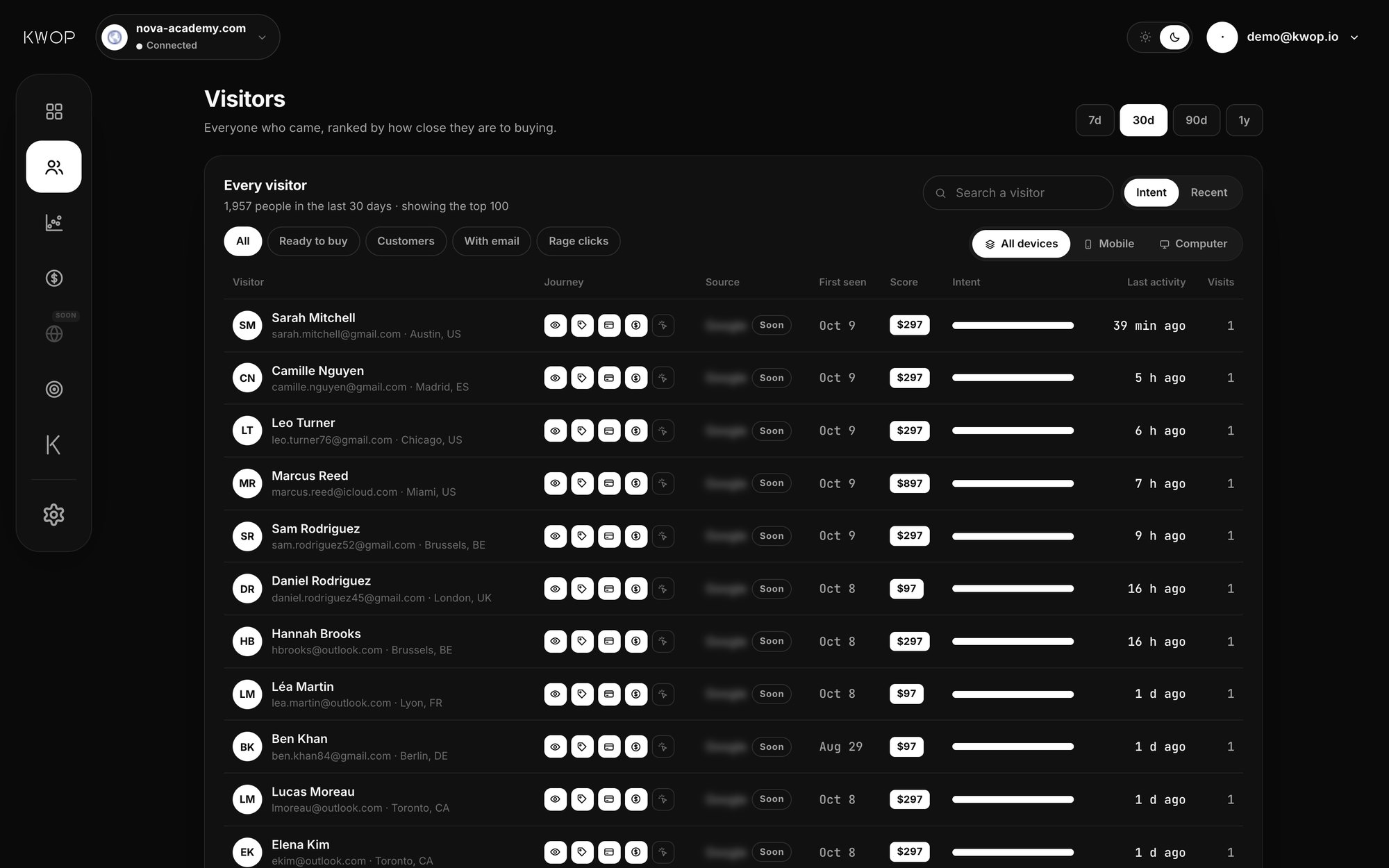
- Who paid (Pro). Connect Stripe, Whop or Shopify with a read-only key. Each payment is matched to the visitor who typed the same email on your site, and the replay sits next to the sale. On the Visitors page, the Customers filter shows who paid, Ready to buy shows the high-intent visitors who haven't paid, and With email shows everyone who typed their email.
- Who almost bought. Each visitor gets a buying-intent score from 0 to 100, from how far they went in your funnel, their return visits, whether their email is known and the pages they saw; buyers score 100. A hot lead has a score of 65 or more, a known email and no payment. The Follow-ups page lists them with an email written from their own visit, up to seven over 15 days, ready to send from Gmail in one click. Starter covers your hottest 30% of leads, Pro every hot lead.
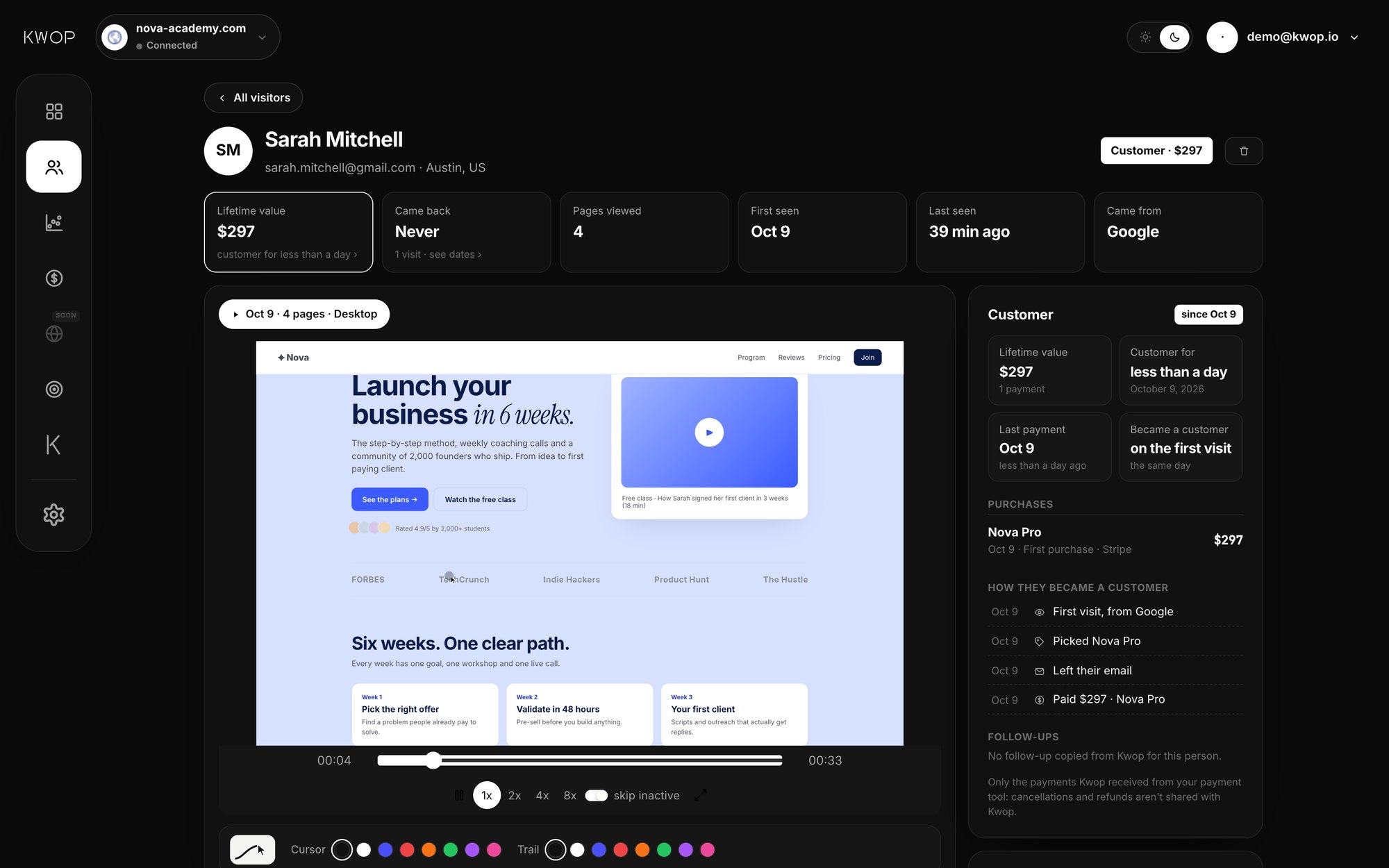
On privacy: IP addresses are not saved with visits (see Kwop's privacy page), and you can delete a visitor, with their replays and email, from their page in the dashboard. Want to look before installing anything? The free website test sends 3 test visits through your site and shows them as replays.
What can't Kwop tell you?
Kwop doesn't guess identities, so some visitors stay anonymous, and for some jobs another tool fits better.
- No company lookup and no identity database. If you sell to businesses and want the company names of anonymous visitors, Leadfeeder or RB2B do that; Kwop doesn't.
- No name without an email. Someone who never types their email on your site stays anonymous. You still get their full replay, source, device and how far they went.
- Hosted checkout pages aren't recorded. Stripe Checkout and Whop checkout run on their own domains, and Shopify's checkout doesn't run your site's scripts. Kwop sees the click that leads there and matches the payment afterwards by email; a payment made under a different email than the one typed on your site isn't linked.
- No location lookup. Real visits don't show a city, since Kwop doesn't look up locations from IP addresses. The cities in the demo above are sample data.
- Websites only. Visits on mobile browsers are recorded; native mobile apps are not.
FAQ
Can I see who visited my website for free?
You can see what visitors did for free with Google Analytics 4 or Microsoft Clarity, and B2B sites can see some company names with the free plans of Leadfeeder or RB2B. To see a named private person, they have to type their email on your own site.
Can Google Analytics show who visited my website?
No. Google Analytics 4 shows pages, sources, devices and rough locations in aggregate. Google's policy says no personally identifiable information, such as email addresses, may be passed to Google, and GA4 does not log or store IP addresses.
Can I see the IP addresses of my visitors?
Usually yes, in your server or hosting access logs, but an IP address points to a network, not a person. Under EU law it can be personal data, and Kwop does not save IP addresses with visits.
Is there a tool that names anonymous visitors?
For US business traffic, person-level tools such as RB2B match some visitors to LinkedIn profiles; RB2B says its person-level ID is US only. Company tools such as Leadfeeder name companies, not people. For shoppers and fans, the dependable route is to ask for their email on your own site.
Is website visitor identification legal under the GDPR?
Identifying a person, by email or by IP address, is processing personal data, so you need a lawful basis and must say so in your privacy notice. The EU Court of Justice held in Breyer (2016) that an IP address can be personal data. This is general information, not legal advice.
Can I see which visitors bought and which didn't?
Yes, if payments can be matched to visits. With Kwop Pro, each Stripe, Whop or Shopify payment is matched to the visitor who typed the same email on your site, so you see buyers and the named visitors who went far and didn't pay.
Does Kwop identify anonymous visitors?
No. Kwop names a visitor only when they type their email in one of your own forms or your site calls Kwop.identify. It does not look up companies or people from IP addresses and does not save IP addresses with visits.
Sources
- RB2B, FAQ and pricing: person-level ID US only, global company-level ID, free plan. Checked 17 October 2026.
- Leadfeeder, pricing: Lite plan, up to 100 identified companies a month, 7 days of visitor history; verified emails and phone numbers on the paid Activate plan. Checked 17 October 2026.
- Warmly, pricing: website visitors identified as contacts and companies. Checked 17 October 2026.
- Clearbit, changelog, 13 February 2025: free tools, including the Weekly Visitor Report, discontinued on 30 April 2025. Checked 17 October 2026.
- Google, Best practices to avoid sending Personally Identifiable Information (PII) and IP masking in Universal Analytics (GA4 does not log or store IP addresses). Checked 17 October 2026.
- Microsoft Learn, Clarity FAQ (updated 8 September 2026) and Identify API. Checked 17 October 2026.
- Court of Justice of the EU, judgment of 19 October 2016, Breyer, C-582/14, ECLI:EU:C:2016:779.
- EU, General Data Protection Regulation (EU) 2016/679, Recital 30.
Paste your site, see your visitors in minutes
Paste your link and create a free account: a few minutes later you watch 3 test visits of your site as videos. No card.