
Kwop › Guides › Which traffic source makes money
Which traffic source makes you money? How to track sales by source
To know which traffic source makes money, count sales and revenue per source, not clicks or visits: give each channel its own tracked link, or use a tool that ties each payment to the visit it came from. Revenue per visitor (revenue divided by visitors, for each source) then tells you which channel is worth your time; Kwop (kwop.io) ties Stripe, Whop and Shopify payments to each visit and its source.
Clicks, visits or sales: which number shows that a source makes money?
Only sales. Clicks are counted where the link lives, visits by your analytics and sales by your payment provider; a source makes money only when its visits turn into payments.
| Number | Who counts it | What it misses |
|---|---|---|
| Clicks | Instagram, TikTok, your link-in-bio tool, a tracking link | Whether they bought |
| Visits | Your analytics (Google Analytics, Shopify, a replay tool) | Who paid |
| Sales | Stripe, Whop, Shopify | Where the buyer came from, unless the sale is joined to the visit |
The platform with the most clicks can bring the fewest buyers, so the job is to join sales to the first two numbers.
How do you track revenue by traffic source?
Use a separate tracked link for each channel, read the sales reports of the platform you sell on, or use a tool that ties each payment to the visit before it. Most creators combine two of them.
| Method | What you get | Blind spot |
|---|---|---|
| 1. One tracked link per channel | Sales per link: per platform, even per post | Only counts people who used that exact link |
| 2. Your platform's reports | Sales by referrer on Shopify; revenue without a source on most creator platforms | Depends on the platform |
| 3. Each payment tied to its visit | The source and visits behind each payment, then totals per source | The buyer must type their email on your site |
Method 1: one tracked link per channel
Give every place you post its own link, then compare sales per link. It is the only way to tell two posts on the same platform apart.
- Whop tracking links. Marketing › Tracking links in the Whop dashboard creates a link to your checkout or store for a chosen plan, and shows its clicks, revenue generated, conversion rate and converted users. Whop suggests separate links for your emails, X posts, Instagram bio and YouTube descriptions.
- Stripe Payment Links with UTM codes. Add
utm_source,utm_medium,utm_campaign,utm_contentorutm_termto the link, for example?utm_source=tiktok&utm_medium=bio. Per Stripe's docs, this needs "redirect" as the confirmation behavior: after paying, the buyer lands on your redirect URL carrying the same UTM codes, so the analytics on your thank-you page sees which link sold. - UTM tags on links to your store, so a UTM-aware tool such as Google Analytics or Shopify's reports files the visit under that channel.
The catch: someone who sees your reel, then searches your name on Google and buys never used your tagged link.
Method 2: the reports of the platform you sell on
- Shopify: "Total sales by referrer" shows sales by the site customers came from (Direct, Search, Email, Social or Unknown), using the last-interaction referrer. "Sessions by referrer" counts visits only; "Performance by marketing channel" adds sales and ad spend per channel.
- Whop: analytics cover revenue, MRR, users, top affiliates and an estimated count of store page visits, with no traffic source; that comes from tracking links.
- Kajabi: Offer stats show purchases, net revenue, conversion rate and average order value; Kajabi's help article on them mentions no traffic source.
- Stan Store: its Store Analytics help covers Meta and TikTok pixel IDs and date ranges, with no article on sales by source.
Method 3: tie each payment to the visit it came from
Record where every visit came from, learn who the visitor is when they type their email on your site, then match each payment's email to that visitor and add up per source. No link per post is needed, and people who found you through search or a shared link count too. The limits: the buyer must type their email on your own site, and a tool that reads the referrer, as Kwop does, tells you Instagram, not which reel.
How do you track sales from your Instagram or TikTok bio link?
Put a different link in each bio and count sales per link, not clicks. A link-in-bio page counts taps, not the sale that happens later on your checkout, and it hides the platform: a referrer-based tool sees the visit coming from linktr.ee, not Instagram or TikTok.
Linktree's Insights, for example, show views, clicks, click rate and the sources that brought people to your Linktree; its Monetization section counts earnings only for links that earn through Linktree itself (Earn Links, paid Courses, digital products).
- One link per platform: a Whop tracking link, a Stripe payment link with its own
utm_source, or your page with UTM tags, different for your Instagram bio, TikTok bio and YouTube description. - One
utm_contentper post to compare two reels, for exampleutm_content=reel-oct-14, read by a UTM-aware tool. - Send the bio to your own page, not a bio-link page. The visit then arrives from Instagram or TikTok when the app passes a referrer, your page carries your analytics and replay script, and you can ask for the email before the hosted checkout.
- Test every link from the app on your own phone, then check which source your tool recorded.
Why does my traffic show as "Direct"?
Because the visit arrived without a referrer, the address a browser passes on to say which page the visitor came from. With no referrer and no tag on the link, analytics tools file the visit under Direct.
- No previous page: a typed address, a bookmark or a QR code.
- Apps: links tapped in email or messaging apps can open without a referrer, and the browser inside a social app can send none, or a different one, depending on the app and its version. Test your own links rather than trusting a rule.
- The previous page blocks it: a link marked
rel="noreferrer", or a page with theno-referrerpolicy, sends nothing. - Your site is on http://: browsers don't send the referrer from an HTTPS page to an HTTP page.
Even when a referrer is sent, the browser's default policy passes only the domain to another site: a tool sees instagram.com, never the post. If much of your revenue shows up as Direct, add tracked links per channel (method 1).
What is revenue per visitor, and how do you compare it by source?
Revenue per visitor (RPV) is revenue divided by visitors over the same period; for each source, it tells you what one visit from that channel is worth. It equals conversion rate × revenue per buyer, so a source that sends fewer, better visitors can beat a bigger one.
RPV of a source = revenue from that source ÷ visitors from that sourceWorked example with made-up round numbers, 30 days of a course creator's site:
| Source (example) | Visitors | Buyers | Revenue | Conversion rate | Revenue per buyer | RPV |
|---|---|---|---|---|---|---|
| 2,000 | 20 | $2,000 | 1.0% | $100 | $1.00 | |
| YouTube | 500 | 10 | $1,500 | 2.0% | $150 | $3.00 |
| 1,000 | 6 | $1,800 | 0.6% | $300 | $1.80 |
Instagram sends the most people, but each YouTube visit is worth three times as much: at these rates, 100 more YouTube visits bring about $300, 100 more Instagram visits about $100. Ten buyers is still a small sample, so let a few dozen build up per source before you move your whole week.
| Metric | Formula | Answers | Misses |
|---|---|---|---|
| Conversion rate | Buyers ÷ visitors | Does this source's traffic buy? | How much they spend |
| Average order value | Revenue ÷ orders | How big is each sale? | How many visitors never buy |
| Revenue per visitor | Revenue ÷ visitors | What is one visit from this source worth? | Refunds and your costs (ad spend, time spent posting) |
No benchmark here on purpose: public averages mix sites with very different prices. Compare your sources with each other and with your own previous months.
First visit or last visit: which source gets the credit?
It depends on your tool's attribution rule. First-visit credit goes to the source that found the buyer; last-visit credit goes to the one they came back through before paying.
Say someone finds you in a TikTok video on Monday, searches your name on Google on Thursday and buys: first visit TikTok, last visit Google. Shopify's Total sales by referrer uses the last-interaction referrer; a tracked link credits whichever link reached checkout; Kwop credits each buyer to the source of their first visit in the period you look at, and keeps every visit's own source on the visitor's page. Pick one rule and keep it when you compare months.
How does Kwop show which source makes money?
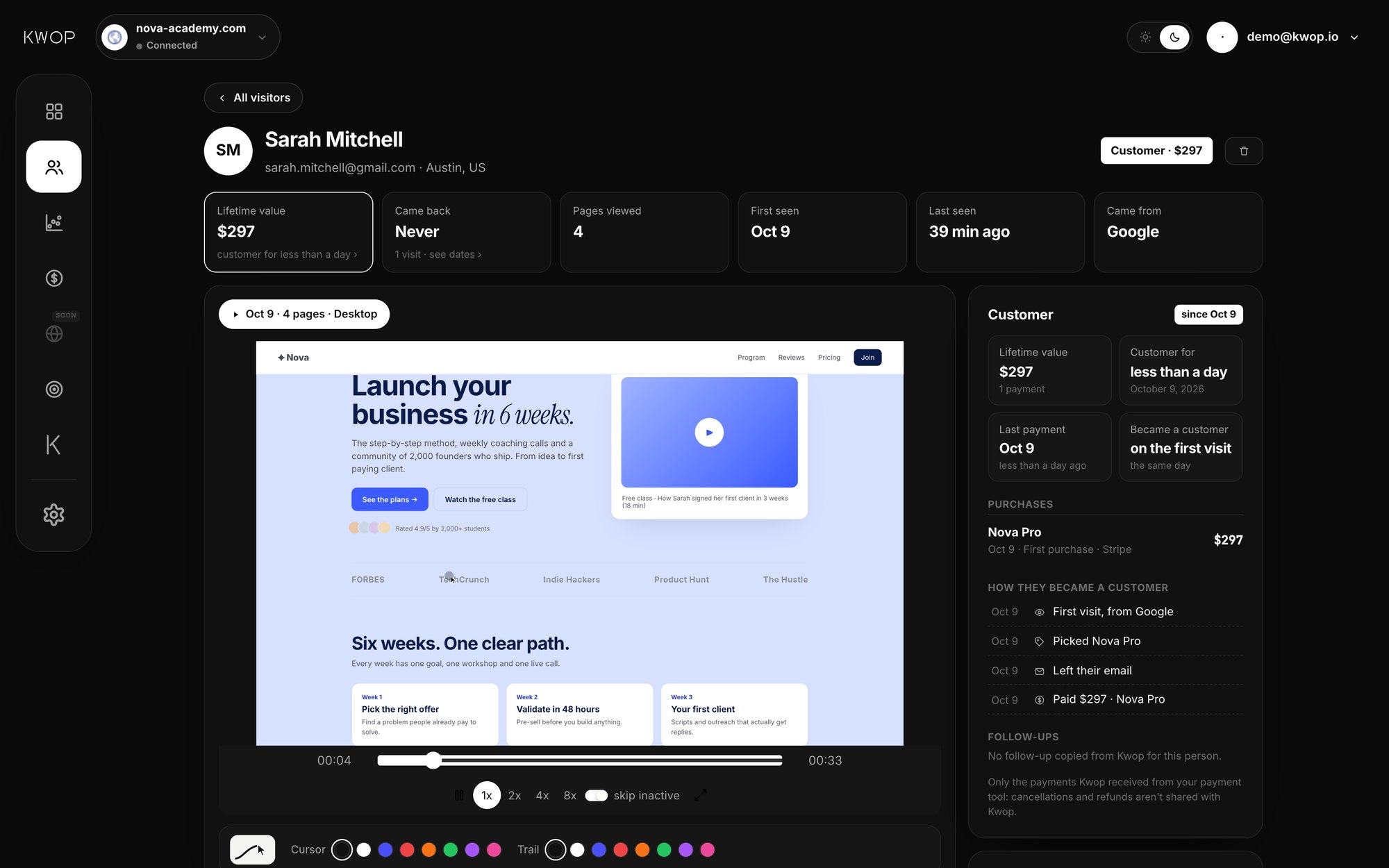
Kwop (kwop.io) is session replay software that ties every website visit to Stripe, Whop or Shopify revenue and tells you who to follow up. It reads where each visit came from, matches each payment to the visitor who typed the same email on your site, and on Pro adds it up per source.
- The source of every visit, read from the browser referrer: Google, Bing, Instagram, TikTok, YouTube, Facebook, X, LinkedIn or Email; any other site by its domain, such as linktr.ee; no referrer means Direct.
- Each visitor's path. A visitor's page shows where their first visit came from, every visit with its date, device and source, and a journey from "First visit, from Instagram" to the payment.
- Payments tied to visits (Pro). Connect Stripe, Whop or Shopify with a read-only key; each payment is matched to the visitor who typed the same email in one of your forms (or was identified with
Kwop.identify). - Revenue per source (Pro). Ask Kwop AI "Which source brings the most money?": it lists visitors, the share who bought and revenue per source, and names the source that brings the most money.
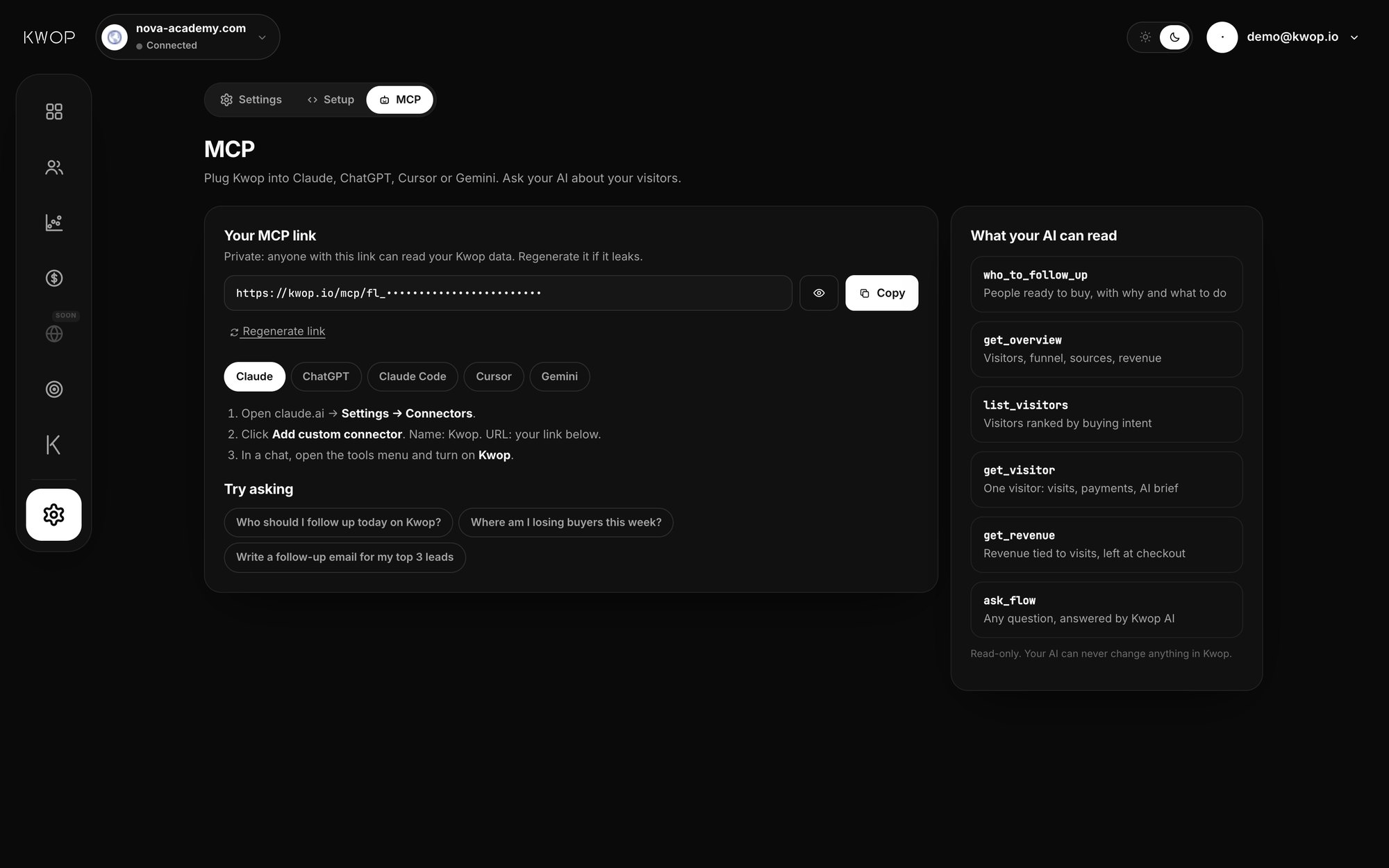
- In Claude or ChatGPT (Pro). Through Kwop's MCP server, the
get_overviewtool returns visitors, buyers and revenue for your six sources with the most visitors.
How it counts: each visitor in the period you choose is credited to the source of their first visit in that period, and a buyer's revenue is the total of every payment matched to them, including payments made before that period. A dedicated Traffic sources view in the dashboard is coming soon; today the totals per source come from Kwop AI and the MCP server.
See also Kwop for coaches and course creators, Kwop for Whop sellers and session replay tools that show who paid.
What Kwop doesn't do
- No UTM reading: the source is the referrer only, so Kwop can't split a platform into posts or campaigns. Use Whop tracking links or Stripe payment link UTM codes alongside it.
- No ad-platform data and no ROAS: no ad spend from Meta, TikTok or Google Ads, so no return on ad spend.
- Hosted checkouts aren't recorded: Kwop records the visit up to the click to Stripe Checkout, Whop or Shopify checkout and matches the payment afterwards by email. A buyer who never typed their email on your site stays unmatched.
- Your own site only: a store that lives entirely on whop.com or stan.store gives Kwop nothing to record. Payment connections: Stripe, Whop and Shopify.
FAQ
How do I see which social platform brings sales?
Give each platform its own link and compare sales per link, such as a Whop tracking link or a Stripe payment link with its own utm_source. Or use a tool that ties each payment to the visit's source: Kwop shows the source of every visit and, on Pro, revenue per source.
Does Linktree track sales?
Not the sales on your own checkout. Its Insights count views, clicks and click rate, and its Monetization section only counts links that earn through Linktree itself (Earn Links, paid Courses, digital products). A sale on your own Stripe, Whop or Shopify checkout after someone taps your link is not part of Linktree's Insights.
Why does my Instagram traffic show as direct?
Because the visit arrived without a referrer. In-app browsers can drop it, and so can links opened from email or messaging apps. Put a tracked link in your bio, then tap it from your own phone and check which source your tool records.
What is revenue per visitor?
Revenue divided by visitors over the same period: $3,000 from 1,000 visitors is $3 per visitor. Worked out per source, it shows what one visit from each channel is worth, combining conversion rate and order size.
Does Kwop read UTM parameters?
No. Kwop reads the browser referrer of each visit (Google, Instagram, TikTok, YouTube, Email, another site's domain, or Direct when there is none). For per-post or per-campaign tracking, use Whop tracking links or UTM codes in a tool that reads them, alongside Kwop.
Can Claude tell me which source made the most money?
Yes, with Kwop Pro. Connect Kwop's MCP server to Claude and ask: its get_overview tool returns visitors, buyers and revenue per source from your own site. ChatGPT in developer mode, Cursor and Gemini CLI can use it too.
Sources
- Whop docs, Tracking links (clicks, revenue generated, conversion rate and converted users per link) and Analytics. Checked 17 October 2026.
- Stripe docs, Track a payment link: UTM codes need the redirect confirmation behavior; 150-character limit. Checked 17 October 2026.
- Shopify Help Center, Acquisition reports and Sales reports: Total sales by referrer. Checked 17 October 2026.
- Kajabi Help Center, View Offer stats. Checked 17 October 2026.
- Stan Help Center, Store Analytics. Checked 17 October 2026.
- Linktree Help Center, Understanding your Insights (updated 27 March 2026). Checked 17 October 2026.
- MDN Web Docs, Referrer-Policy (last modified 4 September 2026) and rel="noreferrer". Checked 17 October 2026.
Paste your site, see your visitors in minutes
Paste your link and create a free account: a few minutes later you watch 3 test visits of your site as videos. No card.