
Kwop › Guides › Abandoned checkout recovery
How to recover abandoned checkouts on Stripe, Whop and Shopify
You can only email someone who left a Stripe, Whop or Shopify checkout if you have their email and permission to write: Shopify can send its own abandoned-checkout emails, Stripe Checkout gives you a recovery link you must send yourself, and Whop documents no abandoned-checkout email at all. Kwop (kwop.io) shows who reached checkout and left, and drafts their follow-up from the visit, as long as they typed their email on your own site. So on every platform, the fix that works is to collect the email on your own page before the hosted checkout.
Why do people leave checkout without paying?
Many were never about to pay; the others often hit a surprise cost, a doubt about the payment page, a forced account or an error. Baymard Institute puts the average documented cart abandonment rate at 70.22% across 50 studies (list updated 22 September 2025).
In Baymard's survey, 42% of US online shoppers had abandoned a cart because they were "just browsing / not ready to buy", a group no reminder changes much. Here are the reasons the other shoppers gave:
| Reason (Baymard) | Share | What to check on your own funnel |
|---|---|---|
| Extra costs too high (shipping, tax, fees) | 40% | Show the full price, tax and fees before the checkout link |
| Delivery was too slow | 20% | For courses, memberships and software, say when access starts |
| Didn't trust the site with card information | 19% | Same name and branding on your page and the checkout |
| The site wanted an account | 18% | Ask for an email, not an account |
| Checkout too long or complicated | 17% | Remove the optional fields you control |
| Website errors or crashes | 17% | Watch replays of people who clicked "Buy"; test on a phone |
| Returns policy not satisfactory | 13% | State the refund rule next to the button |
| Couldn't see the total cost up front | 12% | Show the yearly total or the number of instalments |
| Card declined | 10% | Offer a second way to pay |
| Not enough payment methods | 9% | Turn on the wallets your buyers use |
The shares add up to more than 100%, and the right-hand column is our advice, not Baymard's. To find your own reason from your visits, see why visitors don't buy.
What is the difference between an abandoned cart and an abandoned checkout?
An abandoned cart is someone who added a product or picked a plan and left before starting checkout, usually without giving an email. An abandoned checkout is someone who started paying, typically typed an email, and left before the payment went through.
- Shopify's rule: a checkout counts as abandoned once it stays incomplete for more than ten minutes after the customer gave their email (Shopify Help Center).
- Stripe's rule: a Checkout Session is abandoned when it reaches its expiry time unpaid, 24 hours after creation by default (Stripe Docs).
- No cart at all: if your "Choose plan" button links straight to Stripe, a Payment Link or Whop, that click is the start of checkout.
Only a checkout usually comes with an email, and nobody can email an anonymous cart.
How does checkout recovery work on Stripe, Whop and Shopify?
Only Shopify sends an abandoned-checkout email for you; Stripe gives you the parts to build one, and Whop documents nothing for it (each platform's docs, checked 17 October 2026).
| Sends the email for you? | What you get | Who it can reach | |
|---|---|---|---|
| Shopify | Yes, with the abandoned checkout automation in Shopify Messaging | An email with a link back to the checkout, after a delay you set | People who gave their email at checkout; by default only those subscribed to email marketing |
| Stripe Checkout | No | A recovery URL in the checkout.session.expired webhook, usable for 30 days | People who ticked promotional consent, a box Stripe offers to US businesses and US customers only |
| Stripe Payment Links | No | No recovery URL setting, but the same buy.stripe.com link can be sent again | Only people whose email you collected yourself |
| Whop | No (nothing documented) | Tracking links, and a payment.failed event when a charge fails | Only people whose email you collected yourself |
| Kwop | No: it writes the email, you send it from Gmail in one click | Who left, their visit as a replay, and an email written from it | Anyone who typed their email on your own site |
Stripe Checkout: recovery step by step
Stripe treats cart-abandonment emails as promotional: customers must agree to receive them before you write. The setup lives in the API and a webhook, so it needs a developer:
- Create the Checkout Session with
consent_collection[promotions]=auto, so Checkout can ask for promotional consent. - Add
after_expiration[recovery][enabled]=true, plusafter_expiration[recovery][allow_promotion_codes]=trueif the recovered checkout should accept a promo code. - Optionally shorten
expires_at: 24 hours after creation by default, 30 minutes minimum. - Listen for
checkout.session.expired. Its payload carriesafter_expiration.recovery.url, usable for 30 days; opening it creates a copy of the expired session. - Send the email yourself, once per person: each abandoned session fires its own event.
- Measure: the new session's
recovered_fromfield points to the expired one when it completes.
The catch: Stripe offers that consent box only to US businesses and US customers, and an expired session's email isn't returned without consent. Everyone else collects the email and consent on their own page before redirecting, which Stripe accepts in place of consent_collection.
Stripe Payment Links
Payment Links (buy.stripe.com), Stripe's no-code checkout, have a consent_collection.promotions setting, US-only as well, but no after_expiration recovery setting (Stripe API reference).
No developer? Collect the email on your own page first (see below) and write to those people with your link; timing and wording are in how to follow up website leads. Or let Kwop list who clicked your Stripe link and didn't pay, email already written (Kwop for Stripe).
Whop
As of 17 October 2026, Whop's help center and developer docs describe no abandoned-checkout email and no abandoned-checkout webhook. Its automated messages ("Support chats") go out when someone joins or leaves a whop, and its webhooks cover payments (including payment.failed), memberships, invoices, refunds and disputes. Tracking links show clicks, revenue and conversion rate per link, but not who clicked and didn't buy.
So ask for the email on a page of your own before the Whop checkout link. If your store lives only on whop.com, there is no page of yours to do that on (see Kwop for Whop).
Shopify
Shopify is the only one of the three with built-in recovery emails, under Apps > Messaging > Automations. What to know (Shopify Help Center, checked 17 October 2026):
- Timing: a new abandoned-checkout automation you add waits 10 hours by default (your first one keeps your earlier settings). You change the wait by editing the workflow in Shopify Flow.
- Audience: by default it only emails customers subscribed to email marketing. You can switch the To: field to all customers.
- Channels: Online Store and Buy Button only; Shopify POS and third-party channels send no recovery email.
- Limits: no email if they already bought, hit a payment error, gave a phone number instead of an email, or your shop doesn't ship to their address. Abandoned checkouts are deleted after three months, and a sent recovery link can't be disabled.
How do you get the email before a hosted checkout?
Ask for it on your own page, one step before the checkout link: a one-field form ("Where should we send your access?") that then opens the Stripe, Whop or Shopify checkout.
- Email-first button. "Buy" opens one email field, then sends the buyer straight to checkout.
- A free step first. A free trial or account for software; a free lesson or opt-in for coaches and course creators.
- An email, not an account. Baymard's 18% who left over a forced account is the reason to stop at one field, plus a consent box where the law requires it.
Kwop reads an email typed in your site's own forms (any email field, when it changes or the form is sent) or passed with Kwop.identify(email). Passwords and other fields are never read, and data-capture-email="off" turns this off. That email is how Kwop names the visitor and matches their payment.
How does Kwop find the people who left checkout?
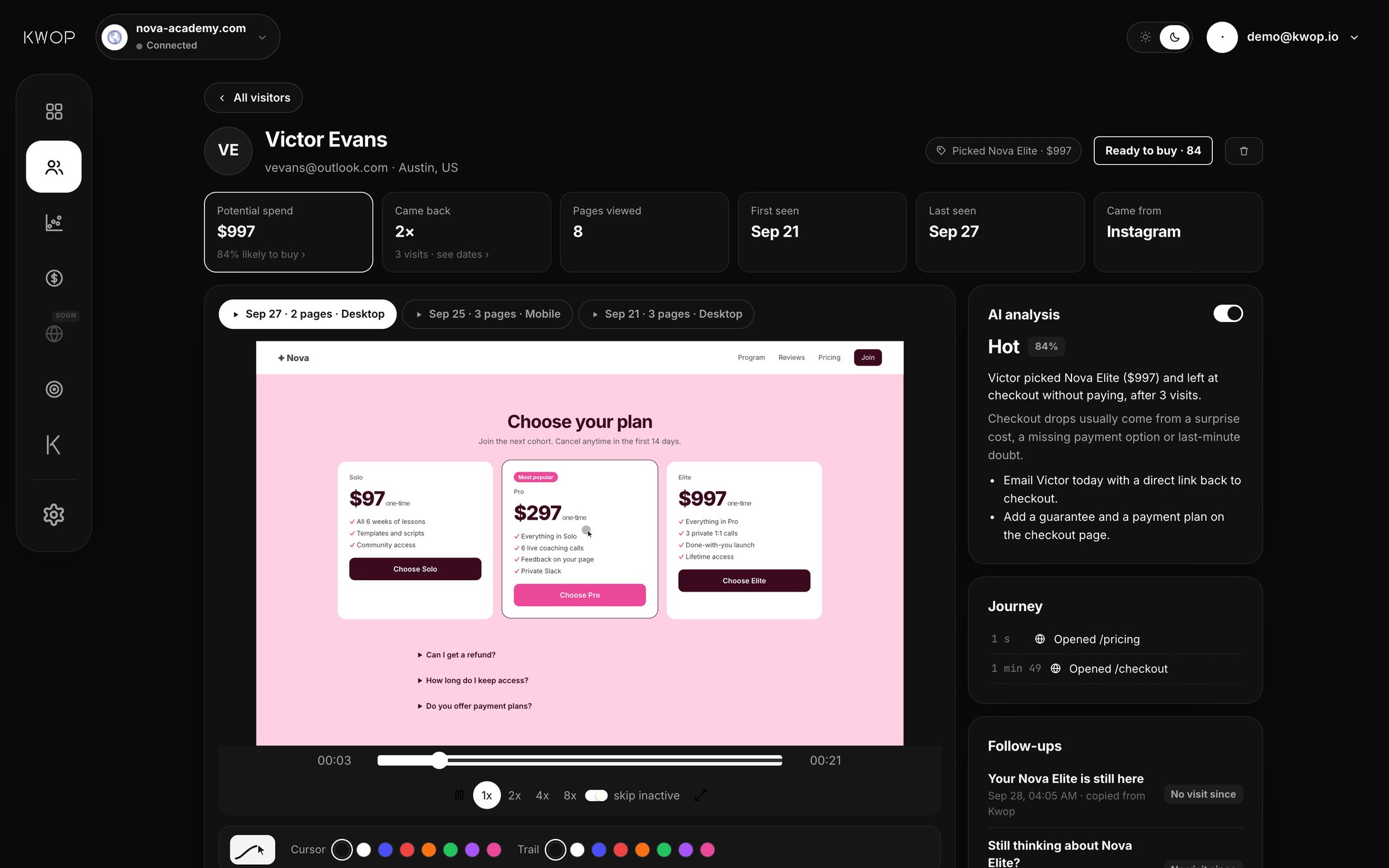
Kwop counts a visitor as reaching checkout when they click a link to Stripe (buy.stripe.com, checkout.stripe.com) or Whop, or open a checkout or cart page on your site. If they also typed their email on your site and no payment arrives under that email, they usually score high enough (65 or more) to show up as a hot lead, with a follow-up written from their visit.
- Add one script line to your site. Kwop records each visit as a session replay and finds your funnel (for example Visit, Pricing, Checkout, Paid) from your pages and visits.
- Each visitor gets a buying-intent score from 0 to 100 (how to find hot leads). Someone who reached checkout and left without paying is labelled Hot.
- The Follow-ups page lists hot leads with up to 7 emails (day 0, 1, 3, 5, 8, 11 and 15) written from the visit: the plan and price picked, where they stopped, a failed promo code, rage clicks, device, return visits.
- Send with Gmail opens the draft already filled in, with a private Bcc address; you press Send and Kwop marks it sent when the Bcc copy arrives. Each email links back to your site (the checkout page they opened there, otherwise your /pricing page), tagged with the email's number, so you see who came back and from which email.
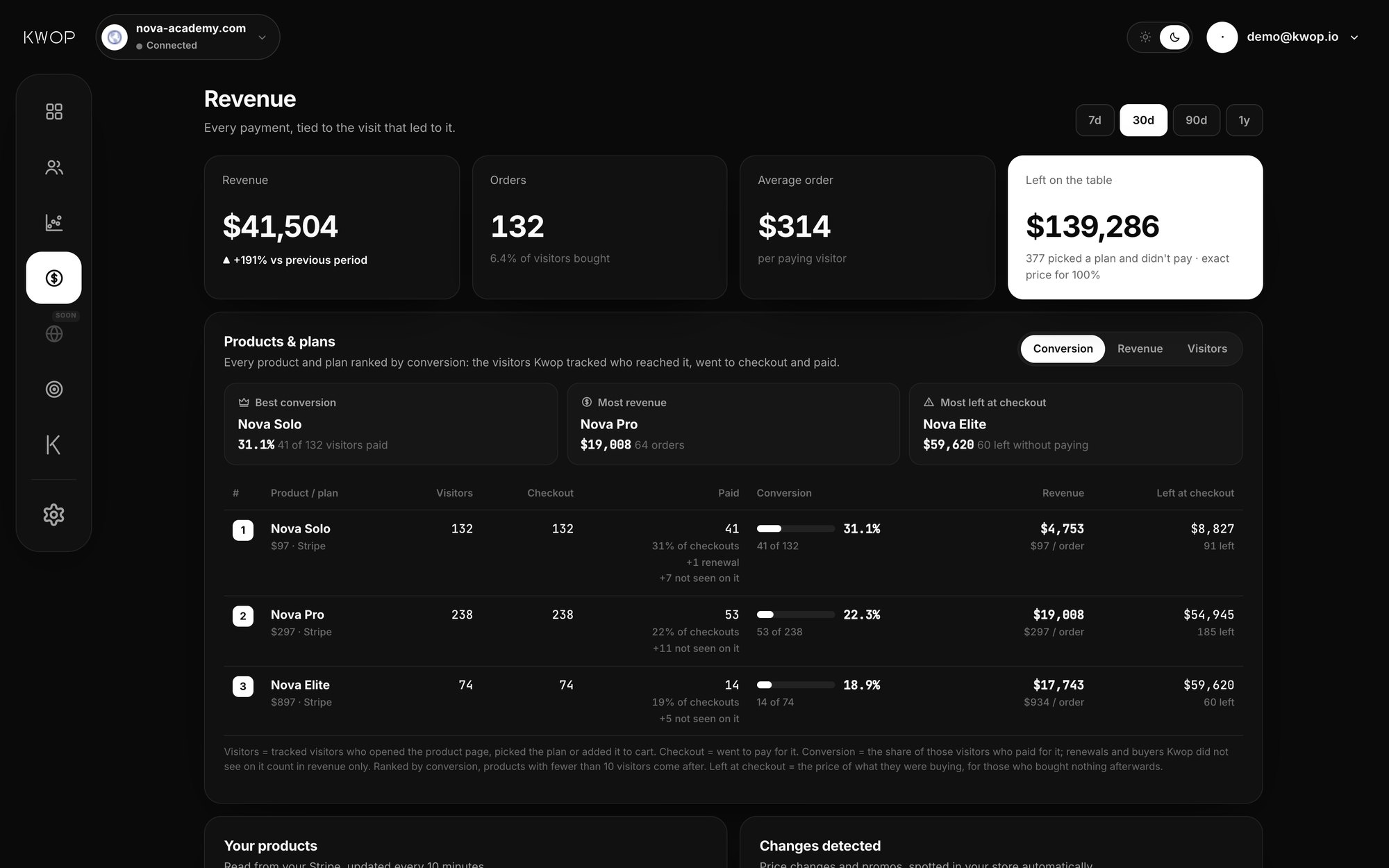
On Pro, connect Stripe, Whop or Shopify with a read-only key: Kwop matches payments to visitors by email, ends the sequence when someone pays, and shows the money left at checkout per plan, at the exact price picked. Kwop AI can also tell you which plan leaves the most money at checkout and what to fix first. Starter gets the hottest 30% of leads, each with the email written, the sequence and Send with Gmail, amounts hidden.
What Kwop doesn't do
- It doesn't record the hosted checkout page. It sees the click to it and, on Pro, the payment afterwards.
- It doesn't import expired Stripe Checkout sessions, only completed Stripe, Whop and Shopify payments.
- It can't follow up anyone whose email it never saw, such as an email typed only on the hosted checkout.
- It doesn't send emails on its own, and it doesn't identify visitors from their IP address.
- Without a payment connector (Starter), it can't see who paid, so check before you write.
- If Shopify's standard reminder is all you need, Shopify already sends it (Kwop for Shopify).
Is it legal to email people who left checkout?
It depends on where they live: US law allows it without prior consent if you follow CAN-SPAM, while the UK and the EU generally require consent or a narrow exception. This is not legal advice.
- United States. The FTC's CAN-SPAM guide sets no opt-in requirement, but each email needs honest sender and subject lines, a notice that it's an ad, a valid postal address and an opt-out honored within 10 business days. Penalties reach $53,088 per email.
- United Kingdom. The ICO requires consent for marketing emails unless the soft opt-in applies: you got the email while selling or negotiating to sell, you market similar products, and you offered an opt-out then and in every message. No purchase is needed if the person actively showed interest in buying, such as a free trial or a quote request; browsing isn't enough, and the ICO doesn't address a started checkout.
- France, as an EU example. The CNIL requires prior consent for marketing emails to consumers. Its existing-customer exception doesn't apply when no sale took place, even if the person created an account.
In practice: a consent box (or, in the UK, an opt-out line) next to your pre-checkout email field, a record of it, and an unsubscribe line plus your address in every follow-up.
FAQ
Does Stripe send abandoned cart emails?
Stripe Checkout doesn't send them for you. With recovery turned on, it gives you a recovery link in the checkout.session.expired webhook and you send the email. The customer's email only comes back if they gave promotional consent, which Checkout collects only for US businesses and US customers.
Does Whop have abandoned checkout recovery?
Not that Whop documents. As of 17 October 2026, docs.whop.com describes automated messages only for people who join or leave a whop, and no abandoned-checkout webhook. Collect the email on your own page before the Whop checkout link.
When should I send the first abandoned checkout email?
Shopify's newly created abandoned-checkout automation waits 10 hours by default, and you can change it. For someone who picked a plan on your site, our follow-up guide suggests the same day, then day 1, 3, 5, 8, 11 and 15, stopping when they pay.
What is the average checkout abandonment rate?
Baymard Institute's average across 50 studies is 70.22% (updated 22 September 2025). It measures cart abandonment, so it includes people who never reached checkout.
Can I recover a checkout without the buyer's email?
No. Shopify, Stripe, Whop and Kwop all need the email before anyone can write to that person, plus permission where the law requires it. Without it, you can still watch the visit to learn why they left.
Is it legal to email people who left checkout?
In the US, CAN-SPAM requires no prior consent but needs a working opt-out, your postal address and honest headers. In the UK and the EU you generally need consent, or in the UK the soft opt-in. This is not legal advice.
Sources (checked 17 October 2026)
- Stripe Docs, Recover abandoned carts and Collect consent for promotional emails.
- Stripe API reference, Create a payment link.
- Shopify Help Center, Abandoned checkouts and the abandoned checkout automation.
- Whop Docs, Support Chats, Tracking Links and Webhooks.
- Baymard Institute, Cart Abandonment Rate Statistics, updated 22 September 2025.
- US Federal Trade Commission, CAN-SPAM Act: A Compliance Guide for Business.
- UK Information Commissioner's Office, How do we comply with the PECR electronic mail marketing rules?
- CNIL, La prospection commerciale par courrier électronique (in French).
Paste your site, see your visitors in minutes
Paste your link and create a free account: a few minutes later you watch 3 test visits of your site as videos. No card.