
Kwop › Guides › Ask AI about your website visitors
How to ask ChatGPT, Claude or Gemini about your website visitors
ChatGPT, Claude and Gemini can't see your website visitors on their own: they only know what you paste in or what a connected data source (an MCP server or connector) returns. Connect your analytics for counts, your payment tool for sales, or Kwop (kwop.io) for each visitor's journey, buying intent and the payment that followed.
What can an AI answer with each kind of data?
It can only answer from the data you give it: counts answer "how many", payments answer "how much", and only a source that tracks each visitor can say who almost bought.
| What you give the AI | Examples | What it can answer | What it can't |
|---|---|---|---|
| A pasted export or screenshot | A GA4 report as CSV, a Stripe payments export | Trends and comparisons inside that file | Anything newer than the export, or any question the file wasn't built for |
| An analytics MCP server | Google Analytics, Microsoft Clarity, Contentsquare | Visits, sources, pages, devices, funnels, frustration signals | Who a visitor was, or whether they paid |
| A product-analytics MCP server | PostHog, Fullstory | Events, funnels, individual sessions, the users you identify | Revenue per person, until you connect and map your payment data |
| A payments MCP server | Stripe | Who paid, how much, subscriptions, refunds | What the payer did on your site, and the visitors who never reached a payment page |
| Per-visitor data tied to payments | Kwop | Each visitor's journey, buying-intent score, who to follow up, the payment that followed, revenue by source | Ad and campaign (UTM) data, heatmaps, the replay video itself |
A pasted file is fine for a one-off question; for anything you ask every week, a live connection fetches fresh data each time. If you first need to know what per-visitor tracking can and can't reveal, see how to see who visits your website.
Which analytics MCP servers exist, and what do they read?
Several analytics, replay and payment vendors now ship one, but they read very different data: Google Analytics and Clarity return aggregate numbers, PostHog and Fullstory events and sessions, Stripe payments, and Kwop each visitor with the payment that followed. Rows checked on each vendor's pages on 17 October 2026.
| Server | Data | Hosting | Read or write | Auth | Limits | Source (checked) |
|---|---|---|---|---|---|---|
| Google Analytics MCP | Aggregate GA4 reports, funnels, realtime. No individual visitors. | Local (you run it with Python) | Read only | Google credentials, analytics.readonly scope | Labeled "Experimental" | GitHub, 17 Oct 2026 |
| Microsoft Clarity MCP | Aggregate metrics by dimension; a filtered list of recordings | Local (Node.js); one-click Claude Desktop extension | Reads (query and list tools) | Clarity Data Export API token | Launch post: 10 requests per project per day, last 1 to 3 days | GitHub, 17 Oct 2026 |
| PostHog MCP | Analytics, recordings, flags, experiments, SQL; revenue if Stripe is connected | Remote (US and EU) | Read and write (even deleting recordings); a read-only header hides writes | OAuth, or a personal API key | Free to connect; some AI tools billed | PostHog docs, 17 Oct 2026 |
| Stripe MCP | Customers, payments, subscriptions, invoices, products; Treasury money movement in preview | Remote (mcp.stripe.com) | Read and write; a human confirms some writes, such as refunds | OAuth or agent API keys (full-access secret keys refused from December 2026) | None stated | Stripe docs, 17 Oct 2026 |
| Contentsquare MCP (owner of Hotjar) | Aggregate frustration, funnel, journey and error data | Remote, in Claude's directory | Not stated | Sign-in from your AI app | Free plan: up to 300 tool calls a month | Pricing, 17 Oct 2026 |
| Fullstory MCP | Segments, funnels, journeys; a session's events and screenshots | Remote | Read, plus tools that create segments and funnels | OAuth or API key | Paid plans; some tools need StoryAI Premium | Fullstory docs, 17 Oct 2026 |
| Mouseflow MCP | Recordings, heatmaps, funnels, feedback, aggregates | Hosted version listed as "Coming Soon" | Not stated | Mouseflow API key | Plans with API access (Premium and up for new customers) | Mouseflow, 17 Oct 2026 |
| Kwop MCP | Each visitor and visit, buying intent, who to follow up, Stripe/Whop/Shopify payments tied to the visitor, products and promo codes, follow-up drafts | Remote (kwop.io/mcp) | Read only: 9 tools | Private link or Bearer token, regenerable | Kwop Pro | Kwop MCP docs, 17 Oct 2026 |
Local or remote matters. A local server runs on your computer (Claude Code, Cursor, Gemini CLI, desktop apps); Claude on the web and ChatGPT need a remote server reachable over the internet. Comparing replay tools more broadly, see Kwop vs PostHog and Kwop vs Microsoft Clarity.
How do you connect an MCP server to ChatGPT, Claude or Gemini?
Paste a remote server's URL into your AI app and sign in, or add a config entry that starts a local one. Menu names move often; these match each vendor's help pages on 17 October 2026.
- Claude (web and desktop): open Customize → Connectors (in older versions: Settings → Connectors), click + Add → Add custom connector, enter a name and the server URL, choose how it signs in, then Add. In a chat, click + → Connectors and turn it on. The Free plan allows one custom connector; on Team and Enterprise, an owner adds it first in Organization settings.
- ChatGPT: OpenAI's current developer docs add custom servers through Plugins → + → Add custom MCP server, then the URL and authentication. In older versions it is Settings → Apps & Connectors → Advanced → Developer mode, then Create. Availability depends on your plan and workspace.
- Claude Code:
claude mcp add --transport http <name> <url>, with--header "Authorization: Bearer …"if the server needs a key. - Cursor: add the server under
mcpServersin~/.cursor/mcp.jsonwith itsurl. - Gemini CLI:
gemini mcp add --transport http <name> <url>, or anhttpUrlentry in~/.gemini/settings.json. Since 18 June 2026, Google serves Gemini CLI only to paid Gemini API key users and Gemini Code Assist Standard or Enterprise licenses; free and Google AI Pro or Ultra users were moved to Antigravity CLI. - Gemini app: on gemini.google.com, Settings → Connected Apps → Custom apps → Add a custom app, then the server URL. Google limits it to personal accounts in the US, aged 18 or over, in English.
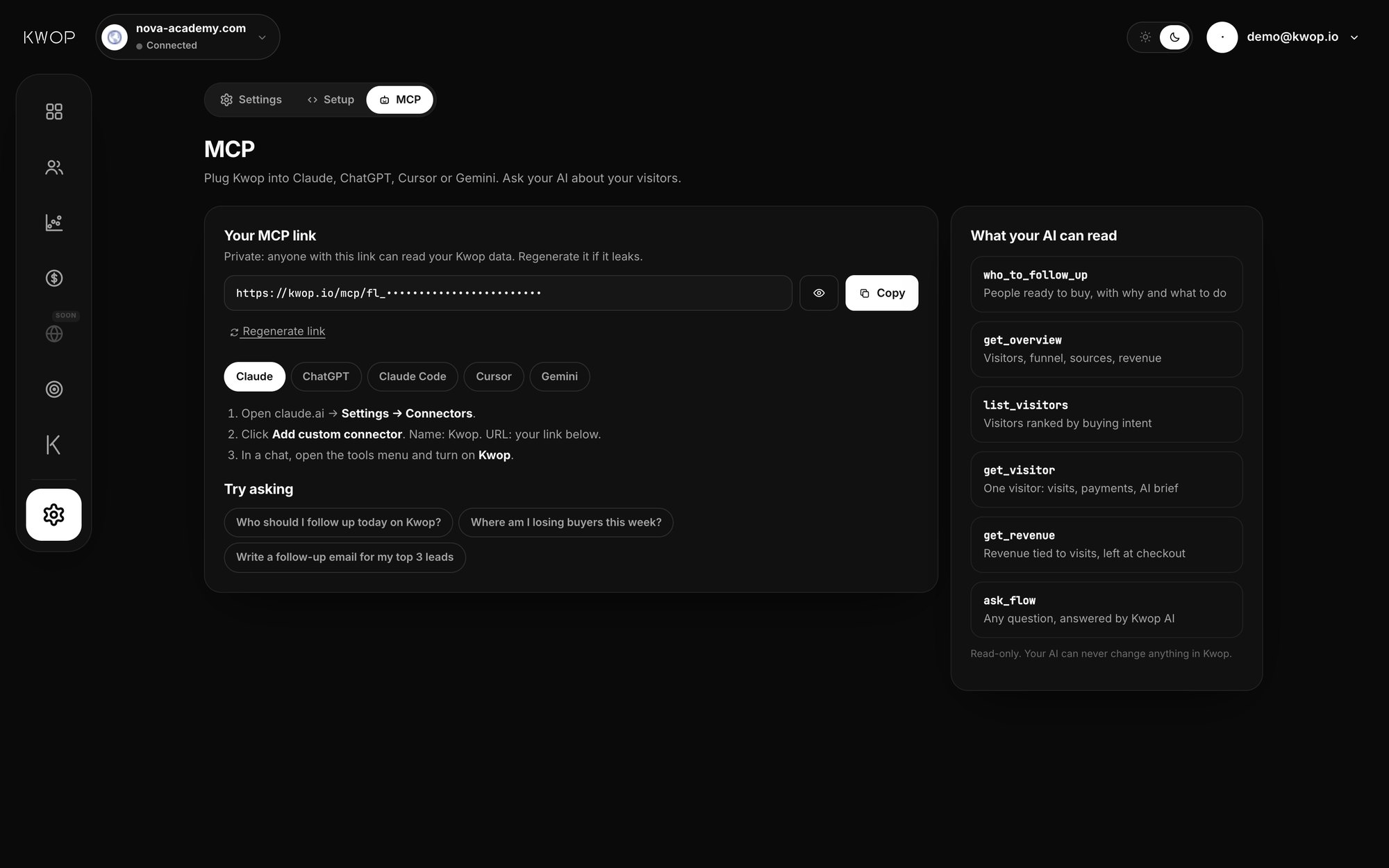
For Kwop, your dashboard's MCP page fills in your link; the full reference is in the Kwop MCP docs.
What questions should you ask an AI about your website data?
Ask what your connected data can answer; otherwise the AI guesses. Twelve good questions, with the data each needs:
| Question | Data it needs | Can answer it |
|---|---|---|
| "How many people visited this week, and from where?" | Visit counts and sources | Any analytics tool, Kwop |
| "Which pages do people leave from?" | Exit pages | PostHog (paths), Kwop (top exit pages) |
| "Where do people drop out of my funnel?" | Funnel steps | Google Analytics, PostHog, Fullstory, Kwop |
| "Who is rage-clicking, and where?" | Frustration signals | Clarity, Contentsquare, Fullstory (by page or element); Kwop (which visitors rage-clicked, so you watch their replays) |
| "What happened on my site in the last 2 hours?" | Realtime or short-window visits | Kwop (any window from 1 minute to 24 hours); Google Analytics' realtime report covers only the last 30 minutes |
| "How much did I make this month?" | Payments | Stripe, PostHog with Stripe connected, Kwop on Pro |
| "What's my MRR and churn?" | Subscription data | Stripe (analytics tool in preview), PostHog revenue analytics. Not Kwop. |
| "Which traffic source made the most money?" | Visits and payments tied to the same person | Kwop; PostHog once Stripe customers are mapped to people. See which traffic source makes money. |
| "Which visitors this week were closest to buying?" | Each visitor's journey and a buying-intent signal | Kwop; PostHog or Fullstory with your own segment |
| "Who should I follow up today, and what should I write?" | Per-visitor data, an email, whether they paid | Kwop (see how to find hot leads) |
| "What did this customer do before paying?" | One person's visits plus their payment | Kwop; PostHog once mapped; Fullstory if you can find their session |
| "What should I change on my checkout page?" | The page itself plus what visitors did on it | Kwop; Contentsquare or Clarity for friction metrics |
Name the period and the site, and ask the AI to show the numbers it used.
Is it safe to connect your analytics or Stripe to an AI?
Yes, if you limit what the AI can do: read-only tools, a credential you can revoke, approval prompts left on, and care with text that comes from the web. The risk grows with write access, so payment tools deserve the most care.
- Prefer read-only. Google says its Analytics server takes read requests only, PostHog has a read-only header, and all 10 of Kwop's tools are marked read-only. Stripe's can write, so give its agent API key only the permissions it needs.
- Use a credential you can cut off. Revoke Stripe OAuth sessions, rotate API tokens, or click Regenerate link on Kwop's MCP page; the old link stops working at once.
- Keep approval prompts on. Cursor asks before each tool call by default, Claude lets you choose "Allow always" per tool, and Gemini CLI's
trustsetting, off by default, skips all confirmations. - Watch for prompt injection. Text from a web page, a form or another server can carry hidden instructions. Stripe's docs advise to "exercise caution when using the Stripe MCP with other servers to avoid prompt injection attacks". Don't let one chat both read untrusted content and hold a tool that moves money.
- Remember where the data goes. Whatever a tool returns, including visitor emails, enters your conversation with the AI provider. Check its data settings first.
How does Kwop let your AI see each visitor?
Kwop (kwop.io) is session replay software that ties every website visit to Stripe, Whop or Shopify revenue and tells you who to follow up. On Pro, its remote MCP server gives Claude, ChatGPT, Claude Code, Cursor and Gemini CLI 9 read-only tools, from visitors ranked by buying intent to revenue, products and follow-up drafts.
- Each visitor, not just counts. Every visit (source, device, pages, time), payments and a brief: why they stopped, what to do next.
- Visits and money together. With Stripe, Whop or Shopify connected, each payment is matched to the visitor who typed the same email on your site.
- From question to follow-up. Your AI lists people who were ready to buy, left their email and didn't pay, and drafts each email from their visit. It sends nothing; send it yourself or from the Follow-ups page with Gmail.
- What to fix first. Ask "what should I fix first?" and Kwop AI answers from your data: the funnel step where you lose the most, rage clicks, hot leads and the page people leave from most.
The same tools power Kwop AI, the chat inside your dashboard.
What your AI still can't do
- It reads facts, not the video. Through Kwop your AI gets each visit's pages, timing, source, device and payment, not the replay itself.
- Names only for identified visitors. Kwop names someone only when they type their email in one of your own forms or your site calls
Kwop.identify. It doesn't de-anonymize anyone or look people up from IP addresses. - Sources come from the browser referrer. No UTM or ad data. Hosted checkouts aren't recorded; payments are matched by email.
- Check key numbers. Confirm any number you'll act on in the dashboard.
- No heatmaps, surveys or A/B tests. For those, Clarity, Contentsquare or PostHog fit better. The MCP is a Pro feature; Starter doesn't include it.
FAQ
Can ChatGPT see who visits my website?
Not on its own. ChatGPT only sees what you paste in or what a connected MCP server returns. Connected to Kwop, it can list your visitors and name the ones who typed their email on your site.
Can Claude connect to Google Analytics?
Yes, through Google's experimental Google Analytics MCP server, which runs on your computer and has read-only access to your GA4 reports. Google documents it for Claude Code and Gemini CLI. It returns aggregate reports, not individual visitors.
Can ChatGPT watch my session recordings?
Not the video. Some tools hand the AI a text version instead: Fullstory's MCP returns a session's events and screenshots at chosen moments, and through Kwop your AI reads each visit's facts (pages, time, source, device, payment) plus a short brief.
Is there an MCP server that shows both my website visitors and my Stripe revenue?
Yes. Kwop's MCP server (Pro) matches each Stripe, Whop or Shopify payment to the visitor who typed the same email on your site, so your AI gets the visits and the payment together. PostHog can do it too once you connect Stripe and tag each Stripe customer with their PostHog person ID.
Is it safe to connect Stripe to ChatGPT?
It can be, with care. Stripe's MCP server can write (refunds, subscriptions, coupons), so connect with OAuth or an agent API key limited to what you need, keep tool approval on, and don't mix it with tools that read untrusted web content. Stripe asks a human to confirm some writes, such as refunds.
Does Kwop's MCP work with Gemini?
Kwop documents Gemini CLI: add your MCP link as httpUrl in ~/.gemini/settings.json. Kwop's guide doesn't cover custom apps in the Gemini app yet, which Google limits to personal accounts in the US, aged 18 or over.
Sources
- Google Analytics, Google Analytics MCP Server (Experimental) on GitHub, and Google for Developers, Analytics MCP server (updated 16 September 2025): local server,
analytics.readonlyscope, read requests only. Checked 17 October 2026. - Microsoft, clarity-mcp-server on GitHub, the Clarity MCP launch post (4 June 2025) and Clarity Data Export API (updated 5 December 2025). Checked 17 October 2026.
- PostHog, MCP server, MCP FAQ (read-only header, OAuth or API key) and Connect revenue to customers. Checked 17 October 2026.
- Stripe, Model Context Protocol (MCP): remote server, OAuth or agent API keys, write tools, human confirmation, migration by 30 November 2026. Checked 17 October 2026.
- Contentsquare, Pricing (MCP tool calls per plan) and 5 ways to query Contentsquare data with Claude (28 August 2026). Checked 17 October 2026.
- Fullstory, Fullstory MCP and developer docs on authentication and tools. Checked 17 October 2026.
- Mouseflow, MCP Server and launch press release (1 May 2026). Checked 17 October 2026.
- Anthropic, Get started with custom connectors using remote MCP and Claude Code MCP docs. Checked 17 October 2026.
- OpenAI, Connect and test your plugin (adding a custom MCP server to ChatGPT). Checked 17 October 2026.
- Cursor, MCP docs. Checked 17 October 2026.
- Google, Gemini CLI MCP servers (updated 6 October 2026), Google Developers Blog (19 May 2026) and Connect & manage custom apps for Gemini Apps. Checked 17 October 2026.
See who pays on your site
Paste your link and create a free account: a few minutes later you watch 3 test visits of your site as videos. No card.